

Steady: Daily Budget Planner
ChangHyun Nam Finance iPhoneiPadiPod touch
Steady: Daily Budget Planner is a free Finance app for iPhone and iPad by ChangHyun Nam. Requires iOS 26.0. Updated October 30, 2026.
- Price
- Free
- on the App Store
- Size
- 33 MB
- Age 4+
- Updated
- Oct 30
- 2026 · v1.1.4
Screenshots
Save to Pinterest


About Steady: Daily Budget Planner
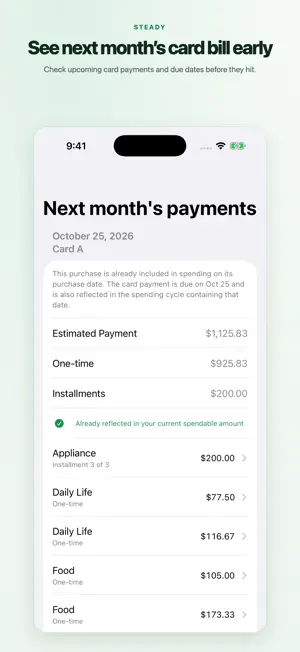
Know exactly how much you can spend today. Steady takes your income, fixed costs, savings and card bills, then answers the one question that matters every morning: how much is safe to spend today? WHY STEADY IS DIFFERENT Most budget apps show what you already spent. Steady shows what you can still spend — for today, and for the rest of your pay cycle. SET UP IN TWO MINUTES • Pick a currency, enter monthly income, choose your payday • Add fixed costs and savings once • Steady builds your cycle around your payday, not the calendar month LOG A SPEND IN SECONDS • Quick entry: type "Lunch 12" and it's saved • Scan a receipt or order and let Steady fill in the details — free and unlimited • Categorise, search, filter and edit anything later • Recurring income, fixed costs and savings apply automatically • Optional daily reminder to log, plus Shortcuts and Siri for quick entry SEE WHAT'S COMING • Upcoming card payments and due dates before they hit • Remaining living expenses and days left in this cycle • A Home Screen widget with today's number UNDERSTAND YOUR SPENDING • Category breakdowns and trends at a glance • Insights that show where your spending is concentrated • Weekly, monthly, yearly and custom-range analysis • Monthly and weekly reports, weekday spending patterns and asset flow • Clear charts instead of spreadsheets STEADY PRO • Compare this period with earlier ones and see what changed • Month-end budget forecast and spending-pace insights • No ads; reports open without an ad • iCloud sync, so your records follow you to a new device PRIVATE BY DESIGN Your records are stored on your device first and sync only through your own iCloud account. No signup required. The free plan may show some ads; Steady Pro removes ads. The free plan shows banner and native ads. Ads start once you first see your spendable amount, or 3 days after first launch if you never set up income or a budget. Reports, spending patterns, asset flow and yearly or custom-range analysis are free and show a full-screen ad when they open (not within 3 minutes of the previous full-screen ad). Full-screen ads may also appear after some completed actions, when leaving a Pro feature trial and on eligible returns to the app; these have a 3-minute first-launch grace period and frequency limits. Each Pro feature (earlier-period comparison, budget forecast, advanced insights) has a one-time screen-session trial; after viewing a valid result and leaving, Pro is required to use it again. The app uses advertising and usage analytics SDKs; see the Privacy Policy. Steady is free to start. Steady Pro is an optional subscription you can cancel anytime. Terms of Use (EULA): https://www.apple.com/legal/internet-services/itunes/dev/stdeula/ Privacy Policy: https://motionfit.fit/steady/privacy/
What’s new
Version 1.1.4 · Updated October 30, 2026
• A 30-second setup at first launch (monthly income, payday, fixed costs) shows what you can spend today right away, and the app now opens on Today. You can skip it. • Morning notification (optional): see what you can spend today, every morning. • Record faster with the Lock Screen widget and the Record button on Today, and see how what you leave unspent today raises tomorrow's amount. • Reports, spending patterns, asset flow and weekly, monthly, yearly and custom-range analysis are now free. Reports, spending patterns, asset flow and yearly or custom ranges may show an ad before they open. • Daily reminder: turn on a reminder to log your day at a time you choose in Settings. • Calendar: the selected day now shows its income and expense totals, with an Add button. • Improved how ads appear on the free plan. Steady Pro has no ads. • Bug fixes and stability improvements.
App privacy
The developer, ChangHyun Nam, reported these privacy practices to Apple.
Data Used to Track You
The following data may be used to track you across apps and websites owned by other companies:
- Location: Coarse Location
- Identifiers: Device ID
- Usage Data: Product Interaction, Advertising Data
Data Linked to You
The following data, which may be collected and linked to your identity, may be used for the following purposes:
- Location: Coarse Location
- Identifiers: Device ID
- Usage Data: Product Interaction, Advertising Data
- Diagnostics: Performance Data
Used for: Third-Party Advertising, Analytics
Data Not Linked to You
The following data, which may be collected but is not linked to your identity, may be used for the following purposes:
- Diagnostics: Crash Data
Used for: Third-Party Advertising, Analytics, App Functionality
Alternatives to Steady: Daily Budget Planner
Looking for apps like Steady: Daily Budget Planner? Here are 6 similar apps on the App Store.
-
 やりくり家計簿
-
 今日いくら使える?
-
 Lefto: Payday Budget Planner
-
 Hamster Ledger - Budget App
-
 家計簿Aruka - 今日使える金額がわかる
-
 Wance: Daily Budget
| App | Rating | Price | Last updated | Compare |
|---|---|---|---|---|
| Steady: Daily Budget Planner | – | Free | October 30, 2026 | |
| やりくり家計簿 | – | Free | Nov 7, 2026 | Compare |
| 今日いくら使える? | – | Free | Oct 29, 2026 | Compare |
| Lefto: Payday Budget Planner | – | Free | Sep 2, 2026 | Compare |
| Hamster Ledger - Budget App | – | Free | Nov 3, 2026 | Compare |
| 家計簿Aruka - 今日使える金額がわかる | – | Free | Jun 19, 2026 | Compare |
| Wance: Daily Budget | – | Free | Nov 20, 2026 | Compare |