

GCodeReader CNC
Favionics Graphics & Design iPhoneiPadiPod touch
GCodeReader CNC is a free Graphics & Design app for iPhone and iPad by Favionics. Requires iOS 26.0. Updated October 19, 2026.
- Price
- Free
- on the App Store
- Size
- 44 MB
- Age 4+
- Updated
- Oct 19
- 2026 · v1.0.1
Screenshots


About GCodeReader CNC
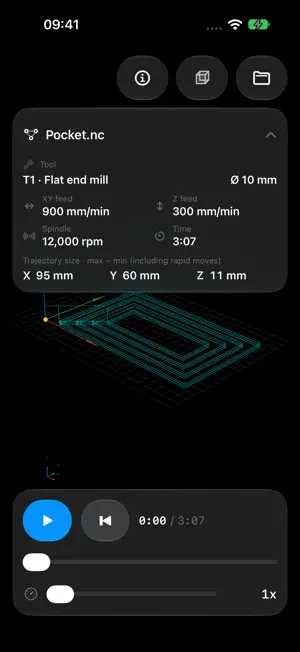
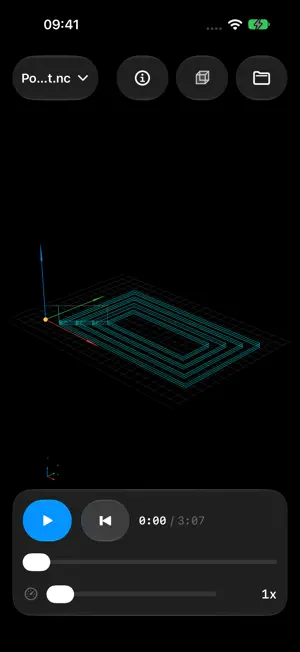
Inspect CNC toolpaths and CAD models locally on your iPhone or iPad. Open files from Files, explore geometry in 3D and review machining programs without an account or cloud conversion. SLDPRT PART VIEWING • View SLDPRT parts in 3D, including saved solid bodies, surfaces and sketch curves. • Show or hide individual bodies and surfaces. • Rotate, pan and zoom, or switch between standard views. • CAD files are opened for viewing; the original CAD file is not modified. G-CODE REVIEW • Explore 3D toolpaths with axes, a grid and view presets. • Play back a program and adjust playback speed. • Review cutter names and diameters from CAM comments, tool numbers, feed rates, spindle speed and estimated run time. • Check X, Y and Z trajectory dimensions, including rapid moves. • Collapse the program information panel to make more room for the toolpath. • Edit feed and spindle values, then explicitly save the file or export a copy. CAD AND 3D MODELS • Open STEP, IGES, BREP and DXF exchange files. • Inspect mesh and scene formats including STL, OBJ, PLY, USD/USDZ, Alembic, DAE and SCN. • View model dimensions, geometry counts and available body information. • Additional previews are available for Parasolid, DWG and CDR, with partial format coverage. FILE COMPATIBILITY SLDPRT viewing uses geometry stored in the part file. Compatibility with native formats depends on the file version and available data. SLDASM assembly import is not supported. For unsupported files, export to STEP, IGES, STL or DXF in the authoring application. LOCAL WORKFLOW Selected files are processed on your device. No sign-in or upload to a conversion service is required. Privacy information and third-party licenses are available from the information button inside the app. Estimated CNC run time is an approximation. Review any edited program before using it on a machine.
What’s new
Version 1.0.1 · Updated October 19, 2026
• Cutter names and diameters are now read from supported CAM comments, including MSG tool descriptions. • Added X, Y and Z trajectory dimensions, including exact XY arc extrema. • Collapse the program details panel into a compact filename control for a clearer toolpath view. • Improved SLDPRT viewing, including solid bodies, surfaces, sketch curves and missing faces in newer part files. • Updated CAD navigation and OCCT-based STEP, IGES and BREP import.
App privacy
The developer, Favionics, reported these privacy practices to Apple.
Data Not Collected
The developer does not collect any data from this app.
Alternatives to GCodeReader CNC
Looking for apps like GCodeReader CNC? Here are 6 similar apps on the App Store. The highest rated is SymmetriCAD: 2D Vector Art CAD (5.0/5), and 5 of the 6 are free to download.
-
 ScreenTwin: measure screenshot
-
 Vexio3D
-
 3D Box Maker
-
 SymmetriCAD: 2D Vector Art CAD
5.0
-
 LocalPix: AI Photo Generator
5.0
-
 CAD Studio - 2D Drafting
5.0
| App | Rating | Price | Last updated | Compare |
|---|---|---|---|---|
| GCodeReader CNC | – | Free | October 19, 2026 | |
| ScreenTwin: measure screenshot | – | Free | Sep 3, 2026 | Compare |
| Vexio3D | – | Free | Oct 28, 2026 | Compare |
| 3D Box Maker | – | Free | Oct 21, 2026 | Compare |
| SymmetriCAD: 2D Vector Art CAD | 5.0 / 5 (1) | Free | Sep 13, 2026 | Compare |
| LocalPix: AI Photo Generator | 5.0 / 5 (1) | Free | Oct 31, 2026 | Compare |
| CAD Studio - 2D Drafting | 5.0 / 5 (2) | 9.99 USD | Oct 5, 2026 | Compare |
Compare GCodeReader CNC with the top alternatives: ratings, updates, ASO score and keyword gaps →