

ScreenTwin: measure screenshot
Mohammad Imran Mia Graphics & Design iPhoneiPadiPod touch
ScreenTwin: measure screenshot is a free Graphics & Design app for iPhone and iPad by Mohammad Imran Mia. Requires iOS 15.5. Updated September 3, 2026.
- Price
- Free
- on the App Store
- Size
- 84 MB
- Age 4+
- Updated
- Sep 3
- 2026 · v1.0.0
Screenshots


About ScreenTwin: measure screenshot
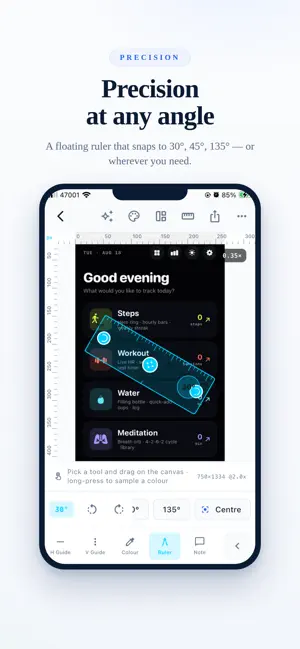
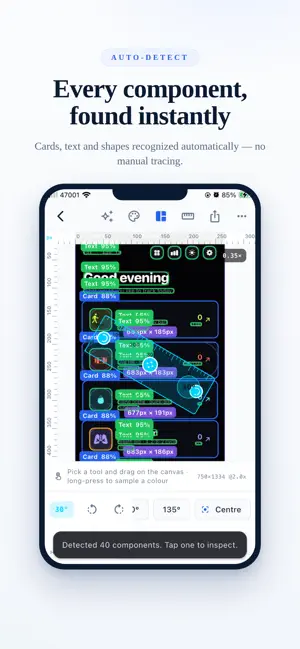
ScreenTwin turns any screenshot into an interactive design inspection canvas. Measure spacing, sample colors, read typography, and export developer-ready specs — without leaving your phone. MEASURE ANYTHING • Distance, width and height between any two points • Horizontal and vertical guides that snap to detected edges • Zoom to 20× for sub-pixel work • Smart snapping to edges, centers, baselines and equal spacing • A floating ruler you can drag and rotate, with a live angle readout • Units in px, pt, dp, mm, cm or inches — or define your own INSPECT EVERY DETAIL • Long-press anywhere for a magnified eyedropper • Every notation: HEX, RGB, HSL, HSB, CMYK, LAB, LCH, OKLab, OKLCH • Copy-ready Flutter, SwiftUI, UIColor, Compose and CSS literals • WCAG contrast ratios against white and black • Color harmonies and 50–900 tonal ramps generated in OKLCH • On-device OCR estimates font size, weight and line height ANALYZE THE LAYOUT • Detects buttons, cards, icons, avatars, navigation bars, tab bars, text fields and dividers • Every detection shows its confidence and the rule behind it • Automatic spacing analysis: gaps, padding, margins and element sizes • A 0–100 score for how closely a design follows an 8-point grid • The spacing scale your screen actually uses EXPORT DEVELOPER-READY SPECS • Annotated PNG and machine-readable JSON • PDF spec sheets for handoff • Paste-ready SwiftUI and Flutter code • Design tokens as a Flutter theme, SwiftUI, CSS variables, JSON or W3C Design Tokens REVIEW TOGETHER • Comment pins, arrows, highlights, rectangles and freehand marks • Status and resolve tracking on every note • Compare two versions with slider, split, overlay or difference modes PRIVATE BY DESIGN Everything runs on your device. Your screenshots never leave your phone, and the app works fully offline. FREE Manual measurement, OCR typography, the color picker, and PNG and JSON export. PRO AI component detection, spacing analysis, design tokens, compare mode, unlimited projects, and PDF, SwiftUI and Flutter export. MADE FOR iOS and Flutter developers, UI/UX designers, QA engineers and product teams. Privacy Policy: https://screentwin.netlify.app/privacy Terms of Use (EULA): https://www.apple.com/legal/internet-services/itunes/dev/stdeula/
App privacy
The developer, Mohammad Imran Mia, reported these privacy practices to Apple.
Data Not Collected
The developer does not collect any data from this app.
Alternatives to ScreenTwin: measure screenshot
Looking for apps like ScreenTwin: measure screenshot? Here are 6 similar apps on the App Store. The highest rated is Wallpapers 17 - Lock Screen (4.7/5), and all 6 are free to download.
-
 GCodeReader CNC
-
 Mockfy
4.0
-
 Silly Smiles Live Wallpapers
4.6
-
 Wallpapers 17 - Lock Screen
4.7
-
 AI Tattoo Generator - AI Ink
4.6
-
 Design Maker For Craft Space!
4.3
| App | Rating | Price | Last updated | Compare |
|---|---|---|---|---|
| ScreenTwin: measure screenshot | – | Free | September 3, 2026 | |
| GCodeReader CNC | – | Free | Oct 19, 2026 | Compare |
| Mockfy | 4.0 / 5 (5) | Free | Nov 14, 2025 | Compare |
| Silly Smiles Live Wallpapers | 4.6 / 5 (737) | Free | Oct 28, 2026 | Compare |
| Wallpapers 17 - Lock Screen | 4.7 / 5 (254) | Free | Mar 11, 2026 | Compare |
| AI Tattoo Generator - AI Ink | 4.6 / 5 (1,292) | Free | Mar 31, 2025 | Compare |
| Design Maker For Craft Space! | 4.3 / 5 (959) | Free | Jun 8, 2026 | Compare |