

Lugji: Cantonese AI Notes
LUGJI LIMITED Productivity iPhoneiPadiPod touch
Lugji: Cantonese AI Notes is a free Productivity app for iPhone and iPad by LUGJI LIMITED. Requires iOS 26.0. Updated September 29, 2026.
- Price
- Free
- on the App Store
- Size
- 8 MB
- Age 4+
- Updated
- Sep 29
- 2026 · v1.2.3
Screenshots


About Lugji: Cantonese AI Notes
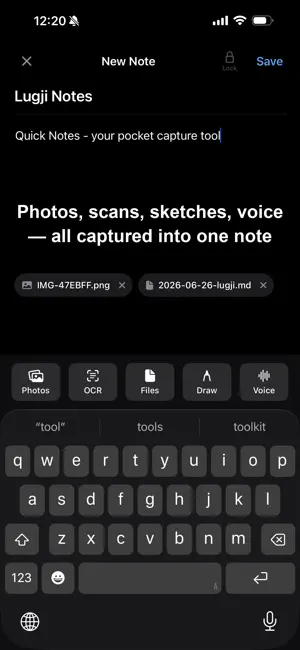
Let every conversation become knowledge you own. Lugji is an on-device voice assistant built for English, Cantonese & Mandarin meetings. Recording and transcription run entirely on your iPhone, then write into your iCloud or the Obsidian vault you connect — no account, nothing sent to a processing server. Lugji is serverless Your content and keys never reach Lugji. No backend, no API keys, no tracking. Privacy here isn't packaging — it's a structural fact. Core features • Meeting recording & live transcription — one-tap recording for long meetings and interviews; Cantonese, Mandarin and English transcribed live with Apple's built-in on-device engine. • AI summary (on-device · helper) — on Apple Intelligence–capable devices, Lugji can generate a meeting summary, processed entirely on your device: no Apple servers, no Private Cloud Compute, no cloud. (Requires iPhone 15 Pro or later; not available in mainland China.) • Quick Notes — a thought, a whiteboard photo, a voice snippet: captured instantly as standard Markdown. Apple Pencil sketches, image text recognition (OCR · Traditional Chinese + English), and voice-to-text. • Write into iCloud or Obsidian — every note is saved to your iCloud, or the local Obsidian vault you connect, with frontmatter and tags. Obsidian is your library; Lugji is the fastest way in. Why on-device? Cloud transcribers upload your audio to servers where it may be used to train AI; English-first models may be less suitable for Cantonese conversations; and they make you download 1–2 GB models and set up API keys. Lugji uses Apple's built-in engine, works in airplane mode, and is tuned for Cantonese meetings and everyday conversation. Device requirements: on-device transcription needs iPhone 12 / iPhone SE (3rd gen) / iPad (10th gen) / iPad Air (4th gen) / iPad mini (6th gen) / iPad Pro (11" 3rd gen, 12.9" 5th gen) or newer. AI Summary requires an Apple Intelligence-capable device. Recording itself works on every supported device. Pricing Start free (with usage limits). Plus (unlimited) and Ultra (advanced security: on-device AES-256-GCM encryption for locked notes & recordings, key only in your iCloud Keychain · enterprise) are planned for a future update. — Made in Hong Kong. Apple and Apple Intelligence are trademarks of Apple Inc. Obsidian is a trademark of Dynalist Inc.
What’s new
Version 1.2.3 · Updated September 29, 2026
This update: • New: tap the sparkles icon at the top right of your list to learn about Lugoffice, our sister app that turns meeting transcripts into written minutes, and download it from the App Store without leaving Lugji • Improved: the storage location at the top of your list is now shown in full instead of being cut off
App privacy
The developer, LUGJI LIMITED, reported these privacy practices to Apple.
Data Not Collected
The developer does not collect any data from this app.
Alternatives to Lugji: Cantonese AI Notes
Looking for apps like Lugji: Cantonese AI Notes? Here are 6 similar apps on the App Store. The highest rated is D-Pad, Hangul Keyboard (5.0/5), and all 6 are free to download.
-
 Canto AI
-
 CaptionNow 廣東話即時字幕・語音轉文字
-
 smartLLM: Private AI Chat
-
 D-Pad, Hangul Keyboard
5.0
-
 Omucloud: Business Email
-
 Scannect - Scan Business Cards
| App | Rating | Price | Last updated | Compare |
|---|---|---|---|---|
| Lugji: Cantonese AI Notes | – | Free | September 29, 2026 | |
| Canto AI | – | Free | Sep 10, 2026 | Compare |
| CaptionNow 廣東話即時字幕・語音轉文字 | – | Free | Sep 24, 2026 | Compare |
| smartLLM: Private AI Chat | – | Free | Sep 5, 2026 | Compare |
| D-Pad, Hangul Keyboard | 5.0 / 5 (1) | Free | Apr 14, 2026 | Compare |
| Omucloud: Business Email | – | Free | Sep 25, 2026 | Compare |
| Scannect - Scan Business Cards | – | Free | Aug 19, 2025 | Compare |