

Canto AI
Ka Ming Ho Productivity iPhoneiPadiPod touch
Canto AI is a free Productivity app for iPhone and iPad by Ka Ming Ho. Requires iOS 17.0. Updated September 10, 2026.
- Price
- Free
- on the App Store
- Size
- 25 MB
- Age 4+
- Updated
- Sep 10
- 2026 · v1.1.4
Screenshots


About Canto AI
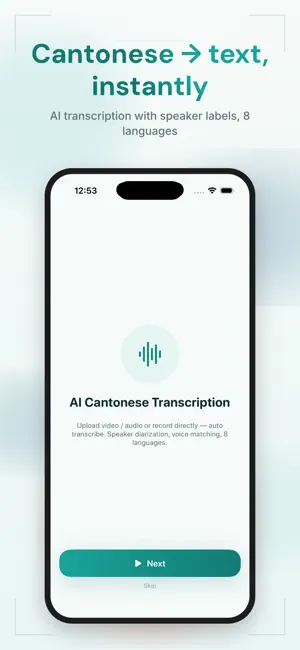
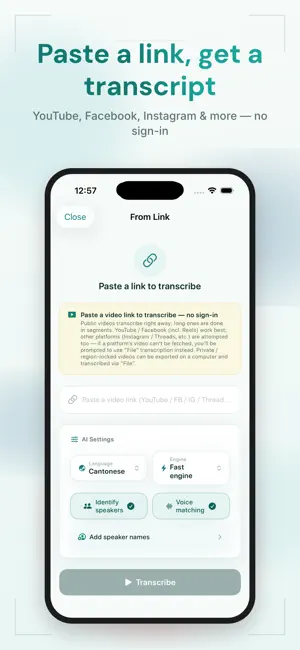
Canto AI is an AI transcription and video-caption tool built for Cantonese. [Paste a link, get text] Paste a YouTube or Facebook link (including Reels) — no sign-in, no download. AI transcribes it into a Cantonese transcript right away. Long videos are auto-split and stream results as they go. [AI Cantonese transcription] Upload video / audio or record live and auto-transcribe. It tells speakers apart with voice matching and handles mixed languages. [AI summary, your format] One tap after transcribing — highlights, paragraph, bullet points, Q&A, meeting minutes or an action list, with optional special requests. [AI Voice (text-to-speech)] Eight natural voices - Cantonese, Mandarin, Taiwanese Mandarin and English. Type text and get audio instantly, with adjustable speed. Read summaries aloud, or add AI voice-over narration in the studio and export it with your video. [Video Caption Studio] One-tap AI captions with pro templates, fancy text and animations; edit line-by-line and word-by-word, with multi-layer captions, multi-track editing and free transform. Plus AI style design, AI scene-based music and AI highlight cuts. Captions and effects are burned in — export MP4 / SRT / VTT. [Live-translate while watching] Pick a foreign-language video and watch it with the original and translated captions overlaid in real time. Privacy: videos being processed stay on your device; only the extracted audio is sent for transcription. For iPhone and iPad. Terms of Use (EULA): https://www.cantonese-ai-transcriber.com/terms.html Privacy Policy: https://www.cantonese-ai-transcriber.com/privacy.html
What’s new
Version 1.1.4 · Updated September 10, 2026
This update focuses on making long transcriptions reliable. - Fixed transcripts going missing from History when you navigated away while a long file was still being transcribed. Transcription now continues in the background and is saved automatically when it finishes. - If saving fails, the draft is kept so you can restore it the next time you open the app, instead of losing the credits you already spent. - Transcriptions restored from the recovery prompt are now saved to History. - Faster transcription, with subtitle timing that follows the speech more closely.
App privacy
The developer, Ka Ming Ho, reported these privacy practices to Apple.
Data Linked to You
The following data, which may be collected and linked to your identity, may be used for the following purposes:
- Purchases: Purchase History
- User Content: Audio Data, Other User Content
- Identifiers: User ID
Used for: App Functionality
Data Not Linked to You
The following data, which may be collected but is not linked to your identity, may be used for the following purposes:
- Contact Info: Email Address
Used for: App Functionality
Alternatives to Canto AI
Looking for apps like Canto AI? Here are 6 similar apps on the App Store.
-
 CaptionNow 廣東話即時字幕・語音轉文字
-
 Lugji: Cantonese AI Notes
-
 廣東話轉錄
廣東話轉錄
-
 Canto AI Note Taker & Recorder
-
 Scannect - Scan Business Cards
-
 SomaTrace
| App | Rating | Price | Last updated | Compare |
|---|---|---|---|---|
| Canto AI | – | Free | September 10, 2026 | |
| CaptionNow 廣東話即時字幕・語音轉文字 | – | Free | Sep 24, 2026 | Compare |
| Lugji: Cantonese AI Notes | – | Free | Sep 29, 2026 | Compare |
| 廣東話轉錄 | – | Free | Jul 3, 2026 | Compare |
| Canto AI Note Taker & Recorder | – | Free | Oct 6, 2026 | Compare |
| Scannect - Scan Business Cards | – | Free | Aug 19, 2025 | Compare |
| SomaTrace | – | Free | Oct 5, 2026 | Compare |
Compare Canto AI with the top alternatives: ratings, updates, ASO score and keyword gaps →