

CaptionNow 廣東話即時字幕・語音轉文字
Junyi HE Productivity iPhoneiPadiPod touch
CaptionNow 廣東話即時字幕・語音轉文字 is a free Productivity app for iPhone and iPad by Junyi HE. Requires iOS 18.0. Updated September 24, 2026.
- Price
- Free
- on the App Store
- Size
- 19 MB
- Age 4+
- Updated
- Sep 24
- 2026 · v1.8.2
Screenshots


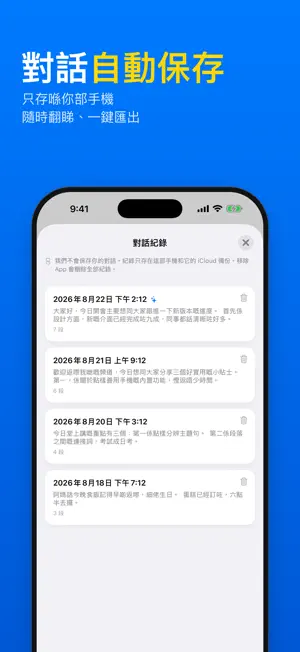
About CaptionNow 廣東話即時字幕・語音轉文字
A real-time speech-to-text tool built around two things: accuracy and low latency. The developer is hard of hearing, and couldn't find a single app that handled Hong Kong Cantonese properly — the code-switching between Chinese and English, the technical terminology — while staying accurate and returning results instantly. So this one got built. Every decision in it comes from what actually holds up in daily use, not from a feature checklist. Features Live transcript — Text appears as you speak. No waiting for the sentence to finish. Captions for audio playing on your phone — Not just the microphone. Video calls, videos, and podcasts get transcribed too, which most comparable tools can't do. Floating captions — Picture-in-Picture keeps captions on screen while you use other apps. You pick the language; it doesn't guess — Mandarin (Taiwan / Mainland), Hong Kong Cantonese including Chinese-English code-switching, and English (US / UK / India / Hong Kong). Once you choose, it stays there — no drifting between languages mid-sentence. Offline recognition — Download a language pack on iOS 26 or later and it works without a network connection. Built for long reading sessions — No decorative clutter. Comfortable to watch through an entire lecture. Who it's for Deaf and hard-of-hearing users — Everyday communication support. See what's being said. Students — Live lecture notes, without losing the thread while you try to keep up. Professionals — Meeting minutes and interview transcripts, handled as they happen. Specifications This is transcription, not translation. What goes in is what comes out — with one exception: spoken Cantonese is transcribed into standard written Chinese, with English terms kept inline as spoken. Online mode uses a cloud recognition engine. Offline mode requires iOS 26 or later. Real examples of recognition errors are welcome — they're the most effective way to improve accuracy right now. Terms of Use (EULA): https://garnet-marimba-2dd.notion.site/Terms-of-Service-2d2f598ba98e80e5b065d198d8acf404?source=copy_link Privacy Policy: https://garnet-marimba-2dd.notion.site/Privacy-Policy-2d2f598ba98e80af99bae73136d3a3b9?source=copy_link
What’s new
Version 1.8.2 · Updated September 24, 2026
Fixed: a downloaded Cantonese model could disappear from the language list after you left and reopened the app. content updated: The Apple model now recommends iPhone 15 Pro or newer. Clearer credit rules: Plus credits (180 a month) do not roll over, top-up credits do not expire, and recording uses Plus credits first.
App privacy
The developer, Junyi HE, reported these privacy practices to Apple.
Data Linked to You
The following data, which may be collected and linked to your identity, may be used for the following purposes:
- Contact Info: Email Address
Used for: App Functionality
Data Not Linked to You
The following data, which may be collected but is not linked to your identity, may be used for the following purposes:
- Purchases: Purchase History
- Identifiers: User ID
- Usage Data: Product Interaction
Used for: App Functionality
Alternatives to CaptionNow 廣東話即時字幕・語音轉文字
Looking for apps like CaptionNow 廣東話即時字幕・語音轉文字? Here are 6 similar apps on the App Store. The highest rated is AI 錄音器 - 最簡易的錄音逐字稿工具 (4.0/5), and all 6 are free to download.
-
 Lugji: Cantonese AI Notes
-
 Canto AI
-
 廣東話轉錄
-
 AI 錄音器 - 最簡易的錄音逐字稿工具
4.0
-
 Kinotes: AI Voice Note Taker
-
 KeyFeed: RSS Keyword Radar
| App | Rating | Price | Last updated | Compare |
|---|---|---|---|---|
| CaptionNow 廣東話即時字幕・語音轉文字 | – | Free | September 24, 2026 | |
| Lugji: Cantonese AI Notes | – | Free | Sep 29, 2026 | Compare |
| Canto AI | – | Free | Oct 10, 2026 | Compare |
| 廣東話轉錄 | – | Free | Jul 3, 2026 | Compare |
| AI 錄音器 - 最簡易的錄音逐字稿工具 | 4.0 / 5 (2) | Free | Aug 19, 2026 | Compare |
| Kinotes: AI Voice Note Taker | – | Free | Oct 13, 2026 | Compare |
| KeyFeed: RSS Keyword Radar | – | Free | Aug 26, 2026 | Compare |