

Skano: Business Card Scanner
Trever Green Business iPhoneiPadiPod touch
Skano: Business Card Scanner is a free Business app for iPhone and iPad by Trever Green. Rated 5.0/5 from 12 ratings. Requires iOS 26.0.
- Rating
- 5.0
- 12 ratings
- Price
- Free
- on the App Store
- Size
- 153 MB
- Age 4+
- Updated
- Oct 27
- 2026 · v1.6.1
Screenshots



About Skano: Business Card Scanner
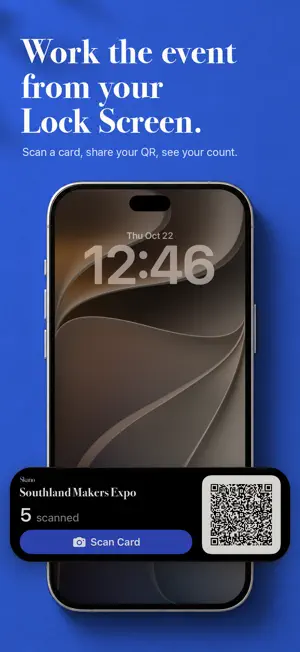
Skano turns a stack of business cards into clean contacts, right on your iPhone. No account, no subscription, and nothing to sign up for. Point your camera at a card. Skano reads the name, company, title, email, phone, and address, then builds a contact you can save, share, or export. Scan one card or a stack at once. Free to try, with a one-time unlock for unlimited scans, batch Add to Contacts, and CSV and CRM exports. FOLLOW UP WHILE IT MATTERS Tap the flag when you save a card and it lands in Follow-Ups, at an event or not. Give it a due date and Skano reminds you. A badge shows what's due or overdue, on the tab or on Skano's icon, and you can add a to-do of your own. WORK THE EVENT Start an event and every card you scan files under it. Your QR code and a live scan count sit on the Lock Screen, so you can share your card or scan the next one without hunting for the app. Pull the event's name, dates, and place straight from your calendar. Notes, brochures, spec sheets, and photos stay with the event they came from. Events are free. SAY IT WHILE IT'S FRESH Tap the mic and speak a note onto a card the moment you scan it. Skano writes it down, and the transcription happens on your iPhone. YOUR CARDS, EVERYWHERE YOU WORK Add cards straight to Contacts, one at a time or all at once. Share vCards. Export spreadsheets for Outlook, Google Contacts, Salesforce, HubSpot, Zoho, Repfabric, or a simple CSV. YOUR OWN CARD, READY TO SHARE Set up My Card once, or fill it from your own contact. Share it with a QR code in the app or from the Lock Screen. QUICK FROM ANYWHERE Scan a card, show My Card, or start an event from Control Center or Siri. BUILT FOR IPHONE DUO Closed, Skano works the way it does on any iPhone. Open, your cards sit in a list beside the one you're reading, an event's page spreads across both displays, and Review puts the card photo beside the form. PRIVATE BY DESIGN Card reading happens entirely on your iPhone. On iPhones with Apple Intelligence, Skano uses Apple's on-device Foundation Models for harder cards; you can turn that off in Settings. Everywhere else, Skano uses its own on-device processing. Your saved cards sync through your own iCloud, encrypted by Apple. Skano has no account and no server, so there is nothing for us to see. Check the privacy label on this page. There is nothing in it.
Ratings & reviews
5.0
12 ratings
What’s new
Version 1.6.1 · Updated October 27, 2026
Faster and smoother, especially on iPhone Duo. Event Mode - End an event straight from the Dynamic Island. - Set Event Mode to run for an hour, until this evening, or until a calendar event ends. It turns itself off and lets you know. - If you swipe the Live Activity away mid-event, Skano reminds you it's still on. Cards - Switching cards beside the list on iPhone Duo now crossfades instead of jumping. - Open in Contacts replaces Add to Contacts once a card is saved there. - The card's action bar tucks away as you read a long card. Polish - Opening cards, switching tabs, saving and scrolling are all quicker. - Opening and closing iPhone Duo with a card open is much faster. - Titles line up across both pages of the open Duo. - Save waits if you mistype an email or website. - Dozens of small animation and layout fixes.
App privacy
The developer, Trever Green, reported these privacy practices to Apple.
Data Not Collected
The developer does not collect any data from this app.
Alternatives to Skano: Business Card Scanner
Looking for apps like Skano: Business Card Scanner? Here are 6 similar apps on the App Store. The highest rated is Cardline - Scan Business Cards (5.0/5), and 5 of the 6 are free to download.
-
 Cardline - Scan Business Cards
5.0
Cardline - Scan Business Cards
5.0
-
 Omni Business Card Scanner
-
 BizCard AI - Card Scanner
-
 Cardr: Business Card Scanner
4.9
Cardr: Business Card Scanner
4.9
-
 PCBC 2025
-
 Business Card Scanner Kardhaus
5.0
Business Card Scanner Kardhaus
5.0
| App | Rating | Price | Last updated | Compare |
|---|---|---|---|---|
| Skano: Business Card Scanner | 5.0 / 5 (12 ratings) | Free | October 27, 2026 | |
| Cardline - Scan Business Cards | 5.0 / 5 (1) | 4.99 USD | May 22, 2026 | Compare |
| Omni Business Card Scanner | – | Free | Jul 29, 2026 | Compare |
| BizCard AI - Card Scanner | – | Free | Aug 24, 2026 | Compare |
| Cardr: Business Card Scanner | 4.9 / 5 (11) | Free | Oct 10, 2026 | Compare |
| PCBC 2025 | – | Free | Jun 4, 2025 | Compare |
| Business Card Scanner Kardhaus | 5.0 / 5 (1) | Free | Oct 20, 2026 | Compare |