

Business Card Scanner Kardhaus
CHEN GUAN-JHEN Business iPhoneiPadiPod touch
Business Card Scanner Kardhaus is a free Business app for iPhone and iPad by CHEN GUAN-JHEN. Rated 5.0/5 from 1 ratings. Requires iOS 26.0.
- Rating
- 5.0
- 1 ratings
- Price
- Free
- on the App Store
- Size
- 30 MB
- Age 4+
- Updated
- Oct 20
- 2026 · v1.3.1
Screenshots


About Business Card Scanner Kardhaus
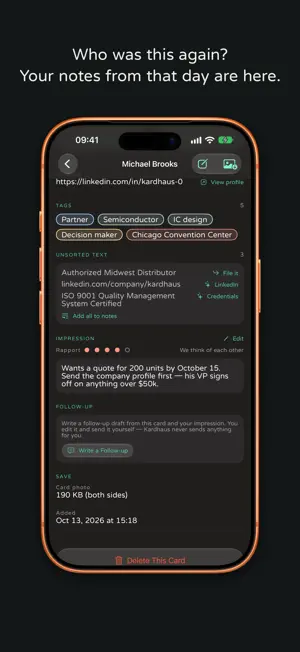
Three months later, all you have is "the machinery guy from Nangang". The card is still there; the person isn't. Kardhaus is for the version of you three months from now. No account. Photo, crop and text recognition happen on your iPhone and work offline. ■ New: the follow-up, in their language Tap Write a Follow-up on a card and Apple's Private Cloud Compute drafts the message in their language, with yours beside it so you know what you're sending. Kardhaus first shows exactly what goes: name, title, company, where and when you met, your impression, tags. Never phone numbers, emails, addresses or the card photo. Used for that request only, never stored, not accessible even to Apple. Nothing is sent to Kardhaus. Drafts are saved with the card. On iOS 27 with Apple Intelligence; otherwise a template writes it. You can turn Private Cloud Compute off in Settings › Apple Intelligence. ■ You forget the name. You remember the room. The card map puts everyone back where you met them. Or just type "the machine-tool person I met in Taichung last month" and it works out the filters itself, on the device. ■ An impression only you can see "She handles purchasing, quote due September." Never printed on a card, and three months later the only thing that saves you. Hold the mic and say it — transcribed on the device, the audio never stored. ■ One photo, every field Cropped, straightened, compressed, then the words go into the right fields: Chinese and Latin names, title, department, company, branch, phone, email, address, even the credentials on a doctor's or lawyer's card. Offline, on a plane or in a basement hall, AI recognition uses the on-device model. ■ The fields a card actually carries A LINE ID gets its own field with an Add Friend button. So do a tax number, an extension, a licence number and a Japanese card's name reading — not dumped into notes you can search but cannot tap. ■ No need to unlock On iPhone 16 or later, set Camera Control to Kardhaus and one press shoots a card on a locked iPhone. Also from the Lock Screen, Control Center or the Action Button. ■ Both sides, one contact Scan the front and back of a bilingual card in one go: one card, fields from both sides. Only shot the front? Tap Add Back; your edits stay put. ■ Your data, your photo library Export vCard or CSV any time. Import vCard, CSV or card photos, checking the column mapping first. Card photos stay in Kardhaus's own database, never your camera roll, and Kardhaus cannot read your library. ■ iCloud sync, and iPad Cards live in your own private iCloud database and follow you to a new phone. Native on iPad too, with Split View and Stage Manager. ■ What people ask before installing Where do my cards go? Onto this phone, and into your own private iCloud database if iCloud is on. No account, no ads, no tracking, and nothing is sent to Kardhaus: we cannot see your cards. Addresses are looked up in Apple Maps. On iOS 27, AI recognition sends that card's photo to Private Cloud Compute on the same terms as drafts, else Apple Intelligence on the device. Natural-language search stays on the device. With the switch in Settings › Privacy on (the default for new installs), purchase records and a random anonymous ID go to RevenueCat. — Terms of Use: https://kardhaus.com/terms Privacy Policy: https://kardhaus.com/privacy End User Licence Agreement: https://www.apple.com/legal/internet-services/itunes/dev/stdeula/
What’s new
Version 1.3.1 · Updated October 20, 2026
• AI recognition now works from your very first card, so names, titles and departments land in the right fields from the start. • Voice notes now listen in your own language. • Fewer interruptions: Kardhaus asks for your attention less often and no longer brings back screens you’ve already closed. • On iPad, the empty right-hand side now explains what it’s for and can bring the card list back when it’s hidden. • Stability and reliability fixes.
App privacy
The developer, CHEN GUAN-JHEN, reported these privacy practices to Apple.
Data Not Linked to You
The following data, which may be collected but is not linked to your identity, may be used for the following purposes:
- Purchases: Purchase History
Used for: Analytics, App Functionality
Alternatives to Business Card Scanner Kardhaus
Looking for apps like Business Card Scanner Kardhaus? Here are 6 similar apps on the App Store. The highest rated is KotaDex: Card/Document Scanner (5.0/5), and all 6 are free to download.
-
 My Card Folio
-
 Cardly - Business Card Scanner
-
 KotaDex: Card/Document Scanner
5.0
KotaDex: Card/Document Scanner
5.0
-
 Business Card Scanner vCardify
5.0
Business Card Scanner vCardify
5.0
-
 Meishido Business Card Scanner
-
 CardVault - Offline Card Vault
| App | Rating | Price | Last updated | Compare |
|---|---|---|---|---|
| Business Card Scanner Kardhaus | 5.0 / 5 (1 rating) | Free | October 20, 2026 | |
| My Card Folio | – | Free | Oct 27, 2026 | Compare |
| Cardly - Business Card Scanner | – | Free | Sep 25, 2026 | Compare |
| KotaDex: Card/Document Scanner | 5.0 / 5 (1) | Free | Oct 21, 2026 | Compare |
| Business Card Scanner vCardify | 5.0 / 5 (2) | Free | Oct 7, 2026 | Compare |
| Meishido Business Card Scanner | – | Free | Oct 6, 2026 | Compare |
| CardVault - Offline Card Vault | – | Free | Oct 17, 2026 | Compare |