

Cardly - Business Card Scanner
INPHIL CHOI Business iPhoneiPadiPod touch
Cardly - Business Card Scanner is a free Business app for iPhone and iPad by INPHIL CHOI. Requires iOS 15.5. Updated September 25, 2026.
- Price
- Free
- on the App Store
- Size
- 69 MB
- Age 4+
- Updated
- Sep 25
- 2026 · v1.0.3
Screenshots


About Cardly - Business Card Scanner
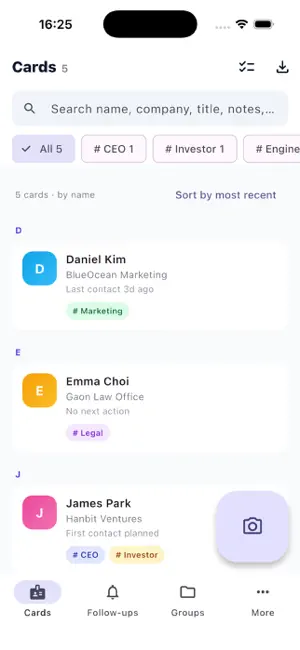
Cardly is a business card manager you can use instantly — no sign-up, no login, no ads. ■ Snap a card, get a contact Shoot a card or pick one from your photo library. Cardly recognizes name, company, title, phone, mobile, email, address, and website, and lets you review and edit every field before saving. The original image is kept, so you can re-scan anytime. ■ Recognition never leaves your device OCR runs on Apple Vision and on-device ML Kit. Card images are never uploaded — everything works the same in airplane mode. ■ A CRM, not just a card holder Search by name, company, title, notes, or tags. Organize with tags and groups, attach free-form notes, and get automatic role/industry tag suggestions. ■ Never miss a follow-up Set a follow-up date per contact and get a local notification at that time, with a today queue, done/snooze, and next-step suggestions. ■ Duplicates, merged Received the same person's card twice? Cardly detects duplicates by email and mobile number and merges them into one. ■ Export, import, back up Export to Excel (XLSX), CSV, and vCard — whole list, a group, or search results. Import CSV/vCard, and back up everything to a JSON file you keep yourself. ■ Save to iPhone contacts One tap adds a card to your address book. Write-only access, only when you tap — Cardly never reads your existing contacts. ■ Caller name on incoming calls See whose card it is when they call, even if you never saved them to Contacts. Turn it on once in Settings; numbers and names never leave your device. ■ Free and Cardly Pro Save up to 50 new cards for free. Cardly Pro (optional one-time purchase, not a subscription) removes the limit. Cards you have already saved always stay viewable, searchable and exportable, and export and backup stay free. Privacy is the architecture, not a promise Cardly has no server and makes no network requests at all. Card images, contacts, notes, and tags stay on this device and are never transmitted anywhere. No ads, no analytics, no tracking. Terms of Use (EULA): https://www.apple.com/legal/internet-services/itunes/dev/stdeula/ Privacy Policy: https://creativelab-lee.github.io/cardly-privacy/
What’s new
Version 1.0.3 · Updated September 25, 2026
• Caller name on incoming calls: see whose card it is even if you never saved them to Contacts (turn it on once in Settings; numbers never leave your device) • Cardly Pro, a one-time purchase (not a subscription): new installs save up to 50 cards for free, Pro removes the limit • If you were already using Cardly before this update, you keep saving unlimited cards for free • Cards you have already saved always stay viewable, searchable and exportable, and export and backup stay free • Fixed empty screens and the Groups tab getting cut off with large text sizes
App privacy
The developer, INPHIL CHOI, reported these privacy practices to Apple.
Data Not Collected
The developer does not collect any data from this app.
Alternatives to Cardly - Business Card Scanner
Looking for apps like Cardly - Business Card Scanner? Here are 6 similar apps on the App Store. The highest rated is Business Card Scanner Kardhaus (5.0/5), and all 6 are free to download.
-
 KVT Business Card Scanner
-
 Business Card Scanner Kardhaus
5.0
Business Card Scanner Kardhaus
5.0
-
 KotaDex: Card/Document Scanner
5.0
KotaDex: Card/Document Scanner
5.0
-
 Cardly - Digital Business Card
2.0
Cardly - Digital Business Card
2.0
-
 Business Card Scanner CardScan
-
 CardSnap: Business Card Scan
5.0
CardSnap: Business Card Scan
5.0
| App | Rating | Price | Last updated | Compare |
|---|---|---|---|---|
| Cardly - Business Card Scanner | – | Free | September 25, 2026 | |
| KVT Business Card Scanner | – | Free | Oct 14, 2026 | Compare |
| Business Card Scanner Kardhaus | 5.0 / 5 (1) | Free | Oct 20, 2026 | Compare |
| KotaDex: Card/Document Scanner | 5.0 / 5 (3) | Free | Oct 28, 2026 | Compare |
| Cardly - Digital Business Card | 2.0 / 5 (1) | Free | Jun 23, 2026 | Compare |
| Business Card Scanner CardScan | – | Free | Sep 9, 2026 | Compare |
| CardSnap: Business Card Scan | 5.0 / 5 (3) | Free | Aug 30, 2026 | Compare |