

BizCard AI - Card Scanner
Byoungho Kim Productivity iPhoneiPadiPod touch
BizCard AI - Card Scanner is a free Productivity app for iPhone and iPad by Byoungho Kim. Requires iOS 17.0. Updated August 24, 2026.
- Price
- Free
- on the App Store
- Size
- 2 MB
- Age 4+
- Updated
- Aug 24
- 2026 · v1.1.0
Screenshots

About BizCard AI - Card Scanner
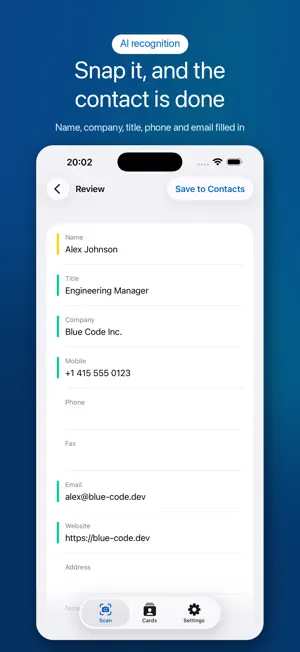
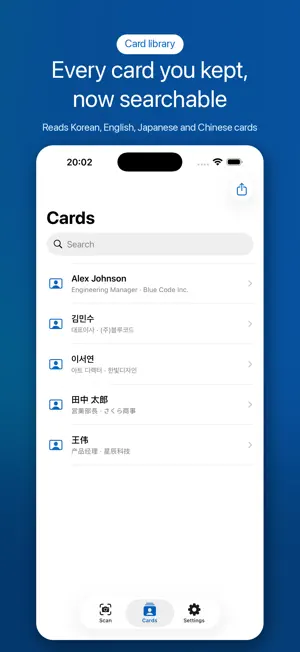
Stop typing contacts by hand. BizCard AI turns any business card into an iOS contact in one tap. Just point your camera, snap the card, and the app reads the name, company, title, phone, email, website, and address automatically. Key features - Instant capture with Apple Vision OCR for accurate text recognition - Smarter field detection on iOS 26 and later with Apple Intelligence - Auto-mapping of name, company, title, phone, email, website, and address - One-tap save to the native iOS Contacts app, no separate database to learn - Share any single card as a vCard (.vcf) Privacy by design Everything runs on your device. Card images and extracted text never leave your iPhone. No cloud uploads, no analytics, no tracking, no ad SDKs. The app works completely offline, so you can scan cards on a plane, at a conference hall, or anywhere with no signal. Multilingual recognition Reads business cards in English, Korean, Japanese, and Simplified Chinese. Perfect for international events, trade shows, and global sales teams. Who it is for - Sales reps, account managers, and consultants who exchange cards every week - Founders, recruiters, and freelancers building their network - Conference, trade show, and meetup attendees - Anyone who values privacy and wants to keep contact data off the cloud What you get for free Scan and save up to 100 cards, search your history, and share individual cards as vCard — all free. BizCard AI Pro (one-time purchase) - Unlimited scanning - Export your entire card library to a CSV file - Pick any set of cards and share them as one vCard Not a subscription. Buy once, keep it forever. Snap. Save. Done. Your network, organized in seconds.
What’s new
Version 1.1.0 · Updated August 24, 2026
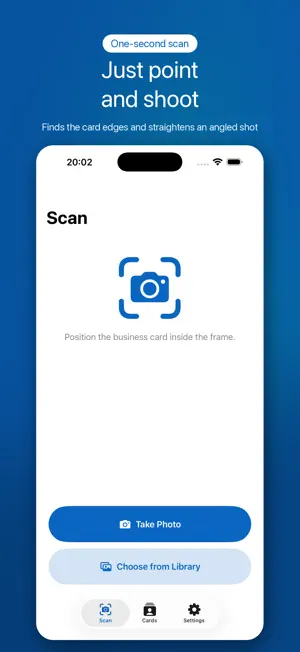
BizCard AI Pro arrives, adding unlimited scanning and library-wide export. - Export your entire card library to a CSV file - Pick any set of cards and share them as one vCard - BizCard AI Pro: a one-time purchase that removes the scan limit (not a subscription) Scanning and saving to Contacts stay free for up to 100 cards, and the cards you already saved do not count toward that. Scanning got a serious upgrade too. - The camera now finds the card's edges and flattens it, even shot at an angle - Capture several cards in one session - Fixed: on portrait photos the job title could land in the name field - On iOS 26, Apple Intelligence steps in on cards that are hard to read As always, your feedback is welcome. Thank you.
App privacy
The developer, Byoungho Kim, reported these privacy practices to Apple.
Data Not Collected
The developer does not collect any data from this app.
Alternatives to BizCard AI - Card Scanner
Looking for apps like BizCard AI - Card Scanner? Here are 6 similar apps on the App Store. The highest rated is Met: Business Card Scanner (5.0/5), and all 6 are free to download.
-
 AI Business Card Scan
-
 Urban 8 Properties.
-
 CarEx - Easy expense tracker
-
 Met: Business Card Scanner
5.0
Met: Business Card Scanner
5.0
-
 My BizCard Scan
-
 Scannect - Scan Business Cards
| App | Rating | Price | Last updated | Compare |
|---|---|---|---|---|
| BizCard AI - Card Scanner | – | Free | August 24, 2026 | |
| AI Business Card Scan | – | Free | Dec 13, 2024 | Compare |
| Urban 8 Properties. | – | Free | Oct 3, 2024 | Compare |
| CarEx - Easy expense tracker | – | Free | May 28, 2026 | Compare |
| Met: Business Card Scanner | 5.0 / 5 (1) | Free | Sep 29, 2026 | Compare |
| My BizCard Scan | – | Free | Jul 9, 2024 | Compare |
| Scannect - Scan Business Cards | – | Free | Aug 19, 2025 | Compare |