

Aria – Music Notation Editor
Jack Gruber Music iPhoneiPadiPod touch
Aria – Music Notation Editor is a free Music app for iPhone and iPad by Jack Gruber. Rated 4.8/5 from 31 ratings. Requires iOS 17. Updated October 29, 2026.
- Rating
- 4.8
- 31 ratings
- Price
- Free
- on the App Store
- Size
- 278 MB
- Age 4+
- Updated
- Oct 29
- 2026 · v7.2.1
Screenshots


About Aria – Music Notation Editor
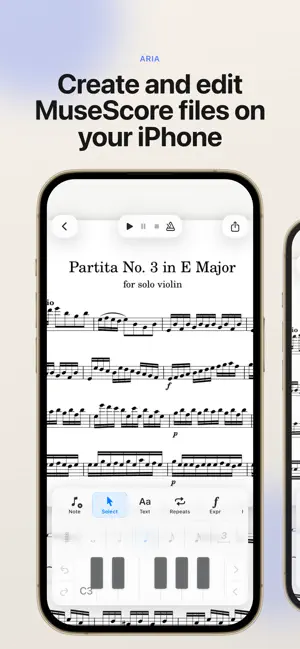
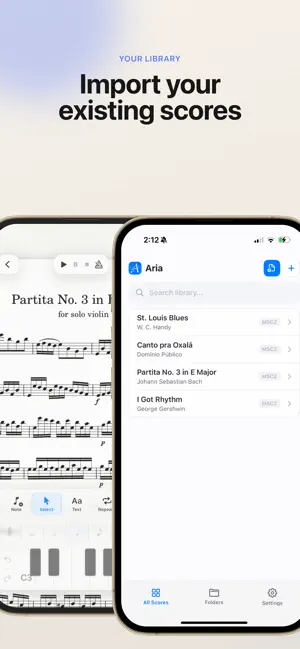
Aria is a notation editor for iPhone and iPad that lets you create, edit, and play back MuseScore files on the go. Open existing MuseScore and MusicXML files, make changes with intuitive touch-based notation controls, play back your score, organize your library, manage individual parts, and export your music when you’re ready to share. Built for musicians who want a lightweight, mobile-friendly way to review, create, and revise scores wherever they are. Features: * Open MSCZ and MusicXML score files * Create new scores from templates * Edit and enter notes with touch controls, Apple Pencil, or a MIDI controller * Play back scores locally * View and manage individual parts * Export and share your work as MSCZ, PDF, MusicXML, audio, and more. Aria is an independent app and is not affiliated with or endorsed by MuseScore, Muse Group, or any related project. Aria is open-source software licensed under the GNU GPLv3. Source code, license notices, and build instructions are available here: https://github.com/hdi200/aria
Ratings & reviews
4.8
31 ratings
What’s new
Version 7.2.1 · Updated October 29, 2026
New in this update • Page-turn pedals: Bluetooth pedals and arrow keys turn pages while you read. • Select Similar: Tap a note, rest, chord symbol or text, then ••• > Select Similar to select everything like it, in the whole score or on the same staff. • Copy and paste between scores: Copy music in one score, open another, and paste it in. • Extend selection menu option: Select a bar, then ••• > Extend Selection, and tap the last bar of your intended selection • Bar line types menu: Tap a bar line and choose double, final, dashed, dotted and more. • Chords in the mixer: Mute or turn down chord symbol playback with the new Chords channel. Fixes • Selecting multiple notes: Fixed issues related to selecting and editing several notes at once.
App privacy
The developer, Jack Gruber, reported these privacy practices to Apple.
Data Not Collected
The developer does not collect any data from this app.
Alternatives to Aria – Music Notation Editor
Looking for apps like Aria – Music Notation Editor? Here are 6 similar apps on the App Store. The highest rated is Nugget 02 - Series 9000 (5.0/5), and all 6 are free to download.
-
 KAGARIBI: AUv3 Synth
4.5
-
 Nyquist Player
4.0
-
 Nugget 02 - Series 9000
5.0
-
 Wavepocket
4.5
-
 ShinRonin
4.9
-
 Etherpad
4.9
| App | Rating | Price | Last updated | Compare |
|---|---|---|---|---|
| Aria – Music Notation Editor | 4.8 / 5 (31 ratings) | Free | October 29, 2026 | |
| KAGARIBI: AUv3 Synth | 4.5 / 5 (4) | Free | Sep 15, 2026 | Compare |
| Nyquist Player | 4.0 / 5 (1) | Free | Sep 21, 2026 | Compare |
| Nugget 02 - Series 9000 | 5.0 / 5 (2) | Free | Sep 15, 2026 | Compare |
| Wavepocket | 4.5 / 5 (2) | Free | Aug 18, 2026 | Compare |
| ShinRonin | 4.9 / 5 (8) | Free | Jul 7, 2026 | Compare |
| Etherpad | 4.9 / 5 (21) | Free | Oct 11, 2026 | Compare |