

Nyquist Player
Jose De Jesus Garfias Music iPhoneiPadiPod touchMac
Nyquist Player is a free Music app for iPhone and iPad by Jose De Jesus Garfias. Rated 4.0/5 from 1 ratings. Requires iOS 17.6. Updated September 21, 2026.
- Rating
- 4.0
- 1 ratings
- Price
- Free
- on the App Store
- Size
- 13 MB
- Age 4+
- Updated
- Sep 21
- 2026 · v1.4
Screenshots
About Nyquist Player
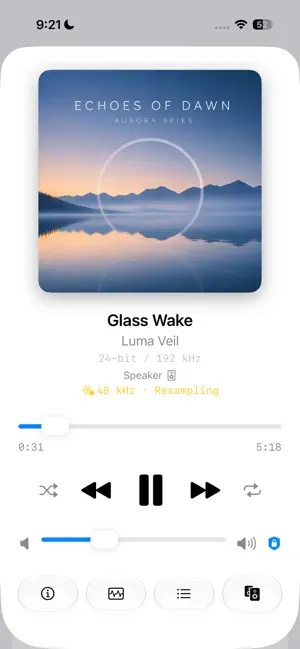
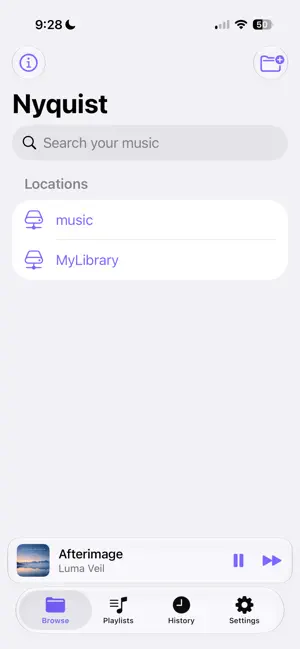
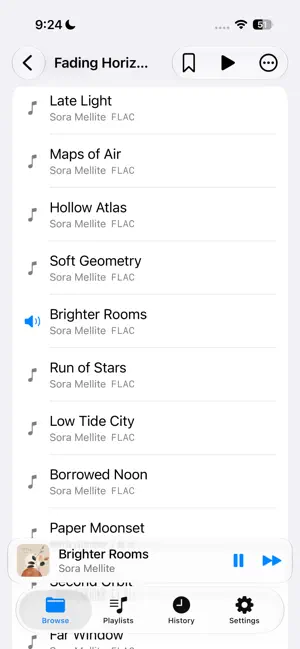
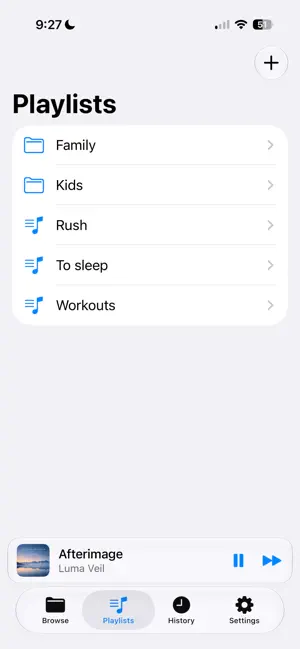
Nyquist is a native, file-first music player for audiophiles who keep large local libraries on SSDs, external drives, and NAS shares. It is not a streaming app — it is a fast, precise playback tool built for people who care about sample rates, bit depth, and an honest signal path. WHY NYQUIST • Bit-perfect intent — On macOS, Nyquist matches your DAC's hardware sample rate to each file (44.1 → 88.2/176.4, 48 → 96/192) and waits for the clock to re-lock so CoreAudio performs no resampling. No cross-family conversions are ever forced on your music. • True gapless playback — Sample-accurate transitions between tracks of the same format, so albums by Pink Floyd, Tool, Daft Punk, live sets, and classical recordings flow without a single gap. • Network play — Discover UPnP/DLNA receivers on your network (Denon, HEOS, and friends) and stream the original file straight to them, with gapless hand-off on receivers that support it. Network devices sit right next to your DACs in the output picker. • Track analysis — A built-in lab for every file: a whole-track waveform with peak, RMS, and dynamic-range readouts; EBU R128 / BS.1770 integrated loudness with ReplayGain; a long-term spectrum that exposes upsampled "hi-res" and lossy-sourced "lossless" files; a full spectrogram; plus live spectrum, level meters, and a stereo goniometer — each with a plain-language verdict. • On-device search — A private, persistent index of your saved locations, with filters by file type and metadata field (title, artist, album, genre, composer, label, year, format). Nothing leaves your device. • Built for huge libraries — Folder-first browsing that behaves like a high-performance file browser, not a slow database. Lazy-loaded discovery means no full-library scan before you can press play, even across 50,000+ tracks. A topology view classifies your folders into artists, albums, EPs, singles, live sets, compilations, box sets, and discs. • NAS-aware — Add SMB shares directly or through the Files app. Remote tracks start instantly while a background copy makes seeks immediate, and the next track is prefetched for seamless rotation. • Playlists — Organize your music into groups and playlists saved as portable .m3u8 files in a folder you choose. Point every device at the same folder — including a NAS share added through the Files app — and your playlists stay in sync across Mac, iPhone, and iPad. Build them from tracks, whole folders, or the current queue, then reorder and edit them anywhere. • Background playback — On iPhone and iPad, playback keeps going when you lock the screen or switch apps, with working lock-screen and Control Center transport — including while streaming to a network receiver. • Flexible volume — On iPhone and iPad the slider follows your device's system volume; on macOS, choose software gain, your DAC's own hardware volume (bit-perfect at any level), or a fixed 100% for maximum purity. An optional limiter caps the level across every output — even against the hardware volume buttons — to prevent accidental loud jumps. • Exclusive (hog) mode — Optionally take exclusive ownership of your DAC during playback on macOS. • Flexible output routing — On macOS, choose the exact CoreAudio output device (USB DAC, built-in, and more); your choice is remembered across launches. On iPhone and iPad, send audio to AirPlay, Bluetooth, or wired outputs with the system route picker. • Deep technical transparency — Inspect format, sample rate, bit depth (with FLAC/ALAC recovery), channel count, codec, and a live signal-path view showing source rate, output rate, and bit-perfect / resampling / exclusive status. • Memory-friendly — Tracks are streamed from disk frame-by-frame, never decoded whole into RAM, so even 24/192 material stays light on resources. SUPPORTED FORMATS FLAC, ALAC, MP3, AIFF, WAV, and AAC today. The engine is format-agnostic, with DSD and SACD ISO planned.
What’s new
Version 1.4 · Updated September 21, 2026
- UI Improvements for iPad. - Speed and performance improvements.
App privacy
The developer, Jose De Jesus Garfias, reported these privacy practices to Apple.
Data Not Collected
The developer does not collect any data from this app.
Alternatives to Nyquist Player
Looking for apps like Nyquist Player? Here are 6 similar apps on the App Store. The highest rated is BitaBit Hi-Fi Audio Player (4.0/5), and all 6 are free to download.
-
 BitaBit Hi-Fi Audio Player
4.0
BitaBit Hi-Fi Audio Player
4.0
-
 Familiar Player
-
 Sonic Player
-
 Stow Player
4.0
Stow Player
4.0
-
 Tonar: FLAC Hi-Res Player
3.8
Tonar: FLAC Hi-Res Player
3.8
-
 fidelplayer: Hi-Res Audio
| App | Rating | Price | Last updated | Compare |
|---|---|---|---|---|
| Nyquist Player | 4.0 / 5 (1 rating) | Free | September 21, 2026 | |
| BitaBit Hi-Fi Audio Player | 4.0 / 5 (5) | Free | Oct 11, 2026 | Compare |
| Familiar Player | – | Free | Oct 26, 2026 | Compare |
| Sonic Player | – | Free | Aug 12, 2026 | Compare |
| Stow Player | 4.0 / 5 (5) | Free | Oct 24, 2026 | Compare |
| Tonar: FLAC Hi-Res Player | 3.8 / 5 (5) | Free | Oct 29, 2026 | Compare |
| fidelplayer: Hi-Res Audio | – | Free | Oct 11, 2026 | Compare |
Compare Nyquist Player with the top alternatives: ratings, updates, ASO score and keyword gaps →