

BitaBit Hi-Fi Audio Player
kult111 Music iPhoneiPadiPod touch
BitaBit Hi-Fi Audio Player is a free Music app for iPhone and iPad by kult111. Rated 4.0/5 from 5 ratings. Requires iOS 17.0. Updated October 11, 2026.
- Rating
- 4.0
- 5 ratings
- Price
- Free
- on the App Store
- Size
- 99 MB
- Age 4+
- Updated
- Oct 11
- 2026 · v1.5.0
Screenshots


About BitaBit Hi-Fi Audio Player
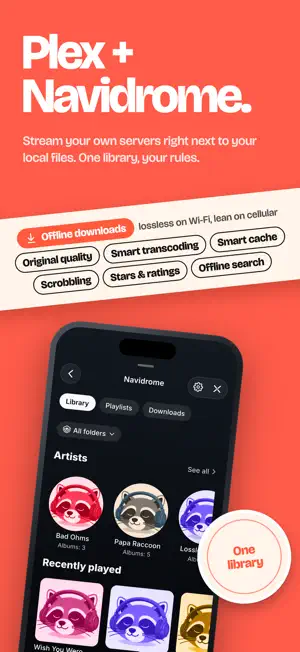
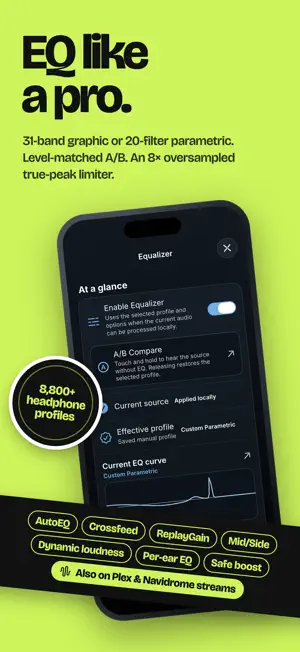
Your music. Your rules. Press play. BitaBit brings your own files, Plex and Navidrome libraries, radio and podcasts together on iPhone and iPad. From hi-res albums to 8-bit favorites, give your collection a player that loves the details as much as you do. LOSSLESS. LIMITLESS. Import from Files or AirDrop, build playlists and take your local music offline. Play FLAC, ALAC, DSD, WAV, AIFF, MP3, AAC, Ogg Vorbis, Opus, WavPack, Monkey's Audio and Musepack. Even VGM/VGZ chiptunes, synthesized live. YOUR SERVERS. RIGHT HERE. Browse and stream music from your own or shared Plex servers, or connect to Navidrome. Artists, albums, playlists and search, all close at hand. With Navidrome, download favorites, browse your saved library offline and choose separate Wi-Fi and cellular quality settings. Smart caching keeps more music ready for the next play. EQ LIKE A PRO. Choose a 10-, 15- or 31-band graphic EQ, or shape your sound with up to 20 parametric filters. Explore over 8,800 AutoEQ headphone profiles, compare at matched loudness with A/B, and fine-tune each channel. Go further with dynamic loudness, ReplayGain, crossfeed and an 8× oversampled true-peak limiter. Save and share complete DSP presets. EQ and live visualizers work with Plex and Navidrome streams too; available processing depends on the source and playback path. RADIO & PODCASTS. Tune in to stations worldwide, save favorites and see live track info when available. Find your shows, download episodes, explore chapters, adjust playback speed, set a sleep timer and move subscriptions with OPML. PLAY IT ON THE BIG SYSTEM. Send your music to TVs and speakers with Chromecast or AirPlay. Your library and your Plex and Navidrome tracks are prepared on your device, and formats the device can't play are converted first. SOUNDSTAGE. Turn your iPhone sideways or go full screen on iPad and let the music fill the screen. Pick MilkDrop presets, from featured classics to fractals and explosions, shuffle your favorites and choose how often they change. Or let Glitch Cover play with your artwork. SEE WHAT YOU HEAR. Enjoy artwork-inspired colors, full-screen covers, reactive visualizers and share cards. Explore format, sample rate, bit depth and signal-path details, with clear distinctions between reported data and estimates. Reach your music with Siri Suggestions and Spotlight. No ads. No account needed for local music, radio or podcasts. Server features require access to your own services. Bring content you have the right to play; BitaBit does not include a music subscription or catalog. Available in 28 languages. Hear what you've been missing.
Ratings & reviews
4.0
5 ratings
What’s new
Version 1.5.0 · Updated October 11, 2026
BitaBit now plays on iPad, and your music gets a stage. • iPad: one app for iPhone and iPad. Your sections in a sidebar, your library in the middle and the player always at hand. • SoundStage: turn your iPhone sideways or go full screen on iPad and let the music fill the screen. MilkDrop presets (featured classics, by style or just your favorites, changing as often as you like) or Glitch Cover, which plays with your artwork. • Navidrome and Plex keep more on your device: covers, album and artist pages and the songs you've played, ready again even without a connection. • Search the queue by title, artist or album and play it right away. • Tap the artist, album or podcast name in the player to go straight there. Select several songs at once in Navidrome and Plex albums and playlists. • Podcasts stay up to date with new episodes, and the progress bar remembers where you left off. • Native menus, smoother transitions and many fixes. Press play. Now on a bigger screen.
App privacy
The developer, kult111, reported these privacy practices to Apple.
Data Linked to You
The following data, which may be collected and linked to your identity, may be used for the following purposes:
- Contact Info: Email Address
- User Content: Other User Content
- Diagnostics: Other Diagnostic Data
Used for: App Functionality
Alternatives to BitaBit Hi-Fi Audio Player
Looking for apps like BitaBit Hi-Fi Audio Player? Here are 6 similar apps on the App Store. The highest rated is Nyquist Player (4.0/5), and all 6 are free to download.
-
 Nyquist Player
4.0
Nyquist Player
4.0
-
 Sonic Player
-
 Familiar Player
-
 Tonar: FLAC Hi-Res Player
3.8
Tonar: FLAC Hi-Res Player
3.8
-
 fidelplayer: Hi-Res Audio
-
 Tanuki Beats: Music Player
3.0
Tanuki Beats: Music Player
3.0
| App | Rating | Price | Last updated | Compare |
|---|---|---|---|---|
| BitaBit Hi-Fi Audio Player | 4.0 / 5 (5 ratings) | Free | October 11, 2026 | |
| Nyquist Player | 4.0 / 5 (1) | Free | Sep 21, 2026 | Compare |
| Sonic Player | – | Free | Aug 12, 2026 | Compare |
| Familiar Player | – | Free | Oct 10, 2026 | Compare |
| Tonar: FLAC Hi-Res Player | 3.8 / 5 (5) | Free | Oct 25, 2026 | Compare |
| fidelplayer: Hi-Res Audio | – | Free | Oct 11, 2026 | Compare |
| Tanuki Beats: Music Player | 3.0 / 5 (1) | Free | Oct 24, 2026 | Compare |