

AppTimeLock: Block Apps
Muhammad Farhan Almasyhur Productivity iPhoneiPadiPod touch
AppTimeLock: Block Apps is a free Productivity app for iPhone and iPad by Muhammad Farhan Almasyhur. Requires iOS 18.0. Updated October 19, 2026.
- Price
- Free
- on the App Store
- Size
- 15 MB
- Age 4+
- Updated
- Oct 19
- 2026 · v1.3
Screenshots


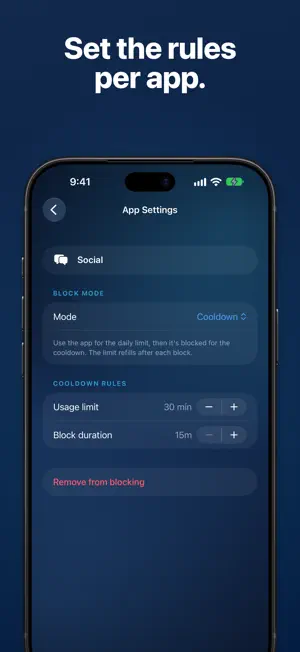

About AppTimeLock: Block Apps
The apps that pull you in are designed to. AppTimeLock puts you back in charge of where your time goes. A BUDGET, NOT JUST A WALL Give an app a daily limit. Use it, and when the budget runs out it locks for a cooldown — then refills. Or block outright when you'd rather not open the door at all. Block a single app or a whole category in one go. PAUSE Not ready to block an app completely? Pause it. Every time you open it, you wait a few seconds first, and Close is always the easy choice. Still want in? Wait it out and you get a Pass: a short stretch in the app before the pause comes back. Each Pass that day makes the next wait a little longer. Add a reason in your own words to see while you wait, and set a daily Pass goal if you like. PROGRESS See your blocks working. Every day your blocks hold, with nothing removed or weakened and your Passes within your goal, adds to your streak. Your stats show opens stopped and hours protected this week, a recap arrives on Sunday evening (you can turn it off), and a share card shows your week in totals, never which apps you block. You earn a freeze every 7 streak days, and it covers a missed day automatically. STRICT MODE Most blockers fail at the moment you need them most. Strict Mode adds a waiting period before you can remove or weaken any block — so a moment of weakness can't undo your whole day. SCHEDULES Block apps during work hours, bedtime, or any window you choose, on the days you choose. PRIVATE BY DESIGN AppTimeLock never learns which apps you pick, and nothing about your blocks ever leaves your device. No account, no tracking, no cloud. FREE AND PRO Free: one app with a Cooldown budget or Pause, this week's stats, your streak, the share card and 1 freeze. Pro: unlimited apps, whole-category blocking, always-on mode, schedules, Strict Mode, Pause on as many apps as you like, Pass lengths of 1, 5, 15 or 30 minutes, Gentle, Standard or Firm waits, your full stats history, and up to 3 freezes. Subscriptions renew automatically until cancelled. Terms of Use: https://apptimelock.com/terms Privacy Policy: https://apptimelock.com/privacy
What’s new
Version 1.3 · Updated October 19, 2026
New: Pause. Keep an app within reach, but every open starts with a short wait. Close is the easy choice; wait it out and you get a Pass. New: Progress. Your streak, weekly stats, a Sunday evening recap and a share card show your blocks working. Plus fixes and stability improvements.
App privacy
The developer, Muhammad Farhan Almasyhur, reported these privacy practices to Apple.
Data Not Collected
The developer does not collect any data from this app.
Alternatives to AppTimeLock: Block Apps
Looking for apps like AppTimeLock: Block Apps? Here are 6 similar apps on the App Store.
-
 CraveLock: Block Apps & Limit
-
 Focus Blocks: App Blocker
-
 AppBlocker: PEAK
-
 ScrollGone: Stop Doomscrolling
-
 LogicLock Screen Time Control
-
 Doomblock – Strict App Blocker
| App | Rating | Price | Last updated | Compare |
|---|---|---|---|---|
| AppTimeLock: Block Apps | – | Free | October 19, 2026 | |
| CraveLock: Block Apps & Limit | – | Free | Oct 7, 2026 | Compare |
| Focus Blocks: App Blocker | – | Free | Sep 26, 2026 | Compare |
| AppBlocker: PEAK | – | Free | Sep 11, 2026 | Compare |
| ScrollGone: Stop Doomscrolling | – | Free | Sep 21, 2026 | Compare |
| LogicLock Screen Time Control | – | Free | Oct 6, 2026 | Compare |
| Doomblock – Strict App Blocker | – | Free | Oct 14, 2026 | Compare |