

LogicLock Screen Time Control
Cedric Julian Zieger Productivity iPhoneiPadiPod touch
LogicLock Screen Time Control is a free Productivity app for iPhone and iPad by Cedric Julian Zieger. Requires iOS 17.6. Updated October 6, 2026.
- Price
- Free
- on the App Store
- Size
- 12 MB
- Age 4+
- Updated
- Oct 6
- 2026 · v2.0.1
Screenshots

About LogicLock Screen Time Control
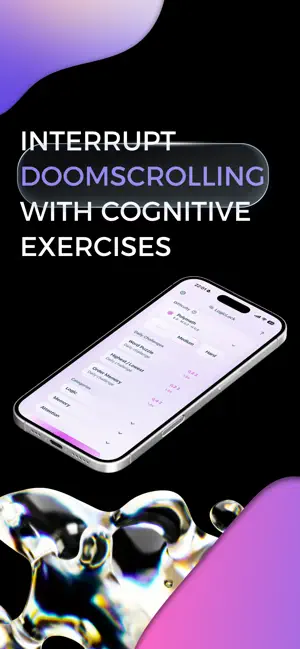
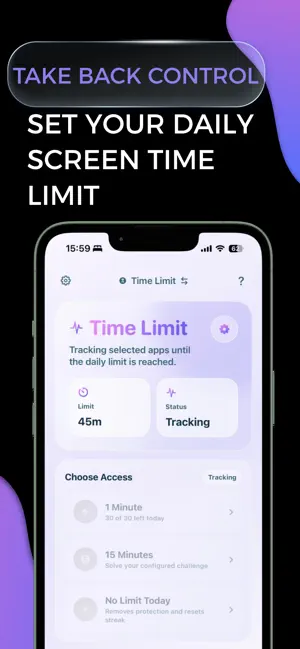
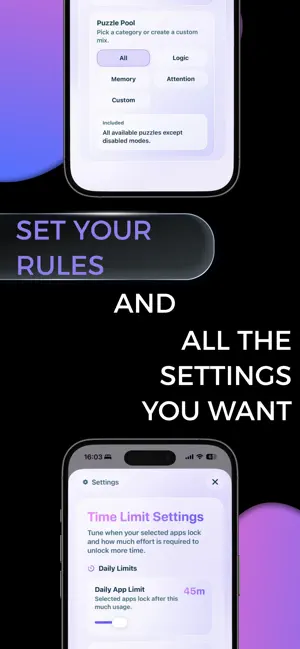
LogicLock Screen Time Control helps make time spent intentional. Time Limit Mode lets you set an access limit for selected apps. Once your time runs out, those apps are automatically restricted, helping you stay within the boundary you set. In Classic Mode, access is earned by completing short puzzle sessions. Instead of opening distracting apps automatically, you first solve challenges designed to engage your focus, memory, attention, and reasoning. Each completed session earns minutes that you can use to unlock your selected apps. The goal is simple: interrupt passive behavior, slow down impulsive app use, and make opening an app a deliberate choice. How it works: Select the apps you want to restrict Set an access limit with Time Limit Mode Complete short puzzle sessions to earn minutes in Classic Mode Use earned minutes to temporarily unlock your apps Build streaks and track your progress over time Challenge types include: Logic and deduction challenges Sequence and pattern recognition Short-term and working-memory tasks Attention and visual discrimination exercises Arithmetic chains and number puzzles Timed focus and reaction challenges Features: Time Limit and earn-to-unlock modes Multiple puzzle categories and difficulty levels Daily challenges Master difficulty profiles Progress, streak, and usage statistics A clean, focused experience LogicLock is for people who want more control over how they use their time and attention. Terms of Use: https://www.apple.com/legal/internet-services/itunes/dev/stdeula/ Privacy Policy: https://www.logiclock-screentimecontrol.com/privacy/ Terms Information: https://www.logiclock-screentimecontrol.com/terms/
What’s new
Version 2.0.1 · Updated October 6, 2026
Introducing Time Limit Mode. A smarter way to cut screen time without locking yourself out completely. Set a daily limit, then solve quick challenges when you want a little more time. Also new: Colorways, smoother interactions, refreshed visuals, and plenty of polish throughout LogicLock.
App privacy
The developer, Cedric Julian Zieger, reported these privacy practices to Apple.
Data Not Collected
The developer does not collect any data from this app.
Alternatives to LogicLock Screen Time Control
Looking for apps like LogicLock Screen Time Control? Here are 6 similar apps on the App Store. The highest rated is Todaiyo (5.0/5), and all 6 are free to download.
-
 Rewire: Screen Time Control
-
 Todaiyo
5.0
Todaiyo
5.0
-
 AppTimeLock: Block Apps
-
 Alarmaze - Solve To Stop
5.0
Alarmaze - Solve To Stop
5.0
-
 Bonfire: Screen Time Blocker
4.4
Bonfire: Screen Time Blocker
4.4
-
 Unglue: Screen Time Friend
4.7
Unglue: Screen Time Friend
4.7
| App | Rating | Price | Last updated | Compare |
|---|---|---|---|---|
| LogicLock Screen Time Control | – | Free | October 6, 2026 | |
| Rewire: Screen Time Control | – | Free | May 18, 2026 | Compare |
| Todaiyo | 5.0 / 5 (2) | Free | May 27, 2026 | Compare |
| AppTimeLock: Block Apps | – | Free | Oct 19, 2026 | Compare |
| Alarmaze - Solve To Stop | 5.0 / 5 (1) | Free | May 22, 2026 | Compare |
| Bonfire: Screen Time Blocker | 4.4 / 5 (67) | Free | Apr 15, 2026 | Compare |
| Unglue: Screen Time Friend | 4.7 / 5 (2,678) | Free | Oct 21, 2026 | Compare |