

Mosaic & Blur - Censor Faces
hidenobu akiyoshi Photo & Video iPhoneiPadiPod touch
Mosaic & Blur - Censor Faces is a free Photo & Video app for iPhone and iPad by hidenobu akiyoshi. Requires iOS 18.0. Updated October 12, 2026.
- Price
- Free
- on the App Store
- Size
- 164 MB
- Age 4+
- Updated
- Oct 12
- 2026 · v2.0
Screenshots



About Mosaic & Blur - Censor Faces
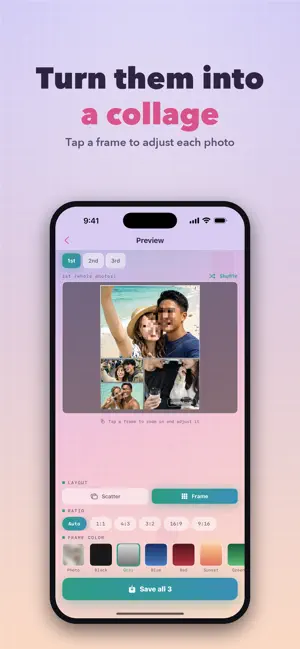
Hide anything you don't want in the frame — in one tap. Your ex in the background, a passerby, your home address, a car's license plate, a delivery slip... Before you post to Instagram, TikTok or a marketplace app, superMosaic wipes out whatever shouldn't be seen. ■ Auto-detects faces, plates & skin AI finds what to hide and mosaics it all at once. Fine-tune by hand anytime. ■ Choose how you hide Mosaic, blur, solid black or color. Black out anything you want gone for good. ■ 4 powerful modes - Detail Mode — edit a single photo with precision - Batch Mode — process dozens of photos at once - 4-in-1 Mode — merge 4 shots into one stylish collage - Video Mode — auto-mosaic every frame ■ Made for people who want to - Hide people caught in the background of a photo - Cover addresses & personal info before selling online - Protect kids' faces before posting - Blur cars and license plates Hide what matters — instantly. Terms of Use (EULA): https://www.apple.com/legal/internet-services/itunes/dev/stdeula/ Privacy Policy: https://hideto0926.github.io/superMosaic/
What’s new
Version 2.0 · Updated October 12, 2026
Version 2.0 makes superMosaic better on bigger screens. - iPhone Duo support Works on both the outer screen and the big inner screen. Open or close your phone and pick up right where you left off. - iPad support Photos and controls are laid out to make the most of the larger display. - Landscape support Use the app with your device turned sideways. - Touch up photos in Batch mode On wide layouts, before and after photos appear side by side. Tap a photo to open the editor and add or remove blurred areas. Your edits are kept when the batch is processed. - Fixes and improvements Fixed buttons and ads running off the edge on narrow screens. Thanks for using superMosaic. Let us know what you think in a review.
App privacy
The developer, hidenobu akiyoshi, reported these privacy practices to Apple.
Data Linked to You
The following data, which may be collected and linked to your identity, may be used for the following purposes:
- Purchases: Purchase History
- Identifiers: Device ID
Used for: Analytics, Product Personalization, App Functionality
Alternatives to Mosaic & Blur - Censor Faces
Looking for apps like Mosaic & Blur - Censor Faces? Here are 6 similar apps on the App Store.


| App | Rating | Price | Last updated | Compare |
|---|---|---|---|---|
| Mosaic & Blur - Censor Faces | – | Free | October 12, 2026 | |
| PictBatch | – | Free | Sep 18, 2026 | Compare |
| ATOMxGALAXIES | – | Free | Aug 26, 2026 | Compare |
| Censor Photo: Redact & Blur | – | Free | Oct 4, 2026 | Compare |
| FaceAway | – | Free | Mar 15, 2026 | Compare |
| Altered States: Live FX | – | Free | Jul 15, 2026 | Compare |
| Hologramm | – | Free | Feb 24, 2026 | Compare |