

Meetings: AI Note Taker
Jye Menzies Productivity iPhoneiPadiPod touchApple Watch
Meetings: AI Note Taker is a free Productivity app for iPhone and iPad by Jye Menzies. Requires iOS 17.0. Updated July 18, 2026.
- Price
- Free
- on the App Store
- Size
- 80 MB
- Age 4+
- Updated
- Jul 18
- 2026 · v1.0.1
Screenshots


About Meetings: AI Note Taker
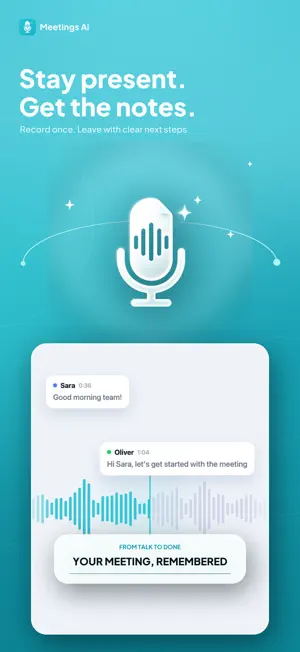
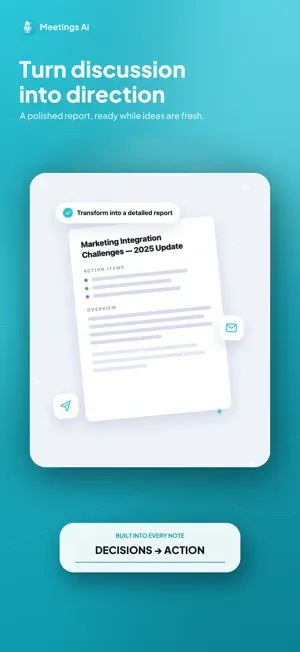
Meetings AI turns every meeting into clear, organized notes — automatically. Hit record (or record straight from your Apple Watch), and Meetings AI transcribes the conversation live on your iPhone. The moment you stop, AI writes a clean structured summary: key points, decisions and action items — ready to read, edit, translate or share. WHY MEETINGS AI • Live transcription — speech is transcribed on-device as you talk • AI summaries — key points, decisions and action items, not a wall of text • Chat with your meetings — ask follow-up questions and get answers from the transcript • Import anything — Share an audio, video or PDF file to Meetings AI and it opens and turns it into a note • Apple Watch — capture conversations from your wrist; they appear in the app • Calendar — connect Google or Microsoft calendars so upcoming meetings are one tap away • Translate summaries into 50+ languages • Share as text, email or PDF • Organize with folders, favorites and search PRIVATE BY DESIGN Recordings stay on your device and transcription runs on-device using Apple speech recognition. Transcript text is sent to our AI provider only to generate summaries, translations and chat answers. If you turn on Email my summary (off by default), your summary and the email address you enter are sent to our email provider only to deliver that email. We never sell your data. FREE TO START Try it free with 60 minutes of recording (up to 30 minutes per take) and 2 AI summaries included. Meetings AI Pro unlocks unlimited transcriptions of any duration, imports, translations and more. Subscriptions Meetings AI Pro and Meetings AI Business are auto-renewable subscriptions, each available as a monthly or annual plan (annual plans include a 3-day free trial). The price is shown in the app in your local currency before you purchase. Payment is charged to your Apple ID account at confirmation. Your subscription automatically renews unless auto-renew is turned off at least 24 hours before the end of the current period. You can manage or cancel your subscription in your Apple ID Account Settings at any time. Terms of Use (EULA): https://meetingsaiapp.com/#terms Privacy Policy: https://meetingsaiapp.com/#privacy
What’s new
Version 1.0.1 · Updated July 18, 2026
Bug fixes and performance improvements.
App privacy
The developer, Jye Menzies, reported these privacy practices to Apple.
Data Used to Track You
The following data may be used to track you across apps and websites owned by other companies:
- Purchases: Purchase History
- Identifiers: Device ID
- Usage Data: Product Interaction
Data Linked to You
The following data, which may be collected and linked to your identity, may be used for the following purposes:
- Purchases: Purchase History
- Identifiers: Device ID
- Usage Data: Product Interaction
- Contact Info: Email Address, Phone Number
- User Content: Audio Data, Other User Content
Used for: Third-Party Advertising, Developer’s Advertising or Marketing, Analytics, App Functionality
Alternatives to Meetings: AI Note Taker
Looking for apps like Meetings: AI Note Taker? Here are 6 similar apps on the App Store. The highest rated is Donote : AI Note Taker, Memo (4.9/5), and all 6 are free to download.
-
 Dicta - AI Note Taker
-
 AI Note Taker - Summary AI
-
 ShareList App
-
 AI Note Taker : Voice Recorder
4.7
AI Note Taker : Voice Recorder
4.7
-
 Mailopoly
2.5
Mailopoly
2.5
-
 Donote : AI Note Taker, Memo
4.9
Donote : AI Note Taker, Memo
4.9
| App | Rating | Price | Last updated | Compare |
|---|---|---|---|---|
| Meetings: AI Note Taker | – | Free | July 18, 2026 | |
| Dicta - AI Note Taker | – | Free | Oct 10, 2026 | Compare |
| AI Note Taker - Summary AI | – | Free | Apr 10, 2026 | Compare |
| ShareList App | – | Free | Aug 25, 2026 | Compare |
| AI Note Taker : Voice Recorder | 4.7 / 5 (7) | Free | Oct 20, 2026 | Compare |
| Mailopoly | 2.5 / 5 (2) | Free | Oct 21, 2026 | Compare |
| Donote : AI Note Taker, Memo | 4.9 / 5 (54) | Free | Apr 27, 2026 | Compare |