

Shard - Notes for Obsidian
Daiki Yamaguchi Productivity iPhoneiPadiPod touch
Shard - Notes for Obsidian is a free Productivity app for iPhone and iPad by Daiki Yamaguchi. Requires iOS 17.0. Updated October 1, 2026.
- Price
- Free
- on the App Store
- Size
- 6 MB
- Age 4+
- Updated
- Oct 1
- 2026 · v1.7.0
Screenshots

About Shard - Notes for Obsidian
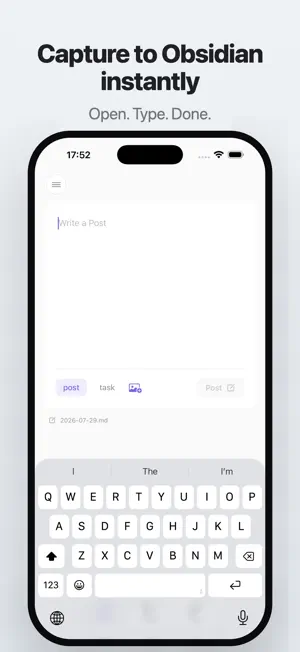
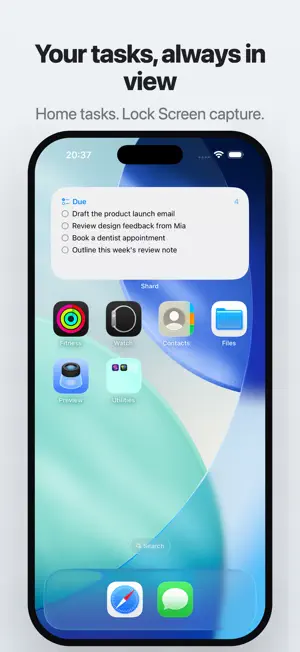
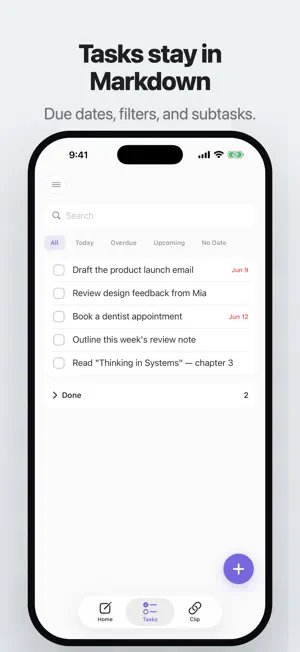
Capture notes to Obsidian in seconds. Open. Type. Done. Shard gives you a fast path from a thought to plain Markdown in your Obsidian vault. After setup, it opens to a focused capture field with the keyboard ready. QUICK CAPTURE • Add notes or tasks to your daily note • Use common Daily Notes and Periodic Notes folder and date settings • Write directly to vaults in iCloud Drive, Obsidian Sync, or on your device • Keep text captures queued on your device when the vault is temporarily unavailable TASKS • Manage Markdown checkboxes from your phone • Add due dates and times • Filter by Today, Overdue, Upcoming, or No Date • Create subtasks and move completed tasks under “Completed” WEB CLIPPER • Save webpage links from the Share Sheet • Open the live page in Shard • Add bullet notes to a linked Markdown note FREE • Quick capture for notes and tasks • Task management • Web link clipping • Lock Screen buttons for New Post and New Task SHARD PLUS • Local reminders for tasks with a due date and time • Home Screen task widgets for today and overdue • Custom Post templates and destinations • Post and Task actions in Shortcuts and the Share Sheet • Image attachments and custom clip destinations PRIVATE BY DESIGN No Shard account. No analytics. No tracking. Your content is written directly to the vault you choose. If a text capture cannot be written immediately, it waits locally on your device. Shard works with plain Markdown, so your notes stay portable and there is no proprietary format. Obsidian is a trademark of Dynalist Inc. Shard is an independent app and is not affiliated with or endorsed by Dynalist Inc. Terms of Use (EULA): https://www.apple.com/legal/internet-services/itunes/dev/stdeula/
What’s new
Version 1.7.0 · Updated October 1, 2026
Custom Notes are here. Add project notes, journals, or other notes to your post picker, each with its own heading and date grouping. • Browse or search all notes in your vault, or create a new one. • Switch between Daily Note and Custom Notes from one compact picker. • Set up destinations and formats before upgrading. Shard Plus is requested when you post with a paid feature. • Cleaner spacing between posts under the same date heading.
App privacy
The developer, Daiki Yamaguchi, reported these privacy practices to Apple.
Data Not Collected
The developer does not collect any data from this app.
Alternatives to Shard - Notes for Obsidian
Looking for apps like Shard - Notes for Obsidian? Here are 6 similar apps on the App Store. The highest rated is Cairn — Markdown Tasks (5.0/5), and all 6 are free to download.
-
 Cairn — Markdown Tasks
5.0
-
 Candor: AI Note
5.0
-
 memomem: Voice Memo & Journal
-
 GoalReach
5.0
-
 Cogito - Local Note-taking app
-
 Better Writing: Second Draft
5.0
| App | Rating | Price | Last updated | Compare |
|---|---|---|---|---|
| Shard - Notes for Obsidian | – | Free | October 1, 2026 | |
| Cairn — Markdown Tasks | 5.0 / 5 (1) | Free | Oct 16, 2026 | Compare |
| Candor: AI Note | 5.0 / 5 (1) | Free | Jun 6, 2026 | Compare |
| memomem: Voice Memo & Journal | – | Free | Oct 3, 2026 | Compare |
| GoalReach | 5.0 / 5 (1) | Free | May 30, 2025 | Compare |
| Cogito - Local Note-taking app | – | Free | Jun 6, 2026 | Compare |
| Better Writing: Second Draft | 5.0 / 5 (1) | Free | May 8, 2026 | Compare |