

memomem: Voice Memo & Journal
Mitsuo Watabe Productivity iPhoneiPadiPod touch
memomem: Voice Memo & Journal is a free Productivity app for iPhone and iPad by Mitsuo Watabe. Requires iOS 15.0. Updated October 3, 2026.
- Price
- Free
- on the App Store
- Size
- 26 MB
- Age 4+
- Updated
- Oct 3
- 2026 · v1.0.2
Screenshots


About memomem: Voice Memo & Journal
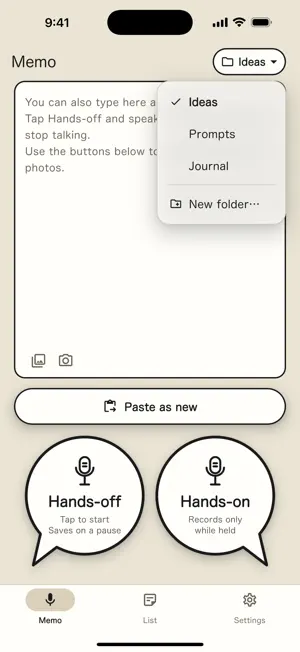
■ Capture an idea the moment it comes — just say it memomem is a memo app you can use by simply talking. Tap “Hands-off” once and speak. When you stop talking, the memo saves itself and the app says “Saved”, so you never have to look at the screen. Ideas that come while driving or doing chores don't slip away. ■ Three ways to capture • Hands-off — tap to start; it saves when you stop talking • Hands-on — records only while you hold the button; release to save • Typing — write directly in the box and save You can attach screenshots and photos too. ■ A daily journal that writes itself Choose the “Journal” folder and everything you save that day is added to one note, each entry with its time. Just speak whenever something comes to mind and you end up with one page per day. ■ A home for your prompts Found a useful prompt on X or elsewhere? Copy it, tap “Paste as new”, and it's saved. When you need it, tap “Copy” in the list and paste it straight into your AI app. Paste a URL and memomem shows the link's thumbnail and title (a YouTube video's name, for example). ■ Easy to find later • Every memo gets a title automatically • On iPhones with Apple Intelligence, on-device AI writes a title that fits the content • Organize with date headings, folders, tags and search • Deleted memos stay in Trash for 7 days, so you can bring them back ■ Your memos live in your own folder Memos can be saved as Markdown files (.md) in any folder available in the Files app — iCloud Drive, Google Drive, Dropbox and more. Open the same folder on your computer to read them. It also works as an Obsidian vault, and journal notes use the same format as Obsidian daily notes. No account is needed. Your memos are never sent to our servers. ■ Good to know • Speech-to-text uses the iPhone's speech recognition (Apple). Microphone and speech recognition access are required • AI titles work only on Apple Intelligence–capable iPhones running iOS 26 or later. On other iPhones, titles are made from the memo text • Please operate the app only when it is safe. Set things up while parked; while driving, use it only by tapping the button once ■ About ads memomem is free to use. To support it, a banner ad is shown at the bottom of the screen.
What’s new
Version 1.0.2 · Updated October 3, 2026
• New Journal folder: memos saved there are added to one note per day, each with its time (the same format as Obsidian daily notes) • Now available in English, Korean, and Simplified and Traditional Chinese
App privacy
The developer, Mitsuo Watabe, reported these privacy practices to Apple.
Data Not Linked to You
The following data, which may be collected but is not linked to your identity, may be used for the following purposes:
- Location: Coarse Location
- Identifiers: Device ID
- Usage Data: Product Interaction, Advertising Data
- Diagnostics: Crash Data, Performance Data, Other Diagnostic Data
Used for: Third-Party Advertising, Analytics
Alternatives to memomem: Voice Memo & Journal
Looking for apps like memomem: Voice Memo & Journal? Here are 6 similar apps on the App Store. The highest rated is Grocery List Calculator: Grabb (4.0/5), and all 6 are free to download.
-
 Quirepad
-
 Lootpad – Instant Notes
-
 MultiSendMemo - Write anywhere
-
 QuickNotion
-
 Taskdown.md
2.5
-
 Grocery List Calculator: Grabb
4.0
| App | Rating | Price | Last updated | Compare |
|---|---|---|---|---|
| memomem: Voice Memo & Journal | – | Free | October 3, 2026 | |
| Quirepad | – | Free | Aug 21, 2026 | Compare |
| Lootpad – Instant Notes | – | Free | Sep 1, 2025 | Compare |
| MultiSendMemo - Write anywhere | – | Free | Aug 29, 2026 | Compare |
| QuickNotion | – | Free | Dec 9, 2024 | Compare |
| Taskdown.md | 2.5 / 5 (2) | Free | Mar 23, 2026 | Compare |
| Grocery List Calculator: Grabb | 4.0 / 5 (1) | Free | Jul 13, 2026 | Compare |