

Barriers: Task & Money Planner
IV Technologies Ltd Productivity iPhoneiPadiPod touchMacApple Watch
Barriers: Task & Money Planner is a free Productivity app for iPhone and iPad by IV Technologies Ltd. Rated 5.0/5 from 5 ratings. Requires iOS 15.0.
- Rating
- 5.0
- 5 ratings
- Price
- Free
- on the App Store
- Size
- 63 MB
- Age 4+
- Updated
- Oct 24
- 2026 · v1.15.0
Screenshots
Save to Pinterest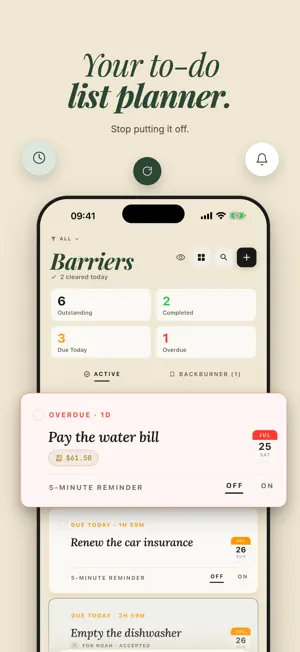

About Barriers: Task & Money Planner
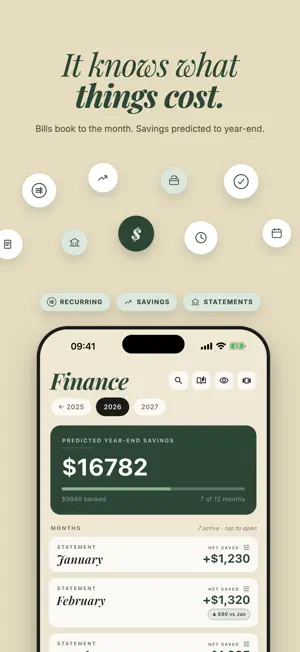
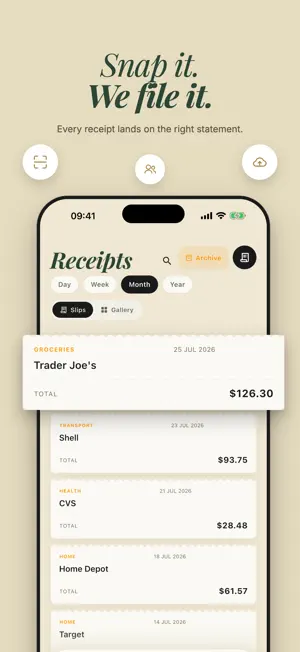
One place for the things you have to do and the money they cost. Check off "pay the gas bill, $86.40" and Barriers offers to book it into June. Barriers is a planner for tasks and money, made for ADHD minds and for anyone whose week does not fit in their head. It reads like a newspaper rather than a checklist: one quiet page a day. No confetti, no points. THE TASKS: FREE, AND UNLIMITED • Deadlines with a countdown, and a morning page that says what is overdue and what is due today • Task alarms: tap the bell on a task, and on iPhone and iPad with iOS 26.1 or later it rings like an alarm, even on silent • Routines that repeat themselves (daily, weekly, monthly, yearly) and, with family sharing, can take turns around the house • A Backburner for what matters but is not urgent, and "At some point" for what has no date at all • Five-minute tasks: mark the small things, and one comes back to you a few times a day • An evening edition that moves whatever is left to tomorrow, in one tap • Check a task off from the Lock Screen, a widget or your wrist, no app to open • One search box across tasks, expenses and receipts SAY IT ONCE "Pay the gas bill $86.40 on Friday, book the dentist Tuesday morning, milk for $3 on the way home." Barriers hears three tasks, two dates and two amounts, and shows you every one of them before a single thing is saved. Dictation is on-device by default. Or photograph a written list and let it read the lines in. One task at a time is free; several in one breath comes with Premium. THE MONEY • A statement for each month: what came in, what went out, what is left, with your pay stub photographed straight in • A bill sits in the months it is actually paid. A quarterly bill lands in those three months, not smoothed into twelve, so a month's total is what really left the account. Copy one forward and it strides four years ahead. • 23 currencies, folded into yours at reference rates • A year-end figure worked out from your own numbers, and a switch that hides every number while you are reading in public • The Annual: a one-page year-end broadsheet with its own headline, saved out as an image • Receipts: photograph one and the store, total and date are read off it. File it to the month it belongs to; an unfiled banner keeps count of the ones still waiting. Finance and Receipts are free for fourteen days; after that, Premium unlocks them with one payment that never renews. Barriers Advanced is an optional subscription that adds sub-tasks and plans the months ahead: payday and bills, set-asides, allowances, and bank statement files read on your device. The family sharing subscription includes Premium and Advanced for the person who pays. SHARE IT WITH THE HOUSE A household of two is free, whether you start it or join one. A third person needs family sharing: a separate auto-renewing subscription, monthly or yearly, two weeks free for new subscribers. It seats six, adds shared receipts and task photos, and lets you be in three households, not one. Whoever holds it pays for everyone they invite. • Give a task to one person: they accept it, or decline and say why • Put one to everybody at once • Rotate a routine around the house, so "whose turn" has an answer • A nudge, at most one per task every twelve hours • Hand a task back • A ledger of who is carrying what Joining someone's family does not unlock Finance, Receipts or Advanced for you: those stay on your own plan. PRIVATE, AND PLAINLY SO No ads, ever. No tracking. No third-party analytics. Usage statistics are off until you turn them on. Your tasks, months and receipts live on your device and sync through your own iCloud; what you hand to a family goes to that family, and if you sign in and have paid, your receipt photos are backed up so a reinstall does not take them. No account is needed for anything except family sharing. WHERE IT RUNS iPhone, iPad, Mac and Apple Watch. 19 languages. Barriers does not give financial, tax or investment advice.
Ratings & reviews
5.0
5 ratings
What’s new
Version 1.15.0 · Updated October 24, 2026
In Finance, change an expense once and choose how far it goes: just this month, this and later months, or every month. A month where you set something different keeps it. Make your own categories in Finance and Receipts. They stay in the list, can be renamed or deleted, and count in every total by category. Add a receipt from a file: tap the receipt button, choose a file, and pick a photo or a PDF from your files or cloud storage. Sub-tasks: switch them on when you add or edit a task, and its card shows how far along it is. They come with Barriers Advanced, or with Family for whoever pays.
App privacy
The developer, IV Technologies Ltd, reported these privacy practices to Apple.
Data Linked to You
The following data, which may be collected and linked to your identity, may be used for the following purposes:
- Contact Info: Email Address, Name
- User Content: Other User Content
- Identifiers: User ID, Device ID
Used for: App Functionality
Data Not Linked to You
The following data, which may be collected but is not linked to your identity, may be used for the following purposes:
- Identifiers: Device ID
- Usage Data: Product Interaction
Used for: Analytics
Alternatives to Barriers: Task & Money Planner
Looking for apps like Barriers: Task & Money Planner? Here are 6 similar apps on the App Store. The highest rated is Waddle: Gentle ADHD Routines (5.0/5), and all 6 are free to download.
-
 Waddle: Gentle ADHD Routines
5.0
-
 Unstuck: ADHD Planner Focus
-
 Orbit: A Fancy Planner
5.0
-
 Ontime: ADHD & Time Blindness
5.0
-
 ADHD Planner - Outcomes
5.0
-
 BloomDay: ADHD Planner
5.0
| App | Rating | Price | Last updated | Compare |
|---|---|---|---|---|
| Barriers: Task & Money Planner | 5.0 / 5 (5 ratings) | Free | October 24, 2026 | |
| Waddle: Gentle ADHD Routines | 5.0 / 5 (8) | Free | Oct 26, 2026 | Compare |
| Unstuck: ADHD Planner Focus | – | Free | Nov 7, 2026 | Compare |
| Orbit: A Fancy Planner | 5.0 / 5 (1) | Free | Jun 26, 2026 | Compare |
| Ontime: ADHD & Time Blindness | 5.0 / 5 (1) | Free | Sep 10, 2026 | Compare |
| ADHD Planner - Outcomes | 5.0 / 5 (3) | Free | Oct 30, 2026 | Compare |
| BloomDay: ADHD Planner | 5.0 / 5 (2) | Free | Oct 14, 2026 | Compare |