

Orbit: A Fancy Planner
Kiera McCabe Productivity iPhoneiPadiPod touch
Orbit: A Fancy Planner is a free Productivity app for iPhone and iPad by Kiera McCabe. Rated 5.0/5 from 1 ratings. Requires iOS 15.0. Updated June 26, 2026.
- Rating
- 5.0
- 1 ratings
- Price
- Free
- on the App Store
- Size
- 3 MB
- Age 4+
- Updated
- Jun 26
- 2026 · v1.1
Screenshots
About Orbit: A Fancy Planner
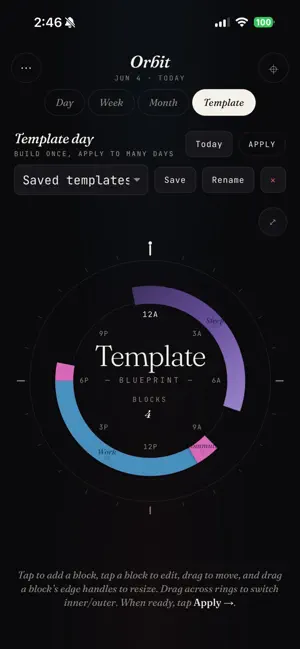
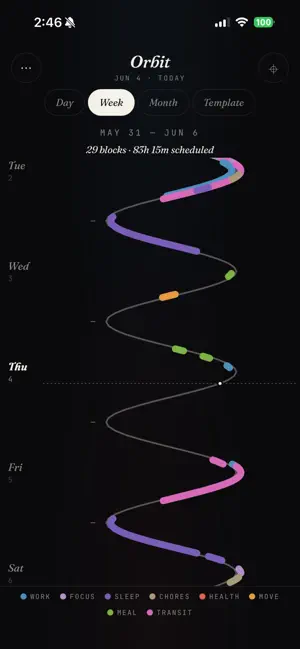
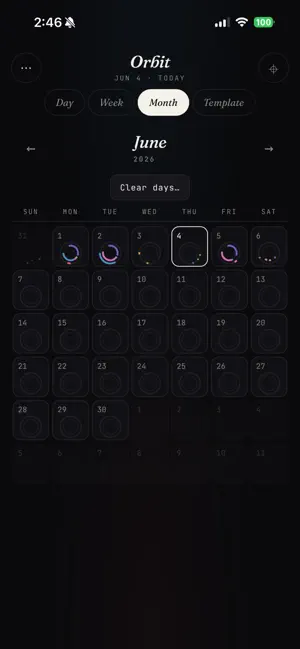
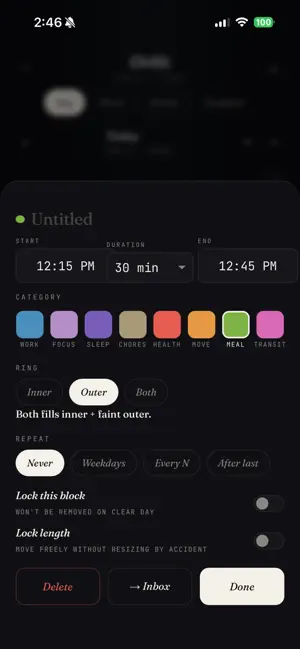
Orbit is a visual planner built around a simple idea: your day is a clock, not a list. Plan your schedule on a 24-hour circular timeline inspired by circadian rhythm planning. Drag activities directly onto the dial, build reusable templates, manage recurring tasks, and see how your time is actually spent. Whether you're planning work, exercise, sleep, meals, or personal projects, Orbit helps you create schedules that are easier to understand and maintain. Features: • Circular 24-hour planner • Two-layer scheduling system for broad and detailed planning • Drag-and-drop time blocking • Recurring tasks and habits • Completion-based task regeneration • Task inbox for unscheduled work • Day, Wave, and Month views • Schedule templates • Color-coded categories • Local-first design with automatic saving • Installable on iPhone, iPad, and desktop Built for visual thinkers, routine builders, and anyone who wants a better way to see their time.
What’s new
Version 1.1 · Updated June 26, 2026
UI/UX Improvements: Inbox Restructuring (June 16) - Replaced Tasks/Repeating tabs with three day-aware filters: Today (one-off tasks), Today ↻ (repeating due today), and All ↻ (all repeating). Removed the "Inbox — GRIP TO DRAG" header and moved +Task button beside tabs. Day View Layout Fixes (June 16) - Fixed empty space at app bottom by changing from height: 100dvh to position: fixed; inset: 0. Fixed dial getting covered by inbox drawer with better sizing. Made inbox drawer collapsible with a toggle button (▤) in the header and auto-hide on zoom. Lock Controls Compaction (June 16) - Consolidated three stacked lock toggles into a single compact "Lock" row with pills for Clear/Duration/Position/All options. Onboarding Improvements (June 16) - Auto-hide inbox "GRIP TO DRAG" header and template hints after 5 opens, with a "Show instructions" toggle in Settings to restore them. Bug Fixes: Fixed 'All instances' recurring edit that was deleting other instances instead of updating them Fixed 'This and future' edit erasing manually scheduled future instances for non-auto-scheduled recurring tasks Fixed month 'This week' clear to only include days within the viewed month Fixed month 'Move all to inbox' losing one-off scheduled tasks Fixed dead self-comparison in month clear day re-render (isSameDay(currentDate, currentDate)) Fixed Apply Template sheet staying visible when navigating away or tapping backdrop Fixed inline inbox edits/deletes not persisting (now saved immediately on close) Feature Enhancements: Multi-Weekday Selection (June 16) - Apply Template now allows selecting multiple weekdays (Mon+Wed, etc.) instead of just one, with presets remaining single-select Dial Math Fixes (June 16) - Made magnet snap and template merge wrap-aware on the 24h dial to properly handle overnight blocks (e.g., 23:55 vs 00:05) Renamed comfort view Auto light / dark mode
App privacy
The developer, Kiera McCabe, reported these privacy practices to Apple.
Data Not Collected
The developer does not collect any data from this app.
Alternatives to Orbit: A Fancy Planner
Looking for apps like Orbit: A Fancy Planner? Here are 6 similar apps on the App Store. The highest rated is Weeeeek (5.0/5), and all 6 are free to download.
-
 SelfPilot: Goal Planner
-
 Weeeeek
5.0
Weeeeek
5.0
-
 NowCue: Daily Planner
5.0
NowCue: Daily Planner
5.0
-
 Plotted: Planner & To Do List
3.0
Plotted: Planner & To Do List
3.0
-
 Ringround: Visual Day Planner
5.0
Ringround: Visual Day Planner
5.0
-
 Dayfold: Planner & Journal
5.0
Dayfold: Planner & Journal
5.0
| App | Rating | Price | Last updated | Compare |
|---|---|---|---|---|
| Orbit: A Fancy Planner | 5.0 / 5 (1 rating) | Free | June 26, 2026 | |
| SelfPilot: Goal Planner | – | Free | Jun 9, 2026 | Compare |
| Weeeeek | 5.0 / 5 (2) | Free | Oct 28, 2026 | Compare |
| NowCue: Daily Planner | 5.0 / 5 (1) | Free | Jun 6, 2026 | Compare |
| Plotted: Planner & To Do List | 3.0 / 5 (1) | Free | Sep 11, 2026 | Compare |
| Ringround: Visual Day Planner | 5.0 / 5 (1) | Free | Sep 29, 2026 | Compare |
| Dayfold: Planner & Journal | 5.0 / 5 (6) | Free | Sep 20, 2026 | Compare |