

Dayfold: Planner & Journal
Shadberry Studios LLC Productivity iPhoneiPadiPod touchMac
Dayfold: Planner & Journal is a free Productivity app for iPhone and iPad by Shadberry Studios LLC. Rated 5.0/5 from 4 ratings. Requires iOS 16.0.
- Rating
- 5.0
- 4 ratings
- Price
- Free
- on the App Store
- Size
- 46 MB
- Age 4+
- Updated
- Sep 20
- 2026 · v1.0
Screenshots



About Dayfold: Planner & Journal
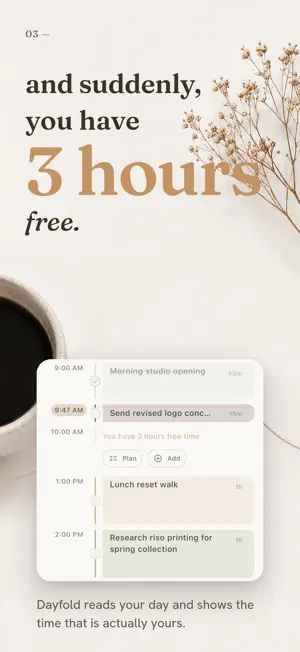
Dayfold is a calm personal organizer that brings your whole day into one place: tasks, calendar, habits, routines, projects, a focus timer, and a journal. It is not built to make you do more. It is built to help you see where you are in your day, what actually needs your attention, and how much time you really have. TODAY One screen that answers "where am I right now?": your schedule, tasks, habits, birthdays, and a journal line for the day. Dayfold even shows how much free time is left in your day. TASKS Capture quickly, plan gently. Give a task an exact date and time, or just say "this week", "next week", "this month". Lists, checklists, priorities, and an Arrange view that helps you place unscheduled tasks into your week when you are ready. CALENDAR Day and week views where tasks and events live together. See your Google Calendar events alongside your own plans. Color comes from your life roles, so one glance tells you what kind of day it is. ROLES Work, home, health, personal. Give everything a role and see your day by the parts of your life, not just by the clock. PROJECTS Boards for bigger plans: client work or a trip for two. Cards with photos, notes, and checklists. Turn any card into a task when it is time to act. HABITS Small rhythms with streaks, multiple check-ins per day, and monthly stats. Share your progress as a clean image card when you feel like it. ROUTINES Reusable blocks like "morning opening" or "evening shutdown" that you drop into your day instead of rebuilding it every time. FOCUS A Pomodoro timer with rounds and breaks, and a Live Activity on your iPhone Lock Screen so the timer stays with you. JOURNAL Short notes that live next to your plans: a diary, ideas, separate spaces for whatever you keep. Not everything needs to be a task. EVERYWHERE Dayfold works offline and syncs across iPhone, iPad, and Mac. On iPad and Mac it grows into a full multi-pane workspace. You can lock the app with a passcode or Face ID. Dayfold is quiet by design. No streak shaming, no productivity scores, no pressure. Just a warm place you return to during the day.
App privacy
The developer, Shadberry Studios LLC, reported these privacy practices to Apple.
Data Linked to You
The following data, which may be collected and linked to your identity, may be used for the following purposes:
- Contact Info: Email Address
- User Content: Photos or Videos, Other User Content
- Identifiers: User ID
Used for: App Functionality
Alternatives to Dayfold: Planner & Journal
Looking for apps like Dayfold: Planner & Journal? Here are 6 similar apps on the App Store. The highest rated is NowCue: Daily Planner (5.0/5), and all 6 are free to download.
-
 NowCue: Daily Planner
5.0
-
 Monthly Planner - Month+
5.0
-
 Plander: Planner & Calendar
5.0
-
 52 Week Planner: To-Do List
5.0
-
 Busy B Planner
5.0
-
 Alune: AI Daily ADHD Planner
5.0
| App | Rating | Price | Last updated | Compare |
|---|---|---|---|---|
| Dayfold: Planner & Journal | 5.0 / 5 (4 ratings) | Free | September 20, 2026 | |
| NowCue: Daily Planner | 5.0 / 5 (1) | Free | Jun 6, 2026 | Compare |
| Monthly Planner - Month+ | 5.0 / 5 (9) | Free | Oct 13, 2026 | Compare |
| Plander: Planner & Calendar | 5.0 / 5 (1) | Free | Oct 10, 2026 | Compare |
| 52 Week Planner: To-Do List | 5.0 / 5 (1) | Free | Feb 11, 2025 | Compare |
| Busy B Planner | 5.0 / 5 (7) | Free | Oct 15, 2026 | Compare |
| Alune: AI Daily ADHD Planner | 5.0 / 5 (2) | Free | Oct 17, 2026 | Compare |