
Washi · Money: Expenses
Tedy Development Finance iPhoneiPadiPod touch
Washi · Money: Expenses is a free Finance app for iPhone and iPad by Tedy Development. Requires iOS 18.0. Updated September 5, 2026.
- Price
- Free
- on the App Store
- Size
- 9 MB
- Age 4+
- Updated
- Sep 5
- 2026 · v1.7
Screenshots


About Washi · Money: Expenses
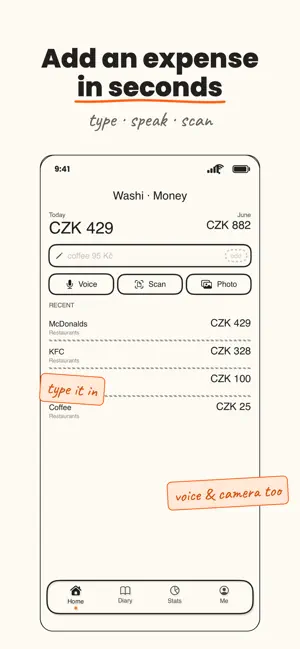
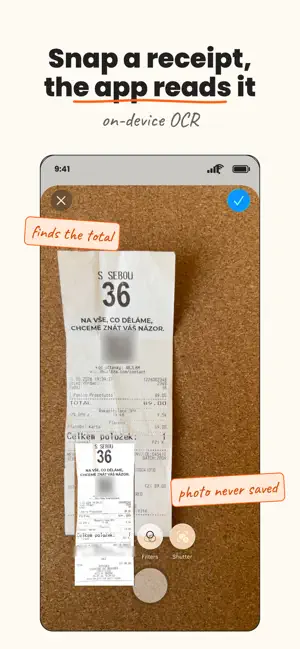
Washi · Money is a private expense diary that lives in your own iCloud and nowhere else. No account, no bank login, no server of ours — just a calm, beautiful way to know where your money goes. Adding an expense takes seconds. Type it like a text, say it out loud, or snap a receipt — on-device AI reads the details and files it for you. THREE WAYS TO ADD Type — write "coffee 95" and it pulls out the amount, currency, and merchant automatically. Speak — dictate an expense aloud and it's parsed instantly, hands-free. Scan — photograph a receipt and on-device OCR reads the total and the shop. SMART, ON YOUR DEVICE Apple's on-device intelligence turns messy, free-form input into a clean expense — amount, currency, merchant, and category. It matches each expense to the right category and learns from your edits over time. Nothing is sent to a server to make this happen. SEE WHERE IT GOES A scrollable diary of everything you've spent, grouped by day. Stats with hand-drawn donut charts, per-currency totals, and your top categories at a glance. A short, AI-written recap of your week. Filter totals and history by day, month, or period. PRIVATE BY DESIGN Your expenses sync only through your own iCloud, where only you can read them. There's no account to create, no ads, and no tracking. Receipt photos are processed on-device and never stored — only the text recognized from them is kept on the expense. Some system features like speech recognition may be handled by Apple depending on your device and language. MADE TO FEEL GOOD A warm, hand-drawn "paper" aesthetic with soft washi tones, playful fonts, and gentle animations — a money app that's actually pleasant to open. ALSO INCLUDED Twenty languages and fourteen currencies — set your defaults in Settings. Edit or delete any expense in a tap. Works offline, and syncs when you're back. WASHI PRO — Use Washi free for 14 days, then unlock unlimited expense logging with a one-time purchase — yours for good, no subscription. Start your private money diary today. Your data stays on your phone, where it belongs.
What’s new
Version 1.7 · Updated September 5, 2026
Eighteen more languages — Washi · Money now speaks twenty. German, French, Spanish, Italian, Dutch, Portuguese, Polish, Swedish, Norwegian, Danish, Finnish, Slovak, Hungarian, Romanian, Greek, Turkish, Ukrainian and Russian join English and Czech. The receipt reader learned the merchants and the "total" wording used in each of those markets, and there are now 14 currencies to choose from. Also in this version: • Runs on iOS 18 and later, so far more iPhones are supported • Your diary, your categories and everything the app has learned from your corrections now sync through your own iCloud • Settings shows whether iCloud sync is actually working, instead of leaving you to guess • Your currency and language choice follow you to a new device
App privacy
The developer, Tedy Development, reported these privacy practices to Apple.
Data Not Collected
The developer does not collect any data from this app.
Alternatives to Washi · Money: Expenses
Looking for apps like Washi · Money: Expenses? Here are 6 similar apps on the App Store.
-
 PennyFi
-
 Finl
Finl
-
 Spenso: Expense Tracker
-
 Fiscado: Finance Tracker
-
 BudgetLoop: Expense Tracker
-
 Student Expenses: Cash Book
| App | Rating | Price | Last updated | Compare |
|---|---|---|---|---|
| Washi · Money: Expenses | – | Free | September 5, 2026 | |
| PennyFi | – | 4.99 USD | Oct 14, 2026 | Compare |
| Finl | – | Free | Nov 19, 2025 | Compare |
| Spenso: Expense Tracker | – | Free | Oct 12, 2026 | Compare |
| Fiscado: Finance Tracker | – | Free | Oct 20, 2026 | Compare |
| BudgetLoop: Expense Tracker | – | Free | Aug 18, 2026 | Compare |
| Student Expenses: Cash Book | – | Free | Oct 13, 2026 | Compare |