

Spenso: Expense Tracker
Chirill Ceban Finance iPhoneiPadiPod touch
Spenso: Expense Tracker is a free Finance app for iPhone and iPad by Chirill Ceban. Requires iOS 26.0. Updated October 12, 2026.
- Price
- Free
- on the App Store
- Size
- 31 MB
- Age 4+
- Updated
- Oct 12
- 2026 · v1.7.0
Screenshots


About Spenso: Expense Tracker
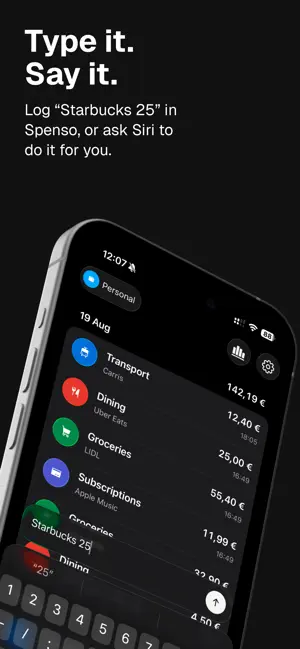
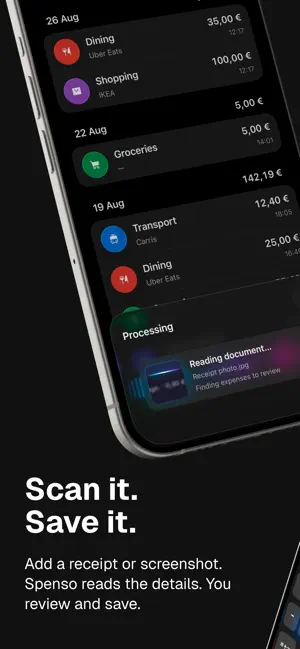
Turn a quick note, receipt, or invoice into an organized expense, without wrestling with forms or complicated dashboards. Write “Coffee 4.50”, describe several purchases in one message, or scan a receipt. Spenso picks out the important details, prepares expense drafts, and lets you review everything before saving. SCAN RECEIPTS AND INVOICES Scan a paper receipt or invoice with your camera, or import a photo or PDF. Spenso AI reads the details and prepares expense drafts for you to check, edit, or discard. Document processing requires an internet connection. KEEP THE DOCUMENT WITH THE EXPENSE Save the source photo or PDF alongside your expenses, so you can open it later to check a total or find a purchase detail. Keep your receipts and spending history together. QUICK CAPTURE, IN YOUR OWN WORDS Enter an expense the way you would naturally say it. Spenso recognizes amounts, merchants, dates, categories, and tags, with on-device processing whenever possible. SIRI AND DICTATION Tell Siri what you spent when your hands are full, or dictate directly in Spenso. Record one expense or several, then confirm, edit, or discard the drafts before anything is saved. A CLEAR DAILY HISTORY See your spending organized by day. Open an expense to adjust its amount, date, category, tags, or note whenever you need to. MONTHLY OVERVIEW Understand where your money went with clear monthly totals and category breakdowns. Open a category to see the expenses behind the total. ORGANIZE IT YOUR WAY Create categories and tags that fit your life. Use separate spaces for personal, travel, or project spending, each with its own currency, categories, and tags. PRIVATE BY DESIGN Saved expenses live on your device and in your private iCloud database. AI and Siri results remain drafts until you explicitly confirm them. Spenso is an expense log, not a budgeting app. Keep a useful record of what you spend without adding another system to maintain. LEGAL Apple Standard EULA: https://www.apple.com/legal/internet-services/itunes/dev/stdeula/ Privacy Policy: https://getspenso.com/legal/privacy-policy Terms of Service: https://getspenso.com/legal/terms-of-service
What’s new
Version 1.7.0 · Updated October 12, 2026
I’ve made it easier to find old expenses and see where your money goes. - Search your history and combine filters for dates, categories, tags, and amounts. - Follow monthly spending and category trends over 3, 6, or 12 months, or this year. - Tap a month in a chart to see the amount and open its expenses. - Move between months with the picker or bottom arrows. I also tidied up the cards and filters, with smoother period changes and clearer chart labels. Thanks for using Spenso!
App privacy
The developer, Chirill Ceban, reported these privacy practices to Apple.
Data Not Linked to You
The following data, which may be collected but is not linked to your identity, may be used for the following purposes:
- Identifiers: User ID
- Usage Data: Product Interaction
- Diagnostics: Crash Data, Performance Data, Other Diagnostic Data
Used for: Analytics, App Functionality
Alternatives to Spenso: Expense Tracker
Looking for apps like Spenso: Expense Tracker? Here are 6 similar apps on the App Store. The highest rated is Expense Tracker: SpendSense (5.0/5), and all 6 are free to download.
-
 Moneux: Money & Wealth Tracker
-
 Expense Tracker: SpendSense
5.0
-
 Trexp — Net Worth Tracker
-
 Expense Spending Money Manager
-
 Washi · Money: Expenses
-
 Affordable
| App | Rating | Price | Last updated | Compare |
|---|---|---|---|---|
| Spenso: Expense Tracker | – | Free | October 12, 2026 | |
| Moneux: Money & Wealth Tracker | – | Free | Aug 1, 2026 | Compare |
| Expense Tracker: SpendSense | 5.0 / 5 (1) | Free | Sep 10, 2026 | Compare |
| Trexp — Net Worth Tracker | – | Free | Oct 22, 2026 | Compare |
| Expense Spending Money Manager | – | Free | May 13, 2026 | Compare |
| Washi · Money: Expenses | – | Free | Sep 5, 2026 | Compare |
| Affordable | – | Free | Sep 19, 2026 | Compare |