

PennyFi
VALENTINA MARIANA FARCASANU Finance iPhoneiPadiPod touchMac
PennyFi is a paid Finance app for iPhone and iPad by VALENTINA MARIANA FARCASANU. Requires iOS 27.0. Updated October 14, 2026.
- Price
- 4.99 USD
- on the App Store
- Size
- 40 MB
- Age 4+
- Updated
- Oct 14
- 2026 · v2.8
Screenshots


About PennyFi
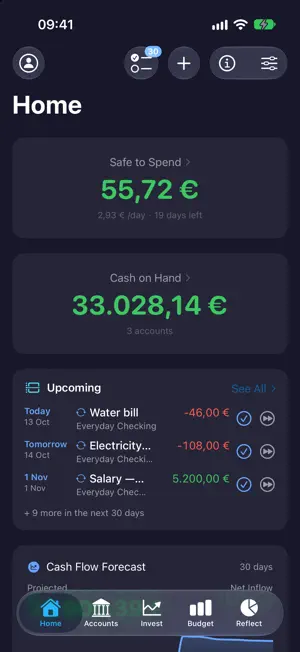
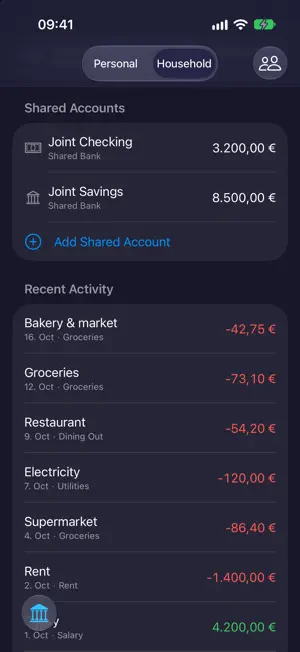
PennyFi — your money, in your pocket, on your terms. Pay once, own it forever. No subscriptions, no bank logins, no ads. Your finances stay on your device — and PennyFi's smart features run on Apple's on-device AI, so nothing you enter ever leaves your hands. KNOW WHAT YOU CAN SPEND • Safe to Spend: one number that answers "can I buy this?" — what's left after bills, budgets, and goals • Cash flow forecast: see your balance weeks ahead, before the bills hit • A customizable Home dashboard: net worth, cash on hand, upcoming bills, top expenses, and more BUDGET YOUR WAY • Guided Budget Builder: answer a few questions, get a working budget • Classic methods (50/30/20 and friends) or fully custom categories • Budget calendar, spending pace, and gentle alerts before you overshoot • Budget together: share accounts and budgets with your partner over iCloud — you both view and edit, no extra account needed EVERY ACCOUNT IN ONE PLACE • Cash, savings, credit cards, loans, and investments — in any mix of currencies • Savings interest tracking, debt payoff strategies (avalanche or snowball), and loan payments with an adjustable interest–principal split • Investment portfolios with live prices and performance history EFFORTLESS ENTRY • Scan a receipt — amount, payee, and line items are filled in by on-device AI • Import bank statements from CSV or PDF, with smart duplicate detection • Rules auto-categorize as transactions arrive; PennyFi even suggests the rules • Split one purchase across categories, tag anything, log by voice with Siri • Review: sweep new transactions in a quick card session — and note how the spending felt UNDERSTAND YOUR MONEY • Ask PennyFi anything about your spending — answered privately, on your device • Smart Insights that stay calm: snooze them or dismiss them for good • Spending anomaly alerts, subscription detection, weekly recap, no-spend streaks, age of money • Reflect: beautiful reports on where it all went, month by month and year by year LIFE ADMIN, HANDLED • Recurring bills with reminders, calendar sync, and a Live Activity for the next bill due • Shared expenses with friends and settle-up math done for you • Savings goals with target dates and progress you can see PRIVATE BY DESIGN • No bank connections — that's a feature: nothing to breach, no credentials to hand over • Face ID / Touch ID app lock • iCloud sync across your iPhone, iPad, and Mac; local backups and full CSV export any time — your data is yours to keep AT HOME ON EVERY DEVICE • Built natively for iPhone, iPad, and Mac • Widgets for Safe to Spend, net worth, and more • Siri Shortcuts, global search, and full keyboard support on Mac • Available in 30 languages One price. Every feature. Forever. That's the deal.
What’s new
Version 2.8 · Updated October 14, 2026
A typo can't cost you data A mistyped amount could delete a category's budget, sell a whole holding, or save a shared household amount a thousand times too small. Those screens now wait until the amount can be read, and editing a transaction has a Cancel button. Transactions keep their account across devices With PennyFi on more than one device, a transaction could lose its account when the other device saved into that same account, and a repair could be undone the same way. PennyFi now keeps the link. If Settings → Backup & Export → Repair Orphaned Transactions lists any, assign them once more and they'll stay. Glass widgets Edit a widget and set its Background to Glass for a frosted card instead of a solid one. Worth versus what you put in Choose vs Invested on the performance chart to see your portfolio's value against the money you put in, with the gap shaded. An All range covers your whole history, and crypto no longer drops out of charts longer than a year. Ask PennyFi follows the conversation Answers appear as they're written, a follow-up like "what about last month?" knows what you asked before, and it can now see last month, the year so far and this month's budget. Scan Receipt, beside the amount The button now sits next to the amount it fills in and scans a photo as soon as you pick it. Canceling the camera no longer removes a photo you had already attached. Adding a transaction, smoothed out It starts on the account you used last, keeps the payee you type, tells you when a rule will pick the category, and the confirmation has Undo. Balance Adjustment takes the real balance Enter what the account actually holds and PennyFi records the difference. Before, the number you entered was recorded as the change itself. Statement imports stop dropping amounts An amount alone on its line in a PDF statement was silently skipped, so its transaction could go missing. Those amounts now come through. App Lock covers everything A sheet left open when PennyFi went to the background stayed visible over the lock, and on Mac, Settings could be opened while locked. The lock now covers both. Ready for iPhone Duo Toolbars fit iPhone Duo's vertical bar and keep the buttons you use most in view. A taller Net Worth widget The extra-large Net Worth widget gains a portrait layout, and VoiceOver now reads all six of its figures instead of three. Readable buttons in dark themes Labels on the app's cyan buttons were hard to read in dark themes. They now switch to black there for clear contrast.
App privacy
The developer, VALENTINA MARIANA FARCASANU, reported these privacy practices to Apple.
Data Not Collected
The developer does not collect any data from this app.
Alternatives to PennyFi
Looking for apps like PennyFi? Here are 6 similar apps on the App Store.
-
 Washi · Money: Expenses
-
 Green Line: Expense Tracker
-
 Pockly: AI Expense Tracker
-
 Famnance: Family Budget
-
 Cashflow: Forecast & Budget
-
 Finloq - Money Manager
| App | Rating | Price | Last updated | Compare |
|---|---|---|---|---|
| PennyFi | – | 4.99 USD | October 14, 2026 | |
| Washi · Money: Expenses | – | Free | Sep 5, 2026 | Compare |
| Green Line: Expense Tracker | – | Free | Oct 17, 2026 | Compare |
| Pockly: AI Expense Tracker | – | Free | Apr 9, 2026 | Compare |
| Famnance: Family Budget | – | Free | Oct 13, 2026 | Compare |
| Cashflow: Forecast & Budget | – | Free | Jul 5, 2026 | Compare |
| Finloq - Money Manager | – | Free | Sep 18, 2026 | Compare |
Compare PennyFi with the top alternatives: ratings, updates, ASO score and keyword gaps →