

Zealth.io
Zealth Planning Finance iPhoneiPadiPod touch
Zealth.io is a free Finance app for iPhone and iPad by Zealth Planning. Requires iOS 18.0. Updated October 7, 2026.
- Price
- Free
- on the App Store
- Size
- 72 MB
- Age 4+
- Updated
- Oct 7
- 2026 · v2.0.0
Screenshots



About Zealth.io
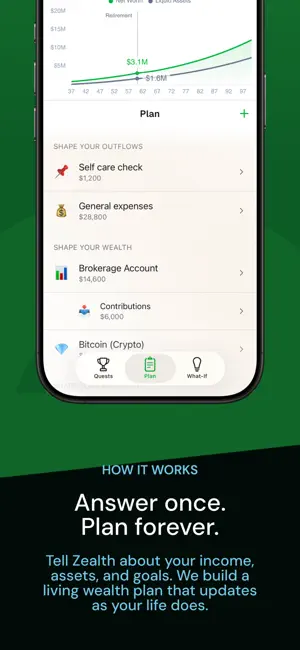
"Everybody needs a financial plan — but not everybody can afford a financial planner. And so, for that reason, here is Zealth." — Gabriel Shahin, CFP & Co-Founder Zealth turns financial planning into an adventure you actually want to go on — built by a Certified Financial Planner for people who don't live in spreadsheets. See your complete financial picture in one place. Know where you stand today. See where you're headed tomorrow. ——— WHAT-IF SCENARIOS ——— What happens if you boost your income by $20K? Retire five years early? Cut expenses by 15%? Adjust income, expenses, and retirement age on the fly and instantly see how those decisions ripple through your future wealth. ——— YOUR WEALTH, MAPPED ——— Net worth, cashflow projections, assets, investments, and liabilities — all calculated automatically. No spreadsheets. No finance degree required. ——— YOUR PERSONAL FINISH LINE ——— Zealth shows you your financial independence date — personalized to your life, not a generic number. Watch how every decision moves you closer to freedom. ——— WHAT YOU CAN TRACK ——— · Employment, bonuses, RSU, tips, side income · Retirement accounts: 401(k), Roth IRA, HSA, SIMPLE IRA, 403(b), 457(b) · Real estate, stocks, bonds, crypto · Mortgage, loans, credit card debt · Life events: home purchase, family, sabbaticals, career changes 86% of users feel more in control of their finances.
What’s new
Version 2.0.0 · Updated October 7, 2026
Zealth 2.0 is a new design, built around one question: are you going to be okay? Your chart now stays on screen while you work. Add to your plan, try a what-if or start a quest, and watch the answer change as you go. Drag the chart taller, or tap its title to see it full screen. New: Quests Plan a big decision before you make it. Start a quest for buying a home, having kids, a career move, moving abroad, starting a business, a big purchase and more. Answer a few questions, and see what it does to your plan, in dollars. • Fine-tune a quest to change how it reshapes what is already in your plan. • Choose which quests count, and see the chart with them or without them. • Your plan stays exactly as it is. Quests show you a possible future beside it. New: Journeys Want to test more than one future? Put different sets of quests into different journeys, then switch between them from the menu and see where each one leads. One journey might be an early retirement abroad, with a move abroad, a career change and a new home. Another might be a family in the suburbs, with kids and a bigger house. You already have one journey, holding everything you have set up so far. Only your quests change from one journey to the next. Your plan and your what-ifs stay exactly as they are. Swipe the chart between three views: • Wealth: what you own over the years, with each line's value at retirement written on it • Cashflow: what comes in and what goes out, year by year • Summary: your net worth today and at retirement, what is left over this year, and how long your money lasts Also new: • Your whole plan is on one screen. Tap + to add to it, tap a row to edit it, and swipe a row to delete it. • What-If keeps retirement age, income and expenses together, with one button to reset them all. • See any what-if or quest against your plan, in dollars. • Tap a milestone on the chart to open that year. • Profile, Settings and Support are in one menu. Open it from the top-left corner, or swipe in from the left edge. • You can now add a second home under Shape Your Property. • Dropdowns no longer open behind the keyboard.
App privacy
The developer, Zealth Planning, reported these privacy practices to Apple.
Data Linked to You
The following data, which may be collected and linked to your identity, may be used for the following purposes:
- Contact Info: Email Address, Name
- Identifiers: User ID
- Usage Data: Product Interaction
- Financial Info: Other Financial Info
- User Content: Customer Support
Used for: Analytics, App Functionality
Data Not Linked to You
The following data, which may be collected but is not linked to your identity, may be used for the following purposes:
- Diagnostics: Crash Data
Used for: App Functionality
Alternatives to Zealth.io
Looking for apps like Zealth.io? Here are 6 similar apps on the App Store. The highest rated is Almie: Budget by Paycheck (5.0/5), and 5 of the 6 are free to download.
-
 Almie: Budget by Paycheck
5.0
Almie: Budget by Paycheck
5.0
-
 Saverly Money
5.0
Saverly Money
5.0
-
 SwipeCaddy: Which Card to Use
5.0
SwipeCaddy: Which Card to Use
5.0
-
 DebtUnlocked - Payoff Planner
5.0
DebtUnlocked - Payoff Planner
5.0
-
 Easy Retirement Calculator
2.8
Easy Retirement Calculator
2.8
-
 MyDebt Fighter Smart Tracker
5.0
MyDebt Fighter Smart Tracker
5.0
| App | Rating | Price | Last updated | Compare |
|---|---|---|---|---|
| Zealth.io | – | Free | October 7, 2026 | |
| Almie: Budget by Paycheck | 5.0 / 5 (3) | Free | Sep 29, 2026 | Compare |
| Saverly Money | 5.0 / 5 (8) | Free | Sep 2, 2026 | Compare |
| SwipeCaddy: Which Card to Use | 5.0 / 5 (4) | Free | Oct 3, 2026 | Compare |
| DebtUnlocked - Payoff Planner | 5.0 / 5 (2) | Free | Sep 29, 2026 | Compare |
| Easy Retirement Calculator | 2.8 / 5 (5) | 0.99 USD | Mar 23, 2024 | Compare |
| MyDebt Fighter Smart Tracker | 5.0 / 5 (3) | Free | Oct 8, 2026 | Compare |
Compare Zealth.io with the top alternatives: ratings, updates, ASO score and keyword gaps →