

SwipeCaddy: Which Card to Use
Const Agility, LLC Finance iPhoneiPadiPod touch
SwipeCaddy: Which Card to Use is a free Finance app for iPhone and iPad by Const Agility, LLC. Rated 5.0/5 from 4 ratings. Requires iOS 16.4.
- Rating
- 5.0
- 4 ratings
- Price
- Free
- on the App Store
- Size
- 71 MB
- Age 17+
- Updated
- Oct 3
- 2026 · v1.1.1
Screenshots


About SwipeCaddy: Which Card to Use
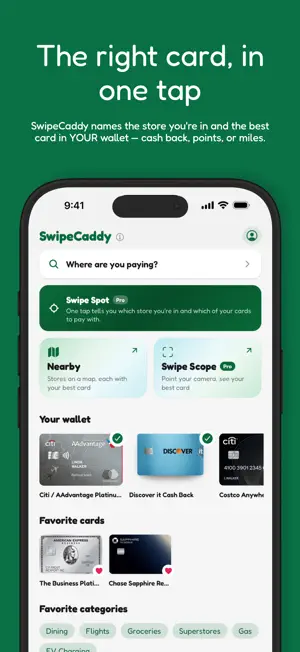
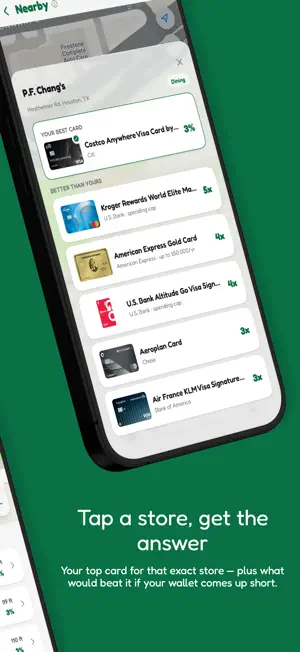
Which credit card should you use at Costco, the gas station, or dinner tonight? SwipeCaddy answers instantly: it knows the reward rates of the major US credit cards and hands you the best one from YOUR wallet. No bank linking. No card numbers. Ever. Just pick the cards you carry and SwipeCaddy does the math. FOUR WAYS TO GET AN ANSWER • SWIPE SPOT — one tap names the store you're standing in AND the card in your wallet to pay with. No searching, no typing, no map. (Pro — everyone gets three free taps) • WHERE ARE YOU PAYING? — pick a store or a spending category and get the answer instantly. • NEARBY — a map of the stores around you, each tagged with the best card in your wallet, before you reach the door. • SWIPE SCOPE — point your camera down the street and see the best card for each storefront in view. (Pro) And when you'd rather not open the app at all, SWIPE SIGNAL sends a best-card alert the moment you arrive at a store. (Pro, in beta) WHY SWIPECADDY • YOUR WALLET, YOUR CARDS — choose from the popular US credit cards and rank only what you actually carry. • CASH BACK, POINTS & MILES — every card is ranked on real cash value with conservative point valuations, so 5x points and 3% cash back finally compare fairly. • FINE PRINT, HANDLED — rotating quarterly categories, spend caps, portal-only offers, and store network rules (like warehouse clubs that only accept one card network in store) are built into every recommendation. • YOUR WALLET, YOUR PLACES — mark cards "Have it" or "Want it", and save the stores and categories you check most. • WORKS OFFLINE — recommendations load even with no signal at the register. • ENGLISH & SPANISH — completamente bilingüe. • DESIGNED FOR iOS 26 — built with Liquid Glass, and it respects Reduce Transparency. DATA YOU CAN TRUST Reward rates rot — cards retire, categories rotate, rates change quietly. SwipeCaddy's database is verified against issuer pages and refreshed weekly, with verification dates published at swipecaddy.com. When the rates change, your answer changes. FREE TO USE SwipeCaddy is free, supported by non-personalized ads. Start as a guest with up to 3 cards — no account required. Sign in free with Apple or Google to keep up to 5 and sync them across your devices. SwipeCaddy Pro removes the ads, unlocks unlimited cards, and adds unlimited Swipe Spot plus Swipe Scope and Swipe Signal. PRIVATE BY DESIGN • The recommendation engine runs entirely on your phone — the ranking never leaves your device. • We never ask for card numbers, logins, or bank access. • As a guest, nothing leaves your phone. Sign in and we save which cards you picked so you can restore them on a new phone — never card details. • Swipe Spot reads your location only when you tap it. • No tracking, and ads are non-personalized. • We don't take referral commissions from card issuers, so the recommendation answers to you — not to whoever pays the most. Questions, or a rate that looks off? Email [email protected] — a human reads every message. SwipeCaddy — The right card, handed to you. Terms of Use (EULA): https://www.apple.com/legal/internet-services/itunes/dev/stdeula/ Privacy Policy: https://www.swipecaddy.com/privacy
What’s new
Version 1.1.1 · Updated October 3, 2026
• Ready for iOS 27. • See how fresh your data is: the Cards, Categories and Merchants lists now show when it was last updated, and every card shows the date its rates were verified. • Pro Lifetime now shows correctly in Settings ("Never expires") instead of a monthly billing bar. • Bought Lifetime but still have a monthly or yearly plan? Settings now tells you it's still renewing and links to Manage subscription so you can cancel it. • We ask for a rating less often, and never right after an ad. • Under-the-hood updates and fixes.
App privacy
The developer, Const Agility, LLC, reported these privacy practices to Apple.
Data Linked to You
The following data, which may be collected and linked to your identity, may be used for the following purposes:
- Identifiers: Device ID, User ID
- Search History: Search History
- Usage Data: Product Interaction
- Contact Info: Email Address, Name
- Diagnostics: Crash Data
Used for: Third-Party Advertising, Analytics, App Functionality
Data Not Linked to You
The following data, which may be collected but is not linked to your identity, may be used for the following purposes:
- Location: Coarse Location, Precise Location
- Usage Data: Advertising Data
- Diagnostics: Performance Data
Used for: Third-Party Advertising, App Functionality
Alternatives to SwipeCaddy: Which Card to Use
Looking for apps like SwipeCaddy: Which Card to Use? Here are 6 similar apps on the App Store. The highest rated is CardPick: Best Card Finder (5.0/5), and all 6 are free to download.
-
 CardPick: Best Card Finder
5.0
-
 SwipeMax: Points Guide
-
 Savings Predictor: Calculator
-
 WageWiz Shift Pay Tracker
-
 DebtErasr
3.7
-
 SwipeSmart – Max Card Rewards
5.0
| App | Rating | Price | Last updated | Compare |
|---|---|---|---|---|
| SwipeCaddy: Which Card to Use | 5.0 / 5 (4 ratings) | Free | October 3, 2026 | |
| CardPick: Best Card Finder | 5.0 / 5 (2) | Free | Aug 30, 2026 | Compare |
| SwipeMax: Points Guide | – | Free | Jul 2, 2026 | Compare |
| Savings Predictor: Calculator | – | Free | Oct 10, 2026 | Compare |
| WageWiz Shift Pay Tracker | – | Free | Jun 22, 2026 | Compare |
| DebtErasr | 3.7 / 5 (3) | Free | Jan 9, 2026 | Compare |
| SwipeSmart – Max Card Rewards | 5.0 / 5 (3) | Free | Sep 30, 2026 | Compare |