

PDF Scanner: Scan Sign OCR
Matthew Wong Productivity iPhoneiPadiPod touch
PDF Scanner: Scan Sign OCR is a free Productivity app for iPhone and iPad by Matthew Wong. Rated 5.0/5 from 1 ratings. Requires iOS 17.0.
- Rating
- 5.0
- 1 ratings
- Price
- Free
- on the App Store
- Size
- 29 MB
- Age 4+
- Updated
- Sep 28
- 2026 · v1.0.14
Screenshots


About PDF Scanner: Scan Sign OCR
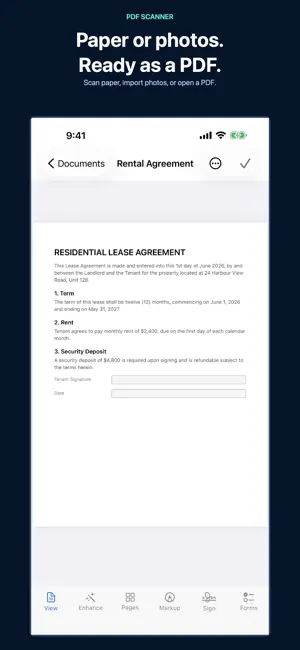
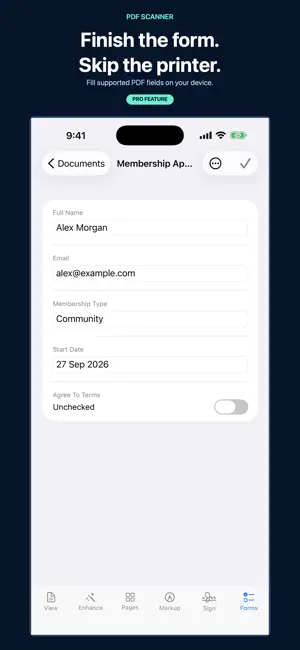
Scan it. Finish it. Find it. Turn receipts, forms, notes, and everyday paperwork into PDFs on your iPhone or iPad. Start with the camera, choose photos, or import a PDF. No app account to create. FROM PAPER OR PHOTO TO PDF - Scan with automatic page-edge detection and perspective correction - Review imported photos, adjust their corners, rotate, and reorder before saving - Keep every scanned page, including pages beyond the free viewing limit - Share PDFs through the apps and services available on your device A LIBRARY YOU CAN COME BACK TO Switch between a visual grid and a compact list. Find documents by name, sort your library, and keep work together in folders. Recently Deleted lets you recover documents for 30 days. Documents use your own iCloud Drive when available, with local storage as a fallback. FINISH YOUR PAPERWORK WITH PRO - Read and export documents of any length, without the free 3-page limit - Export and share without the PDF Scanner watermark - Create searchable PDFs with on-device OCR and find words inside documents - Draw or scan a signature, save it, and place it on a page - Fill supported interactive PDF forms, add text, and mark up with your finger or Apple Pencil - Permanently redact sensitive information - Merge, split, extract, flatten, and password-protect PDFs - Improve pages with all enhance filters and fine adjustments, including Sharp Text for faint print - Revert enhanced pages to a saved picture of how they looked before enhancement, where available - Protect app access with Face ID or your device passcode - Remove ads FREE TO START Scan, import, and organize for free. All captured pages are saved; free viewing shows the first 3 pages of each document. PDFs longer than 3 pages require Pro to share or export. Free exports include a PDF Scanner watermark. When an ad is available, an optional rewarded ad can remove the watermark from one eligible export. The free version is ad-supported. CHOOSE PRO WHEN YOU NEED IT Monthly and annual subscriptions, or a one-time Lifetime purchase. See current localized prices and any eligible trial in the app before confirming. No trial is promised to customers who are not eligible. YOUR DOCUMENTS, YOUR STORAGE Scanning and text recognition run on your device. Documents stay on your device or in your own iCloud Drive, rather than our servers. Keep originals is on by default and saves a picture before enhancement, using your storage; you can manage these copies in Settings. Pro can restore that picture, but it does not restore searchable text, interactive form fields, or later edits. Questions or feedback: [email protected] Subscriptions renew automatically unless cancelled at least 24 hours before the end of the current period. Payment is charged to your Apple ID. Manage or cancel subscriptions in App Store account settings. Lifetime is a one-time purchase. Terms of Use: https://www.apple.com/legal/internet-services/itunes/dev/stdeula/ Privacy Policy: https://mwsupplylimited.github.io/pdfscanner/privacy.html
What’s new
Version 1.0.14 · Updated September 28, 2026
A clearer start and an easier way back to your paperwork. - Scan, choose photos, or import files from the redesigned first-use screen. - Switch between grid and list views to browse your documents. - Reach camera and import tools from the document library. - Compare Pro plans with clear prices and billing terms before continuing. - Improved purchase handling prevents overlapping requests from repeated taps. Your saved documents and existing Pro access are preserved.
App privacy
The developer, Matthew Wong, reported these privacy practices to Apple.
Data Used to Track You
The following data may be used to track you across apps and websites owned by other companies:
- Identifiers: Device ID
- Usage Data: Advertising Data
Data Linked to You
The following data, which may be collected and linked to your identity, may be used for the following purposes:
- Identifiers: Device ID
- Usage Data: Advertising Data
Used for: Third-Party Advertising
Alternatives to PDF Scanner: Scan Sign OCR
Looking for apps like PDF Scanner: Scan Sign OCR? Here are 6 similar apps on the App Store. The highest rated is LiveScan: Scan Text & QR Codes (5.0/5), and all 6 are free to download.
-
 ScanNest: PDF Scanner & OCR
-
 Photo to PDF Converter-Scanner
-
 ToilScan
-
 LiveScan: Scan Text & QR Codes
5.0
LiveScan: Scan Text & QR Codes
5.0
-
 Camera to PDF Scanner
-
 SnapToPDF - PDF Scanner
5.0
SnapToPDF - PDF Scanner
5.0
| App | Rating | Price | Last updated | Compare |
|---|---|---|---|---|
| PDF Scanner: Scan Sign OCR | 5.0 / 5 (1 rating) | Free | September 28, 2026 | |
| ScanNest: PDF Scanner & OCR | – | Free | Jun 18, 2026 | Compare |
| Photo to PDF Converter-Scanner | – | Free | Sep 17, 2026 | Compare |
| ToilScan | – | Free | Jun 18, 2026 | Compare |
| LiveScan: Scan Text & QR Codes | 5.0 / 5 (1) | Free | Aug 20, 2026 | Compare |
| Camera to PDF Scanner | – | Free | Sep 7, 2026 | Compare |
| SnapToPDF - PDF Scanner | 5.0 / 5 (1) | Free | Mar 11, 2026 | Compare |