

Camera to PDF Scanner
Mehmet Ali Demir Productivity iPhoneiPadiPod touch
Camera to PDF Scanner is a free Productivity app for iPhone and iPad by Mehmet Ali Demir. Requires iOS 17.0. Updated September 7, 2026.
- Price
- Free
- on the App Store
- Size
- 19 MB
- Age 4+
- Updated
- Sep 7
- 2026 · v1.1
Screenshots
About Camera to PDF Scanner
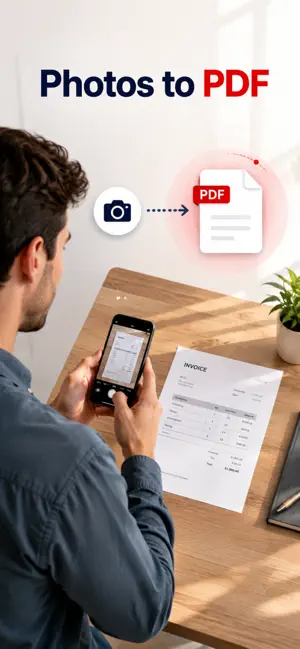
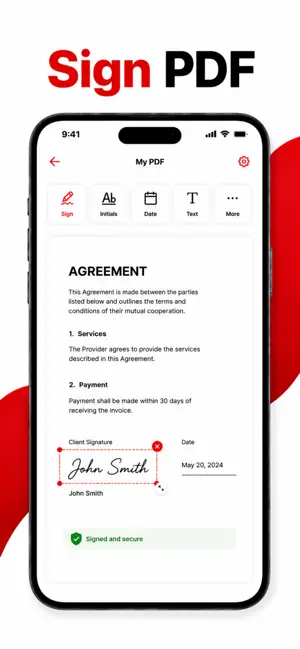
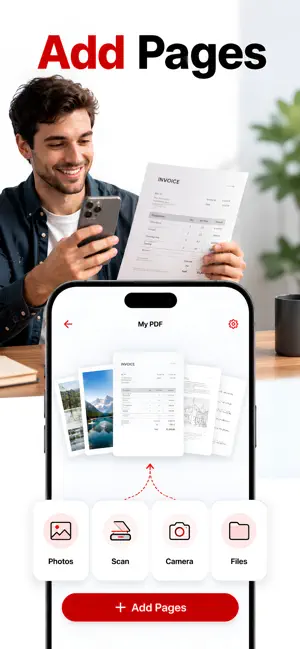
Turn photos, scans and screenshots into one clean PDF in a few taps. Camera to PDF Scanner builds every document on your iPhone: no account, no cloud, nothing uploaded. FOUR WAYS TO ADD PAGES • Choose Photos: pick as many as you like in one go • Scan Document: the camera finds the edges of the paper and straightens it, page after page • Take Photo: capture a single page on the spot • Import from Files: images you already saved You can also reopen a PDF you made and edit its pages again. ARRANGE AND CLEAN UP • Drag pages into the order you want • Rotate left or right • Crop freehand or with a preset: Original, Square, 2:3, 3:2, 3:4, 4:3, 9:16, 16:9 • Filters: Enhance to brighten paper and sharpen text, Grayscale, or high-contrast Black & White • Reset any page back to the original at any time SIGN AND REDACT • Draw your signature in black, blue or red, drop it on any page, and reuse it later. Signatures are saved • Redact erases the pixels from the image itself. It does not just paint a box over them PAGE OPTIONS THAT MATTER • Page size: A4, Letter, or Auto to match each image • Orientation: Portrait, Landscape or Auto • Margins: None, Small, Medium or Large • Fit, Fill or Stretch each image into the page • Quality: Compact, Balanced or Best. The estimated file size is shown on the button before you create anything • Page numbers centred along the bottom SEARCHABLE PDFs Switch on searchable text and the app reads every page, then embeds an invisible text layer under the image. The finished PDF can be searched, and its text selected and copied, in Files, Mail or anywhere else you open it. PROTECT WHAT YOU SEND • Password protect the finished PDF so it cannot be opened without it • Add a text watermark (diagonal, tiled, or a single footer line) with adjustable opacity YOUR LIBRARY Every document you make stays in the app. Search by name, sort by newest, oldest, name or size, rename, select several at once and delete what you no longer need. Share, print or save to Files straight from any document. PRIVATE BY DESIGN Your documents are created and stored on this device. There is no sign-up, no sync and no upload. There are no ads anywhere in the app, free or Pro. PRO The free version includes one PDF. Pro unlocks: • Unlimited PDF conversions • Searchable text with OCR • Watermark and password protection Pro is offered as a weekly or an annual subscription. Payment is charged to your Apple Account at confirmation of purchase. A subscription renews automatically unless it is cancelled at least 24 hours before the end of the current period, and your account is charged for renewal within 24 hours before the period ends. Manage your subscription or turn off auto-renew in your Apple Account settings after purchase. Terms of Use (EULA): https://www.apple.com/legal/internet-services/itunes/dev/stdeula/ Privacy Policy: https://www.mehmetali.co/privacy
What’s new
Version 1.1 · Updated September 7, 2026
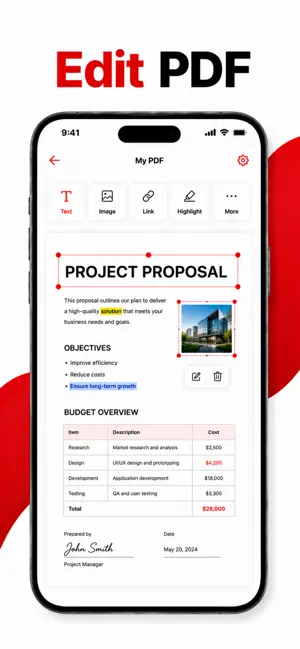
• Edit PDF: add text, photos, links and highlights to a finished PDF • Search: find text inside any PDF and jump between matches • Permissions: decide whether readers of a password-protected PDF may print, copy or make changes • Share: send a PDF by email or through one Share screen with every option in one place • More accurate text recognition for searchable PDFs • Fixes and performance improvements
App privacy
The developer, Mehmet Ali Demir, reported these privacy practices to Apple.
Data Not Collected
The developer does not collect any data from this app.
Alternatives to Camera to PDF Scanner
Looking for apps like Camera to PDF Scanner? Here are 6 similar apps on the App Store. The highest rated is PDF Scanner: Scan Sign OCR (5.0/5), and all 6 are free to download.
-
 PDF to JPEG Converter +
-
 PDF Scanner: Scan Sign OCR
5.0
PDF Scanner: Scan Sign OCR
5.0
-
 Rostr - Roster Sharing
5.0
Rostr - Roster Sharing
5.0
-
 STUDEE : Study Tracker, Plan
-
 ScanLite: Scanner and OCR
-
 Convert Photo to PDF +
| App | Rating | Price | Last updated | Compare |
|---|---|---|---|---|
| Camera to PDF Scanner | – | Free | September 7, 2026 | |
| PDF to JPEG Converter + | – | Free | Sep 14, 2026 | Compare |
| PDF Scanner: Scan Sign OCR | 5.0 / 5 (1) | Free | Sep 28, 2026 | Compare |
| Rostr - Roster Sharing | 5.0 / 5 (2) | Free | Jun 5, 2026 | Compare |
| STUDEE : Study Tracker, Plan | – | Free | Sep 23, 2026 | Compare |
| ScanLite: Scanner and OCR | – | Free | Sep 17, 2026 | Compare |
| Convert Photo to PDF + | – | Free | Jul 30, 2026 | Compare |