

Rodi Dashcam
Chaoyi Chen Navigation iPhoneiPadiPod touch
Rodi Dashcam is a free Navigation app for iPhone and iPad by Chaoyi Chen. Rated 5.0/5 from 1 ratings. Requires iOS 15.1. Updated June 30, 2026.
- Rating
- 5.0
- 1 ratings
- Price
- Free
- on the App Store
- Size
- 28 MB
- Age 4+
- Updated
- Jun 30
- 2026 · v1.6.4
Screenshots

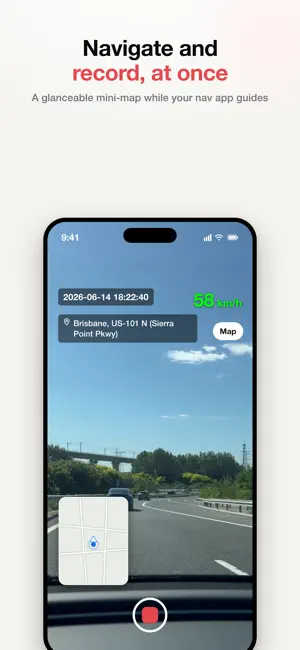


About Rodi Dashcam
Rodi is a smart dashcam for your everyday drive. Mount your phone, hit record, and Rodi captures the road while burning the key details — license plate, speed, address and time — right onto the video. Every clip is automatically organized into trips, so your drives are easy to find later. WHAT RODI DOES • Real-time recording with on-screen overlay — speed, current address, time, and detected license plates baked into the footage. • Automatic license-plate recognition while you drive. • GPS trip tracking — every drive gets a route map and stats (distance, duration, average speed). • Navigation companion — a glanceable mini-map on the recording screen, so you can follow your nav app's guidance and keep the camera rolling at the same time. • Smart trips — clips are grouped into trips automatically by time and location. • Edit afterwards — fix a plate, address, or timing on any clip before you share. • Share with the overlay baked in, or export the original. • Import existing videos and add trip info to them. • Hands-free control — pair over Bluetooth and your car's steering-wheel media buttons start/stop recording and zoom, with an audio confirmation, so you never take a hand off the wheel. • English and Chinese, with localized addresses. PRIVACY FIRST Your videos stay on your device and in your own photo library — Rodi never uploads them. Location is used only to draw the overlay and map your trips; it never leaves your device. The only data Rodi collects is anonymous, app-usage analytics to improve the app — not linked to your identity and never used for tracking. Keep the shape of every road you take.
What’s new
Version 1.6.4 · Updated June 30, 2026
Sharper 4K, an accurate map, and navigate-while-you-record. • Crisper video — 4K now records at a much higher bitrate, so zooming in on a license plate stays clear (and exports keep that quality). • Accurate trip map — your route now lines up with the real roads. • Navigation mini-map — a glanceable, movable map on the recording screen, so you can follow your nav app's guidance and keep recording at once. Tap to open full navigation. • More reliable plate recognition when you re-scan or import videos. • Smoother editing — plate re-scan runs in the background with clearer progress. • Videos now carry the device/camera info, and the screen stays awake while you record.
App privacy
The developer, Chaoyi Chen, reported these privacy practices to Apple.
Data Not Linked to You
The following data, which may be collected but is not linked to your identity, may be used for the following purposes:
- Location: Coarse Location
- Identifiers: Device ID
- Usage Data: Product Interaction
Used for: Analytics
Alternatives to Rodi Dashcam
Looking for apps like Rodi Dashcam? Here are 6 similar apps on the App Store. The highest rated is DashCam: Mobile Drive Recorder (5.0/5), and all 6 are free to download.
-
 Auto Culture DriverCam PiP
-
 OBD Ninja
-
 Most Advanced Dashcam
-
 DashCam: Mobile Drive Recorder
5.0
DashCam: Mobile Drive Recorder
5.0
-
 Car Camera Recorder
3.0
Car Camera Recorder
3.0
-
 dashcamUa
4.0
dashcamUa
4.0
| App | Rating | Price | Last updated | Compare |
|---|---|---|---|---|
| Rodi Dashcam | 5.0 / 5 (1 rating) | Free | June 30, 2026 | |
| Auto Culture DriverCam PiP | – | Free | Aug 10, 2026 | Compare |
| OBD Ninja | – | Free | Oct 21, 2026 | Compare |
| Most Advanced Dashcam | – | Free | Oct 15, 2026 | Compare |
| DashCam: Mobile Drive Recorder | 5.0 / 5 (6) | Free | Oct 13, 2026 | Compare |
| Car Camera Recorder | 3.0 / 5 (3) | Free | Oct 20, 2026 | Compare |
| dashcamUa | 4.0 / 5 (2) | Free | Mar 27, 2026 | Compare |
Compare Rodi Dashcam with the top alternatives: ratings, updates, ASO score and keyword gaps →