

OBD Ninja
SKYPHIC STUDIO Travel iPhoneiPadiPod touch
OBD Ninja is a free Travel app for iPhone and iPad by SKYPHIC STUDIO. Requires iOS 15.5. Updated October 21, 2026.
- Price
- Free
- on the App Store
- Size
- 47 MB
- Age 4+
- Updated
- Oct 21
- 2026 · v1.3.10
Screenshots


About OBD Ninja
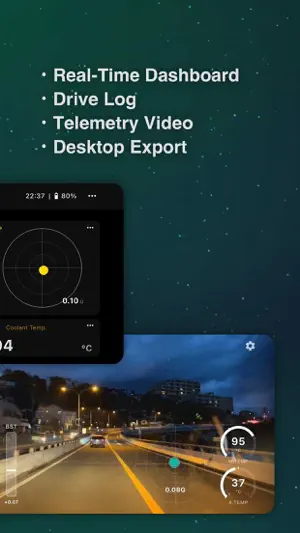
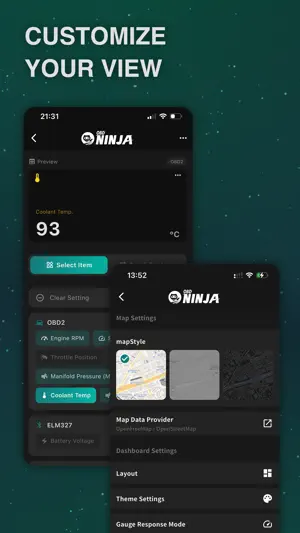
OBD Ninja turns your car into a smart cockpit. Connect a Bluetooth LE ELM327 OBD2 adapter and see your car's hidden data come alive — speed, RPM, fuel economy, estimated horsepower, G-force, coolant temperature, and more — in beautiful real-time dashboards. From the daily commute to a weekend touge run, OBD Ninja captures every drive with telemetry, GPS routes, and video overlays you can replay anytime. ▼ KEY FEATURES ■ GT View — Drive Recording with Telemetry Overlay Record drives with live OBD2 data, speed, G-meter, and gauges burned into the video. The racing-sim inspired HUD turns each clip into a shareable cockpit-cam reel. Playback at up to 8x. ■ Real-Time Dashboard Live OBD2 data in multiple themes and layouts, from minimalist gauges to full cockpit-style displays. With Premium, the Twin Meter layout pairs ring gauges and data sets on one screen. ■ Estimated Power & Virtual Dyno "How much horsepower am I making right now?" See estimated power and torque live, with peak values and the RPM where they occurred. After the drive, Virtual Dyno analyzes the whole drive and draws a dyno-style power and torque curve against RPM. Share it as an image with your car's name. With Premium, Power Calibration refines the estimate for your car using your own drive logs. ※ Estimates are based on fuel flow and are for reference only. ■ Best Accel OBD Ninja finds your best 0-60 / 40-80 / 60-100 / 0-100 km/h times (or 0-30 / 30-50 / 50-70 / 0-60 mph) in every drive log. No timer to start — just look back after the drive. Tap a time to see where it happened on the map, and share the results as an image. With Premium, keep personal bests for each vehicle: beat one and you'll see "New Best!". ※ Estimated from recorded data. Always obey traffic laws on public roads. ■ Fuel Monitor & Coin Alert Real-time fuel efficiency (km/L, MPG, or L/100km) plus the amount and cost of fuel burned. Coin Alert plays a coin sound every time you spend a set amount. ■ GPS Drive Log GPS and OBD2 data in one timeline. Replay any drive on a map, section by section. ■ Save Playback as a Video Save the playback screen — Dashboard or GT View, exactly as shown — as a video, with app sounds such as the speed chime. No subscription required. ■ JDM Speed Chime A faithful recreation of the nostalgic 100 km/h warning chime from classic Japanese cars. With GPS Chime Mode, no OBD2 adapter is required — the chime works on GPS speed alone. ■ Deep Customization Adjust gauge ranges, layouts, color themes, and warning thresholds. Choose km/h / mph, °C / °F, km/L / MPG / L/100km, and PS / HP / kW. ■ PC Companion App Transfer drives to your computer via QR code. The free desktop app exports videos, creates time-lapses, and manages your drive library. ▼ REQUIREMENTS - An OBD2-compliant vehicle (most cars made after 1996 in the US, 2001 in the EU, 2008 in Japan) - A Bluetooth Low Energy (BLE) ELM327 adapter — Wi-Fi and classic Bluetooth adapters are NOT supported ※ Some features, such as GPS Chime Mode, work without an adapter. ▼ PREMIUM SUBSCRIPTION Some advanced features require a Premium subscription (Monthly or Yearly) with a 14-day free trial. Subscriptions auto-renew unless cancelled at least 24 hours before the renewal date. Payment is charged to your Apple ID. Manage or cancel anytime in iPhone Settings → Apple ID → Subscriptions. ▼ LINKS Website: https://www.obd-ninja.com/ Terms of Service: https://www.obd-ninja.com/terms Privacy Policy: https://www.obd-ninja.com/privacy-policy Drive smarter. Drive deeper. OBD Ninja.
What’s new
Version 1.3.10 · Updated October 21, 2026
• New: Best Accel in drive records. Your best 0-60 / 40-80 / 60-100 / 0-100 km/h times from each drive. Tap a row to see it on the map. • Premium: personal bests per vehicle (New Best! and the gap to your best). • The drive record map now shows the whole route. • Fixed connection issues with some Bluetooth LE OBD2 adapters. • Shows what to check when the adapter can't connect.
App privacy
The developer, SKYPHIC STUDIO, reported these privacy practices to Apple.
Data Linked to You
The following data, which may be collected and linked to your identity, may be used for the following purposes:
- Diagnostics: Other Diagnostic Data
Used for: App Functionality
Data Not Linked to You
The following data, which may be collected but is not linked to your identity, may be used for the following purposes:
- Diagnostics: Other Diagnostic Data
- Purchases: Purchase History
- Identifiers: User ID
Used for: Analytics, App Functionality
Alternatives to OBD Ninja
Looking for apps like OBD Ninja? Here are 6 similar apps on the App Store. The highest rated is Rodi Dashcam (5.0/5), and all 6 are free to download.
-
 Rodi Dashcam
5.0
Rodi Dashcam
5.0
-
 OBD2 Scanner: DriveTelemetry
-
 Grand View Recorder
-
 Speedometer: Simple GPS meter
-
 Speed Tracker: GPS Meter
-
 HUD Car Speedometer
| App | Rating | Price | Last updated | Compare |
|---|---|---|---|---|
| OBD Ninja | – | Free | October 21, 2026 | |
| Rodi Dashcam | 5.0 / 5 (1) | Free | Jun 30, 2026 | Compare |
| OBD2 Scanner: DriveTelemetry | – | Free | Jul 2, 2026 | Compare |
| Grand View Recorder | – | Free | Aug 20, 2026 | Compare |
| Speedometer: Simple GPS meter | – | Free | Oct 8, 2026 | Compare |
| Speed Tracker: GPS Meter | – | Free | Sep 24, 2026 | Compare |
| HUD Car Speedometer | – | Free | Oct 23, 2025 | Compare |
Compare OBD Ninja with the top alternatives: ratings, updates, ASO score and keyword gaps →