

Most Advanced Dashcam
Dmitrii Pinchuk Navigation iPhoneiPadiPod touch
Most Advanced Dashcam is a free Navigation app for iPhone and iPad by Dmitrii Pinchuk. Requires iOS 17.0. Updated October 15, 2026.
- Price
- Free
- on the App Store
- Size
- 10 MB
- Age 4+
- Updated
- Oct 15
- 2026 · v1.2
Screenshots
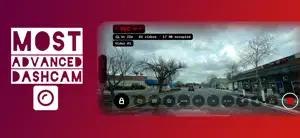

About Most Advanced Dashcam
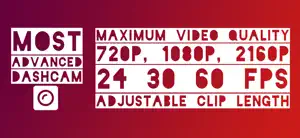
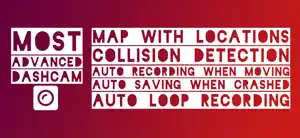
Your Road. Recorded. Turn your iPhone into a smart dashcam that never stops watching the road. Mount it, tap record, and drive. Every trip is captured, every impact is protected, and your phone stays cool. ALWAYS RECORDING. NEVER FULL. Endless loop recording: the oldest clips are replaced automatically, so you never run out of space Works even when your iPhone is nearly full and always leaves room for your phone Crash-safe files: if the phone or app shuts down unexpectedly, your video is saved up to the last 2 seconds Keeps recording during phone calls, and your music and navigation keep playing CRASH DETECTION & PROTECTED CLIPS Detects impacts automatically and locks the clips before, during and after the crash Lock any clip with one tap, while driving or later Protected clips are never auto-deleted CRYSTAL-CLEAR VIDEO Record in 720p, Full HD 1080p (Pro) or 4K (Pro), up to 60 fps (Pro) HEVC encoding gives sharper video in smaller files Built-in stabilization smooths out bumpy roads Ultra Wide, Wide and Telephoto lenses (Pro) STAYS COOL ON HOT DAYS Heat Protection lowers the frame rate automatically when your phone heats up, so the camera never shuts down Eco Screen dims the display while you drive. Tap to wake. AUTO-START WHEN YOU DRIVE (Pro) Recording starts on its own once you’re moving Set your own start speed and delay LIVE LOCATION SHARING (Pro) Share a private link so family can follow your drive in real time Turn it off or reset the link any time EVIDENCE THAT HOLDS UP Date, time, speed and GPS coordinates stamped on exported videos (speed and GPS are Pro) Street names and full GPS data saved with every clip Export without watermark (Pro), ready for insurance and police reports REVIEW EVERY MOMENT Built-in player with playback speed from 0.25× slow motion to 8× (Pro) See every recording on a trip map (Pro) Save clips to Photos with one tap, and the original stays in the app DESIGNED FOR THE ROAD Landscape interface that works with your phone mounted either way Large controls and a clear recording indicator One tap to record, then eyes back on the road DASHCAM PRO Unlock 4K, 60 fps, Full HD, top quality, auto-start, live location, the speed and GPS stamp, trip map, all lenses, playback speed, no watermark and up to 2 TB of loop storage. Choose monthly, yearly or a one-time lifetime purchase. Payment is charged to your Apple ID at confirmation. Subscriptions renew automatically unless cancelled at least 24 hours before the end of the current period. Manage or cancel any time in your App Store account settings. Because the road doesn’t wait. Terms of Use: https://www.apple.com/legal/internet-services/itunes/dev/stdeula/ Privacy Policy: https://deliva.club/legal/appstore/dashcam/privacy-policy.html
What’s new
Version 1.2 · Updated October 15, 2026
Smarter, cooler, more reliable recording Never miss a moment: recording now runs nonstop and replaces your oldest clips automatically when storage gets low, even if your phone is nearly full. Crash-safe clips: if the app or phone shuts down unexpectedly, your video is saved up to the last 2 seconds. Keeps recording during phone calls. Audio resumes when the call ends. Your music and navigation keep playing while you record. Sharper video at smaller file sizes with HEVC encoding. Heat Protection: when your phone heats up, the frame rate lowers automatically (you choose how far, down to 15 fps) so recording never shuts down. Eco Screen: the display dims while you drive to keep your phone cool. Tap to wake. Video stays upright whichever way you mount your phone. New features Live Location: share a link so family can follow your drive in real time. Playback speed: slow motion down to 0.25× to analyze an incident, or up to 8× to skim long drives. Auto-start is now adjustable: set the speed and delay that start recording when you drive. Loop storage options now match your iPhone’s capacity. Saving to Photos now keeps the original clip in the app. Fixes Fixed the screen auto-locking and ending recordings mid-drive. Fixed auto-start triggering while walking. Fixed clips occasionally being lost when storage was full. General stability and performance improvements.
App privacy
The developer, Dmitrii Pinchuk, reported these privacy practices to Apple.
Data Linked to You
The following data, which may be collected and linked to your identity, may be used for the following purposes:
- Contact Info: Email Address, Name
Used for: App Functionality
Alternatives to Most Advanced Dashcam
Looking for apps like Most Advanced Dashcam? Here are 6 similar apps on the App Store. The highest rated is Hawk: Dashcam & Drive Recorder (2.0/5), and all 6 are free to download.
-
 Auto Culture DriverCam PiP
-
 Car Clip Camera
-
 Aegis Drive: Dash Cam & Alerts
-
 Grand View Recorder
-
 Hawk: Dashcam & Drive Recorder
2.0
Hawk: Dashcam & Drive Recorder
2.0
-
 OBD Ninja
| App | Rating | Price | Last updated | Compare |
|---|---|---|---|---|
| Most Advanced Dashcam | – | Free | October 15, 2026 | |
| Auto Culture DriverCam PiP | – | Free | Aug 10, 2026 | Compare |
| Car Clip Camera | – | Free | Jan 29, 2025 | Compare |
| Aegis Drive: Dash Cam & Alerts | – | Free | Oct 19, 2026 | Compare |
| Grand View Recorder | – | Free | Aug 20, 2026 | Compare |
| Hawk: Dashcam & Drive Recorder | 2.0 / 5 (1) | Free | Oct 21, 2026 | Compare |
| OBD Ninja | – | Free | Oct 21, 2026 | Compare |