

SnapDoc PDF - AI Scanner
EZTech Global Limited Productivity iPhoneiPadiPod touch
SnapDoc PDF - AI Scanner is a free Productivity app for iPhone and iPad by EZTech Global Limited. Requires iOS 17.0. Updated October 20, 2026.
- Price
- Free
- on the App Store
- Size
- 51 MB
- Age 4+
- Updated
- Oct 20
- 2026 · v1.3
Screenshots


About SnapDoc PDF - AI Scanner
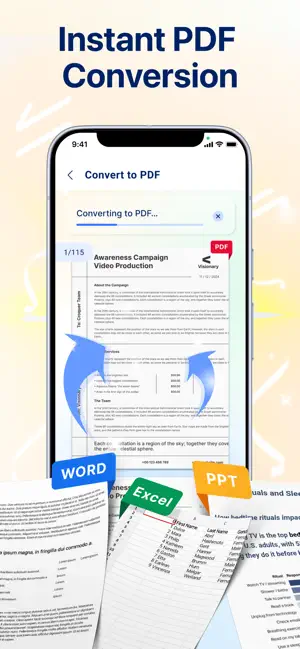
SnapDoc PDF - AI Scanner: Scan, Edit & Manage PDFs Effortlessly Turn your phone into a smart document scanner, your all-in-one document scanner, powered by AI. SnapDoc PDF helps you capture, edit, organize, and share documents quickly, securely, and professionally: powered by advanced AI technology. Why Choose SnapDoc PDF: - Smart AI Scanning: AI technology automatically detects document edges, corrects skewed angles, and removes shadows: delivering sharp, professional scans in seconds. - Powerful PDF Converter: Convert Office files to high-quality PDFs in seconds. - Perfect Formatting: Maintain 100% of your original layout, fonts, and images. What you see in Office is what you get in PDF. - One-Tap Conversion: No complex settings: just select your file and get a professional PDF result instantly. - Smart Document Manager: Your all-in-one hub to organize, find, and control all your files. - Centralized Library: Automatically scans and categorizes all your PDF into one organized view. - Instant Search: Locate any file in seconds with a powerful, intuitive search engine. No more scrolling. - Full File Control: Rename, delete, or share files directly from the app. Keep your digital workspace clean and professional. - Multi-Page Support: Scan dozens of pages and compile them into a single, neatly ordered PDF in just a few seconds. - Productivity Booster: Save time with batch scanning, one-tap renaming, and automated file organization. Add password protection to keep sensitive documents secure. - Image Enhancement: Adjust brightness and contrast, remove shadows, and apply smart filters for the best possible scan quality. - Instant Sharing & Printing: Send scans via email, messaging apps, or print directly to any Wi-Fi printer. - User-Friendly Interface: Clean, intuitive design: easy to use for professionals, students, and everyday users alike. Download SnapDoc PDF today and say goodbye to paperwork hassle. - Subscription Pricing & Terms: Account Charge: Your iTunes Account will be charged once you confirm your purchase. Account Settings: You can manage your subscriptions and disable auto-renewal in your Account Settings after the purchase. Auto-Renewal: Subscriptions will automatically renew unless auto-renewal is turned off at least 24 hours before the end of the current period. Renewal Cost: The renewal cost will be charged to your account 24 hours before the end of the current period. Cancellation Policy: If you choose to cancel a subscription, it will remain active until the end of the period. Auto-renewal will be disabled, but no refunds will be provided for the current subscription. Free Trial: Any unused portion of a free trial period, if offered, will be forfeited upon purchasing a subscription. Terms: https://www.apple.com/legal/internet-services/itunes/dev/stdeula/ Privacy Policy: https://docs.google.com/document/d/1FZmafk69SrWpdb1aYAlYFuSiB3qnYMfya0kL5hLLldw/edit?usp=sharing
What’s new
Version 1.3 · Updated October 20, 2026
update new feature, fix bugs
App privacy
The developer, EZTech Global Limited, reported these privacy practices to Apple.
Data Used to Track You
The following data may be used to track you across apps and websites owned by other companies:
- Identifiers: Device ID
Data Not Linked to You
The following data, which may be collected but is not linked to your identity, may be used for the following purposes:
- Identifiers: Device ID
Used for: Third-Party Advertising, Analytics
Alternatives to SnapDoc PDF - AI Scanner
Looking for apps like SnapDoc PDF - AI Scanner? Here are 6 similar apps on the App Store.
-
 Scan King: Scanner PDF
-
 Cam Scanner Doc
-
 PDF Masters Pro - PDF Scanner
-
 Spatial Display
-
 Batch PDF Scanner & OCR Lite
-
 ScanNest: PDF Scanner & OCR
| App | Rating | Price | Last updated | Compare |
|---|---|---|---|---|
| SnapDoc PDF - AI Scanner | – | Free | October 20, 2026 | |
| Scan King: Scanner PDF | – | Free | Jun 19, 2026 | Compare |
| Cam Scanner Doc | – | Free | Jun 17, 2026 | Compare |
| PDF Masters Pro - PDF Scanner | – | Free | Aug 1, 2026 | Compare |
| Spatial Display | – | Free | Oct 4, 2026 | Compare |
| Batch PDF Scanner & OCR Lite | – | Free | Jun 18, 2026 | Compare |
| ScanNest: PDF Scanner & OCR | – | Free | Jun 18, 2026 | Compare |