

Spatial Display
Lith Games OÜ Productivity iPhoneiPadiPod touch
Spatial Display is a free Productivity app for iPhone and iPad by Lith Games OÜ. Requires iOS 15.0. Updated October 4, 2026.
- Price
- Free
- on the App Store
- Size
- 107 MB
- Age 4+
- Updated
- Oct 4
- 2026 · v1.0.1
Screenshots



About Spatial Display
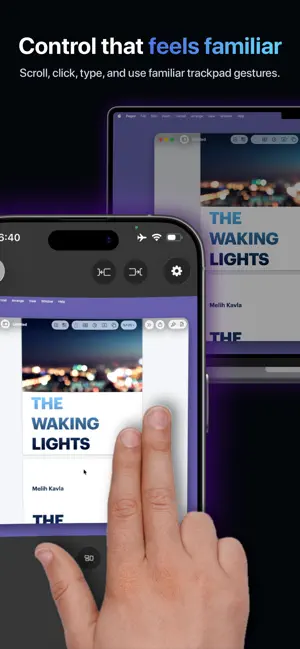
Your Mac desktop, in a spatial workspace on iPhone. Spatial Display transforms your iPhone into a spatial workspace for your Mac. View and control multiple displays, switch between multiple Macs, and use familiar trackpad-style gestures, all from one compact app. MULTI-MONITOR, MADE SPATIAL Bring every selected Mac display into its own virtual screen. Recenter instantly, arrange screens at a comfortable distance, and move between them naturally in portrait or landscape. TRACKPAD-STYLE CONTROL • Tap, drag, and right-click • Scroll smoothly with two fingers • Swipe up with three fingers for Mission Control • Swipe down with three fingers for App Exposé • Swipe left or right with three fingers to change desktops and full-screen apps • Use four-finger gestures for Show Desktop and App Launcher SPATIAL AUDIO Hear your Mac from the direction of its virtual screen. With compatible headphones, head tracking keeps the soundstage anchored as you move. ONE IPHONE, MULTIPLE MACS Sign in to multiple Macs with the same Apple or Google account and quickly choose which available computer to control. BUILT FOR PRODUCTIVITY • Direct-touch or crosshair pointer control • Familiar Mac cursor shapes • Hybrid keyboard with Mac modifiers, arrow keys, Esc, Tab, and F1-F12 • Quick actions for Mission Control, App Exposé, Show Desktop, Dock, and desktop switching • Automatic reconnection when networks change • Guided tutorials GET STARTED Download the free Spatial Display Server companion from the Mac App Store or directly from Lith Games: https://lithgames.com/spatialdisplay Install it on your Mac, sign in with the same account, select the displays you want to share, and connect from your iPhone. Spatial Display works on the same Wi-Fi network or over the internet. Connections are encrypted and use a direct device-to-device path whenever available. Requires a compatible iPhone and a Mac running Spatial Display Server. Some features require Spatial Display Pro. DRM-protected video may appear black while screen sharing is active. Terms of Use: https://www.apple.com/legal/internet-services/itunes/dev/stdeula/
What’s new
Version 1.0.1 · Updated October 4, 2026
English language support. Bug fixes and improvements.
App privacy
The developer, Lith Games OÜ, reported these privacy practices to Apple.
Data Used to Track You
The following data may be used to track you across apps and websites owned by other companies:
- Location: Coarse Location
- Identifiers: Device ID
- Usage Data: Product Interaction
Data Linked to You
The following data, which may be collected and linked to your identity, may be used for the following purposes:
- Location: Coarse Location
- Identifiers: Device ID, User ID
- Usage Data: Product Interaction, Other Usage Data
- Purchases: Purchase History
- Contact Info: Email Address, Name
Used for: Developer’s Advertising or Marketing, Analytics, App Functionality
Data Not Linked to You
The following data, which may be collected but is not linked to your identity, may be used for the following purposes:
- Diagnostics: Crash Data, Performance Data, Other Diagnostic Data
Used for: Analytics, App Functionality
Alternatives to Spatial Display
Looking for apps like Spatial Display? Here are 6 similar apps on the App Store. The highest rated is AiLinks - AI Chat & Voice Note (5.0/5), and all 6 are free to download.
-
 Grocery List & Cart: Grovias
-
 SnapDoc PDF - AI Scanner
-
 AiLinks - AI Chat & Voice Note
5.0
AiLinks - AI Chat & Voice Note
5.0
-
 Wisp: AI Meeting Notes
-
 GLI: Goals & Focus Tracker
4.8
GLI: Goals & Focus Tracker
4.8
-
 Tally - Daily Time Tracker
4.8
Tally - Daily Time Tracker
4.8
| App | Rating | Price | Last updated | Compare |
|---|---|---|---|---|
| Spatial Display | – | Free | October 4, 2026 | |
| Grocery List & Cart: Grovias | – | Free | Jul 17, 2026 | Compare |
| SnapDoc PDF - AI Scanner | – | Free | Oct 20, 2026 | Compare |
| AiLinks - AI Chat & Voice Note | 5.0 / 5 (6) | Free | Jun 13, 2025 | Compare |
| Wisp: AI Meeting Notes | – | Free | Sep 16, 2026 | Compare |
| GLI: Goals & Focus Tracker | 4.8 / 5 (6) | Free | Dec 12, 2025 | Compare |
| Tally - Daily Time Tracker | 4.8 / 5 (5) | Free | May 14, 2026 | Compare |
Compare Spatial Display with the top alternatives: ratings, updates, ASO score and keyword gaps →