

MarkLift
Embay, LLC Productivity iPhoneiPadiPod touch
MarkLift is a free Productivity app for iPhone and iPad by Embay, LLC. Requires iOS 18.0. Updated August 9, 2026.
- Price
- Free
- on the App Store
- Size
- 10 MB
- Age 4+
- Updated
- Aug 9
- 2026 · v1.1.0
Screenshots
About MarkLift
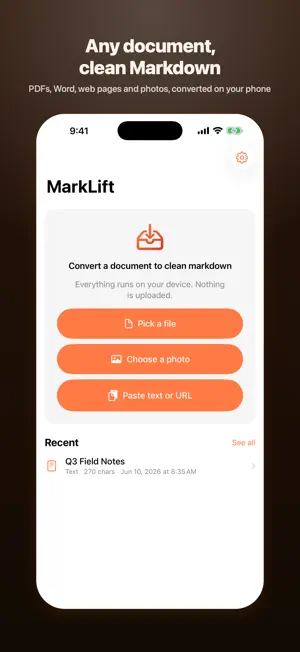
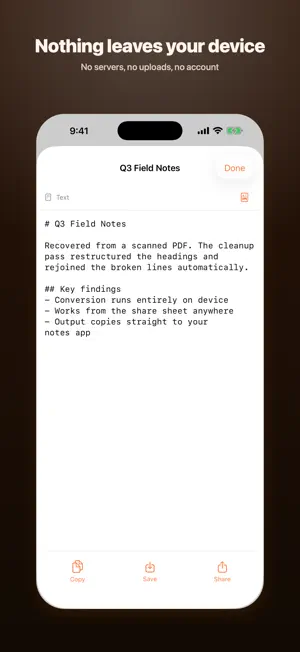
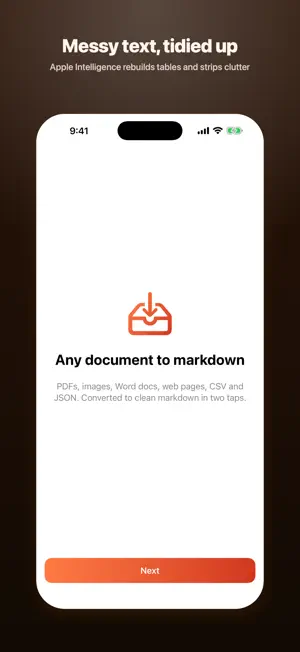
MarkLift turns any document on your iPhone into clean markdown. PDFs, images, Word documents, web pages, CSV and JSON — converted in two taps and ready to paste into ChatGPT, Claude, Obsidian, Bear, Drafts, or your notes. Your documents are converted entirely on your device. The files you convert never leave your phone. WHAT IT CONVERTS - PDF, including scanned pages read with on-device text recognition - Photos and screenshots, with text pulled out automatically - Word documents (.docx), with headings, bold, italics, lists and tables - Web pages — paste a link or share from Safari - CSV to markdown tables, JSON and XML, plain text and markdown AI ENHANCED CLEANUP Apple Intelligence restructures messy text into clean markdown: it fixes broken line wraps, rebuilds tables, removes page numbers and headers, and infers heading levels. Cleanup is optional and reversible — the raw conversion is always kept, so you can switch back with one tap. SHARE SHEET ANYWHERE MarkLift lives in the share sheet. Convert from Safari, Files, or Mail without opening the app. Copy the result, save it as a .md file, or open it straight in your markdown editor. SIMPLE PRICING Three conversions a day are free, in every format. Need more? Watch a short ad for one extra conversion, or unlock unlimited conversions and your full history with a single $4.99 purchase. No subscription. Apple Intelligence cleanup requires a supported device. Conversions work without it. Privacy Policy: https://embay.dev/marklift/privacy Terms of Use: https://embay.dev/marklift/terms
What’s new
Version 1.1.0 · Updated August 9, 2026
MarkLift now speaks 20 languages. The whole app is translated, not just the App Store page. Also in this update: - Now runs on iOS 18, not just iOS 26. Apple Intelligence cleanup still needs a device that supports it; everything else works on any supported iPhone. - Clearer wording around the one-time unlock, so it is obvious it covers unlimited conversions forever rather than a single one. - The unlock price now shows in your own currency everywhere it appears. - A privacy switch in Settings for anonymous usage and crash diagnostics, which you can turn off at any time. - Fixes and groundwork under the hood.
App privacy
The developer, Embay, LLC, reported these privacy practices to Apple.
Data Used to Track You
The following data may be used to track you across apps and websites owned by other companies:
- Identifiers: Device ID
Data Linked to You
The following data, which may be collected and linked to your identity, may be used for the following purposes:
- Location: Coarse Location
- Identifiers: Device ID
- Usage Data: Product Interaction, Advertising Data
Used for: Third-Party Advertising, Developer’s Advertising or Marketing, Analytics, App Functionality
Data Not Linked to You
The following data, which may be collected but is not linked to your identity, may be used for the following purposes:
- Diagnostics: Performance Data, Other Diagnostic Data, Crash Data
- Purchases: Purchase History
Used for: Third-Party Advertising, Analytics, App Functionality
Alternatives to MarkLift
Looking for apps like MarkLift? Here are 6 similar apps on the App Store. The highest rated is Aurisper: AI Voice Input (5.0/5), and all 6 are free to download.
-
 LocalScan PDF Offline
-
 Artificial PDF — PDF to Text
1.0
Artificial PDF — PDF to Text
1.0
-
 CleanMD: PDF to Markdown
-
 Aurisper: AI Voice Input
5.0
Aurisper: AI Voice Input
5.0
-
 TimeStory: Timeline Maker
3.7
TimeStory: Timeline Maker
3.7
-
 PSI Solarcell
| App | Rating | Price | Last updated | Compare |
|---|---|---|---|---|
| MarkLift | – | Free | August 9, 2026 | |
| LocalScan PDF Offline | – | Free | May 30, 2026 | Compare |
| Artificial PDF — PDF to Text | 1.0 / 5 (1) | Free | Aug 10, 2026 | Compare |
| CleanMD: PDF to Markdown | – | Free | Sep 4, 2026 | Compare |
| Aurisper: AI Voice Input | 5.0 / 5 (1) | Free | Mar 23, 2026 | Compare |
| TimeStory: Timeline Maker | 3.7 / 5 (3) | Free | Sep 8, 2026 | Compare |
| PSI Solarcell | – | Free | Sep 20, 2026 | Compare |
Compare MarkLift with the top alternatives: ratings, updates, ASO score and keyword gaps →