

TimeStory: Timeline Maker
Casual Programmer, LLC Productivity iPhoneiPadiPod touch
TimeStory: Timeline Maker is a free Productivity app for iPhone and iPad by Casual Programmer, LLC. Rated 3.7/5 from 3 ratings. Requires iOS 17.0.
- Rating
- 3.7
- 3 ratings
- Price
- Free
- on the App Store
- Size
- 28 MB
- Age 4+
- Updated
- Sep 8
- 2026 · v2.3
Screenshots

About TimeStory: Timeline Maker
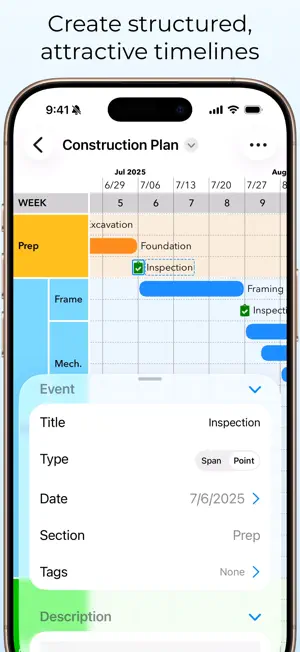
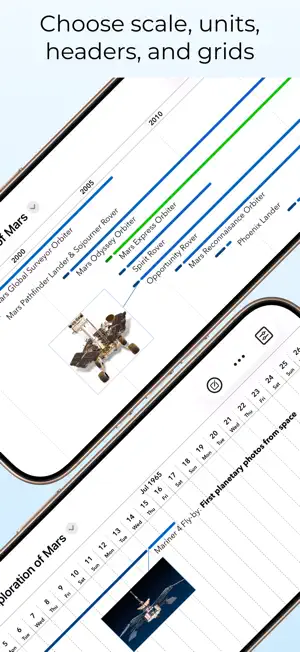
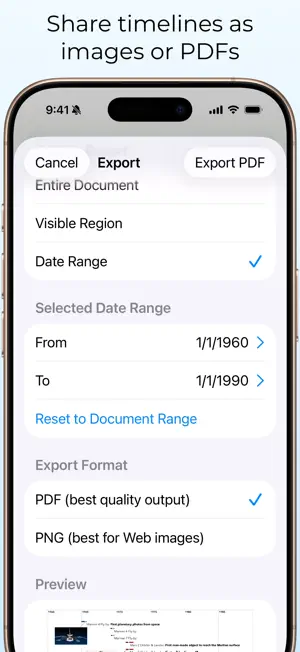
TimeStory for iPad/iPhone is a paid app (one-time purchase or annual subscription) for creating graphical timelines--project plans, roadmaps, personal journals, histories, and more, on scales from days to centuries--quickly and easily, while avoiding the complexity of project management tools. The free download lets you open, view, and share timelines created on TimeStory for Mac. If you want to create and edit timelines on your iPad/iPhone, you can activate the built-in free trial, and then, if you choose, pay once or subscribe annually. The free trial does not auto-renew into a subscription, so there’s no risk. Use natural touchscreen gestures to navigate and scale the timeline. Create an event just by tapping one of the New Event buttons then tapping or dragging on the timeline where you want it. Attach photos or image files. Divide your timeline into sections. Import your own SVG or PNG icons to mark points in time. Apply background colors, fonts, event shapes, text alignment, and more. Share your work in PDF or PNG format, exporting an entire timeline or just a section of it. On iPad, TimeStory has great support for Apple Pencil and external keyboards and pointers, works great in Split View and other multitasking modes, and supports multiple windows so you can open multiple documents at once or keep it open next to your research. Versions: This version of TimeStory was built to natively support iPad and iPhone. **Note: TimeStory for Mac is a separate purchase.** More info at https://timestory.app/get/ Web: Learn more on our website (https://timestory.app/), with example timelines, release history, and documentation. (Terms of use: https://www.apple.com/legal/internet-services/itunes/dev/stdeula/)
What’s new
Version 2.3 · Updated September 8, 2026
** Images are much faster and more efficient Timelines with images in them get a big boost in performance with this update. They will load faster, editing and navigation will be quicker and smoother (especially on older hardware), the app will use less memory, and the files will usually be much smaller than before. ** More free trial opportunities on iOS Whenever there’s a new update of the iOS app, starting now, if you’ve ever used a free trial but not bought it, your free trial will restart with a new two weeks as soon as you open it. We’ve put a lot of work into the app over the years, and this way you can see if maybe it fits you better now, or if maybe we’ve fixed a bug or shortcoming that you ran into last time. (As always, the free trial does *not* automatically turn into a purchase or subscription, unlike a lot of other apps. It just gives you two weeks of everything free, then switches back to read-only mode.) ** Other fixes - Cleaned up some extra items in the attached-image menu. - Fixed the progress animation when you tap on a document and it takes a while to load.
App privacy
The developer, Casual Programmer, LLC, reported these privacy practices to Apple.
Data Not Collected
The developer does not collect any data from this app.
Alternatives to TimeStory: Timeline Maker
Looking for apps like TimeStory: Timeline Maker? Here are 6 similar apps on the App Store. The highest rated is Timeline Journal – Daily Diary (4.8/5), and all 6 are free to download.
-
 Truly Simple Timeline
4.2
Truly Simple Timeline
4.2
-
 Aeon Timeline 3
3.9
Aeon Timeline 3
3.9
-
 Timeline Presenter
4.0
Timeline Presenter
4.0
-
 iTimely - Timeline & Milestone
4.4
iTimely - Timeline & Milestone
4.4
-
 Timeline Journal – Daily Diary
4.8
Timeline Journal – Daily Diary
4.8
-
 Case Crafter - Trial Presenter
2.7
Case Crafter - Trial Presenter
2.7
| App | Rating | Price | Last updated | Compare |
|---|---|---|---|---|
| TimeStory: Timeline Maker | 3.7 / 5 (3 ratings) | Free | September 8, 2026 | |
| Truly Simple Timeline | 4.3 / 5 (4) | Free | Oct 7, 2026 | Compare |
| Aeon Timeline 3 | 3.9 / 5 (50) | Free | Sep 16, 2026 | Compare |
| Timeline Presenter | 4.0 / 5 (45) | Free | Oct 10, 2025 | Compare |
| iTimely - Timeline & Milestone | 4.4 / 5 (14) | Free | Oct 23, 2026 | Compare |
| Timeline Journal – Daily Diary | 4.8 / 5 (34) | Free | Jul 23, 2026 | Compare |
| Case Crafter - Trial Presenter | 2.7 / 5 (7) | Free | Sep 16, 2026 | Compare |