

SIDeck Studio
Osama Hasan Productivity iPhoneiPadiPod touch
SIDeck Studio is a free Productivity app for iPhone and iPad by Osama Hasan. Rated 5.0/5 from 1 ratings. Requires iOS 17.6. Updated October 5, 2026.
- Rating
- 5.0
- 1 ratings
- Price
- Free
- on the App Store
- Size
- 110 MB
- Age 12+
- Updated
- Oct 5
- 2026 · v1.1.13
Screenshots



About SIDeck Studio
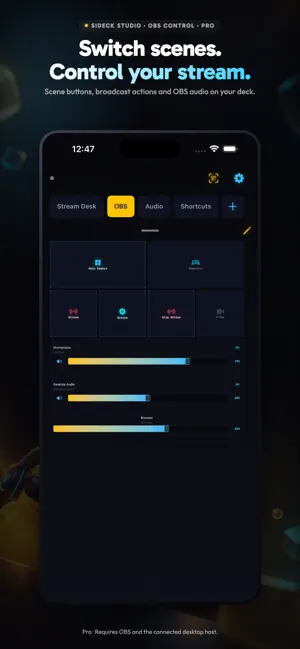
Turn your iPhone or iPad into a custom control deck for your Windows PC or Mac. Put app-volume faders, OBS controls and macros together in Custom Modes. BUILD YOUR DECK Arrange and resize blocks, use a template or start with your own layout. Free includes one mode with up to six blocks, two assigned audio apps and six saved macros. Pro supports up to 20 modes with 40 blocks per mode. Saved Pro macros are uncapped; each macro button still uses a block. CAMERA & MIC FOR OBS With Pro, send your iPhone camera and microphone to OBS over local Wi-Fi. Use supported lenses, zoom, background effects and face-tracked AR props. Effects and lenses depend on your device. AUDIO AND OBS CONTROL Balance app volume from your deck and add OBS input faders or mute controls. Pro adds dedicated broadcast action blocks, scene switching, live previews and hold-to-talk or hold-to-mute controls. Supported OBS hotkeys and the current-scene block are available on Free. MACROS AND WIDGETS Run saved desktop macros from your deck, Home Screen or Lock Screen widgets. Your paired desktop must be reachable. Pro internet macros use the relay; they do not replace local audio or OBS control. STREAMER.BOT With Pro, use supported actions, chat, variables and event blocks in Custom Modes. Requires Streamer.bot running on a Windows desktop and the relevant host connection. SAVED COMPUTERS Save up to five desktop profiles on Free, or unlimited profiles with Pro. Choose the computer you want to control; its desktop host must be reachable. GET STARTED 1. Install the free SIDeck Studio desktop host from sideckstudio.com. 2. Sign in to SIDeck Studio and pair with your desktop using its QR code or supported manual connection. 3. Build a mode and assign your controls. Requires the desktop companion running on a supported Windows PC or Mac. Local controls require an available local connection; OBS features require OBS Studio. English and Arabic are supported. Pro is an optional auto-renewing App Store subscription. Pricing and trial eligibility appear before purchase. Manage or cancel renewals in Apple subscription settings. Privacy: https://sideckstudio.com/privacy Terms: https://sideckstudio.com/terms
What’s new
Version 1.1.13 · Updated October 5, 2026
Custom Modes is now the active control interface. Build audio, OBS and macro controls together; Classic Tabs is no longer available. Camera & Mic Desk: use your iPhone as a camera and microphone for OBS, with supported lenses, zoom, background effects and AR face props. OBS controls: input-volume faders, live scene previews and hold-to-talk controls. Macro widgets for Home Screen and Lock Screen, iPad mode templates and saved desktop profiles. Arabic localization and connection improvements. Advanced camera, preview, scene-switching and hold controls require Pro.
App privacy
The developer, Osama Hasan, reported these privacy practices to Apple.
Data Linked to You
The following data, which may be collected and linked to your identity, may be used for the following purposes:
- Contact Info: Email Address
Used for: App Functionality
Data Not Linked to You
The following data, which may be collected but is not linked to your identity, may be used for the following purposes:
- Usage Data: Product Interaction
- Diagnostics: Crash Data, Performance Data, Other Diagnostic Data
Used for: Analytics, App Functionality
Alternatives to SIDeck Studio
Looking for apps like SIDeck Studio? Here are 6 similar apps on the App Store. The highest rated is NVIDIA Marketplace Admin (5.0/5), and all 6 are free to download.
-
 DevDeck
-
 Lumina Deck
-
 Serein: Screen Time Control
-
 RCON Console & Server Admin
3.7
RCON Console & Server Admin
3.7
-
 EditFlow - Webflow Editor
4.0
EditFlow - Webflow Editor
4.0
-
 NVIDIA Marketplace Admin
5.0
NVIDIA Marketplace Admin
5.0
| App | Rating | Price | Last updated | Compare |
|---|---|---|---|---|
| SIDeck Studio | 5.0 / 5 (1 rating) | Free | October 5, 2026 | |
| DevDeck | – | Free | May 12, 2026 | Compare |
| Lumina Deck | – | Free | Aug 11, 2026 | Compare |
| Serein: Screen Time Control | – | Free | Oct 19, 2026 | Compare |
| RCON Console & Server Admin | 3.7 / 5 (6) | Free | Oct 19, 2026 | Compare |
| EditFlow - Webflow Editor | 4.0 / 5 (7) | Free | Jun 21, 2024 | Compare |
| NVIDIA Marketplace Admin | 5.0 / 5 (3) | Free | Sep 22, 2026 | Compare |
Compare SIDeck Studio with the top alternatives: ratings, updates, ASO score and keyword gaps →