

Lumina Deck
Ceasar Esquivel Productivity iPhoneiPadiPod touch
Lumina Deck is a free Productivity app for iPhone and iPad by Ceasar Esquivel. Requires iOS 15.1. Updated August 11, 2026.
- Price
- Free
- on the App Store
- Size
- 26 MB
- Age 4+
- Updated
- Aug 11
- 2026 · v1.4.1
Screenshots



About Lumina Deck
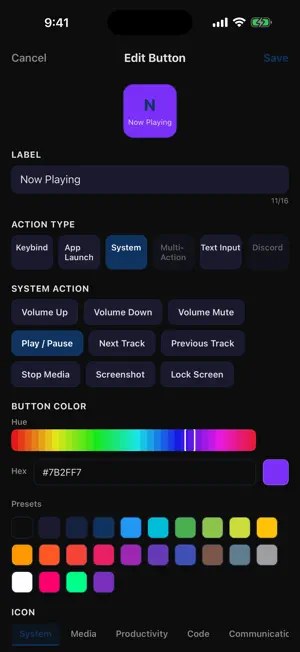
Your iPhone is already on your desk. It might as well do something. LuminaDeck turns it into a customizable grid of buttons that fire real actions on your Windows PC over local Wi-Fi. Keyboard shortcuts, app launchers, OBS scene switches, Discord controls, media keys, multi-step macros — one tap, no hardware. WHAT YOU GET • Custom button grids, 2x4 up to 8x8 (Pro) • 55+ action types: keybinds, system commands, app launchers, media controls, OBS scenes, Discord commands, clipboard actions, soundboard audio • Auto-profile switching — when OBS, VS Code, or Spotify takes focus on the PC, the deck swaps to that layout automatically • Trackpad mode — turn the phone into a precision trackpad for the PC • Phone-as-keyboard — type from your phone keyboard directly into any focused Windows window • Multi-page decks with swipe navigation • Five themes: Obsidian (free) plus Aurora, Daylight, Retro Neon, and Slate (Pro) NO ACCOUNT, NO CLOUD Pair with a QR scan. The phone and PC talk directly over your Wi-Fi network — TLS-encrypted, no relay server, no sign-in. Latency stays under 30 ms because nothing leaves your network. Setup takes under a minute: install LuminaDeck Studio on the PC, scan the QR code, and the deck works. WHO IT'S FOR • Streamers who want OBS scene switching and Discord controls without buying dedicated hardware • Developers who want a build/test/format/commit row of tiles next to their keyboard • Knowledge workers who want clipboard tools, app launchers, and shortcuts they actually remember • Anyone whose iPhone is already sitting on a stand next to their monitor PLUGIN PACKS • OBS — scene switching, source toggles, recording start/stop, stream start/stop • Discord — mute, deafen, push-to-talk, channel switching • Coder Pack — git status, run tests, format buffer, common dev shortcuts • Soundboard — trigger audio clips on the PC instantly • Trackpad Mode — phone becomes a precision pointer ONE-TIME PRO, NO SUBSCRIPTION The free tier is fully usable: build a deck, fire actions, switch profiles. Pro is a one-time $9.99 unlock that adds the larger 8x8 grid, premium themes, and the plugin packs. No monthly fee, no recurring charge, no account required. PRIVATE BY DEFAULT • No telemetry. No analytics. No ad SDKs. • No data leaves your local network. • No login required to use the app. • Open WebSocket protocol — third-party clients welcome. REQUIREMENTS • iPhone or iPad on iOS 16 or later • Windows 10 (2004+) or Windows 11 PC running the free LuminaDeck Studio companion • Phone and PC on the same Wi-Fi network Studio download: https://luminaaio.com/luminadeck QUESTIONS Email [email protected]. We answer. LuminaDeck is an independent product. Not affiliated with any hardware macro deck manufacturer.
What’s new
Version 1.4.1 · Updated August 11, 2026
Reliability update: • Comp code redemption is more robust • OBS controls are now part of LuminaDeck Pro • Bug fixes and stability improvements
App privacy
The developer, Ceasar Esquivel, reported these privacy practices to Apple.
Data Not Collected
The developer does not collect any data from this app.
Alternatives to Lumina Deck
Looking for apps like Lumina Deck? Here are 6 similar apps on the App Store. The highest rated is SIDeck Studio (5.0/5), and all 6 are free to download.
-
 SIDeck Studio
5.0
SIDeck Studio
5.0
-
 Jamf Mobile Assist
-
 Overdeck
-
 PhoneDeck
5.0
PhoneDeck
5.0
-
 MATRIC - Remote for Windows PC
-
 DeckPilot - Workflow Control
5.0
DeckPilot - Workflow Control
5.0
| App | Rating | Price | Last updated | Compare |
|---|---|---|---|---|
| Lumina Deck | – | Free | August 11, 2026 | |
| SIDeck Studio | 5.0 / 5 (1) | Free | Oct 5, 2026 | Compare |
| Jamf Mobile Assist | – | Free | Jul 1, 2026 | Compare |
| Overdeck | – | Free | Sep 4, 2024 | Compare |
| PhoneDeck | 5.0 / 5 (2) | Free | Aug 14, 2026 | Compare |
| MATRIC - Remote for Windows PC | – | Free | Oct 7, 2026 | Compare |
| DeckPilot - Workflow Control | 5.0 / 5 (7) | Free | Sep 18, 2026 | Compare |
Compare Lumina Deck with the top alternatives: ratings, updates, ASO score and keyword gaps →