

DevDeck
Pablo Fonseca Productivity iPhoneiPadiPod touch
DevDeck is a free Productivity app for iPhone and iPad by Pablo Fonseca. Requires iOS 17.6. Updated May 12, 2026.
- Price
- Free
- on the App Store
- Size
- 1 MB
- Age 4+
- Updated
- May 12
- 2026 · v1.1
Screenshots


About DevDeck
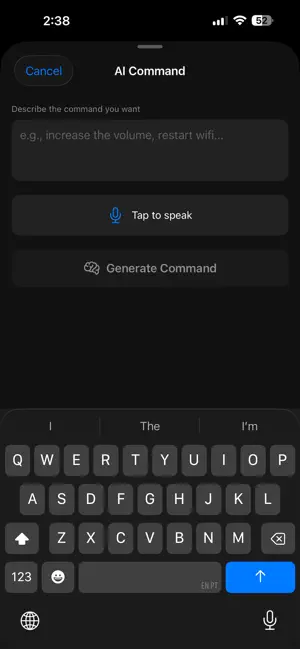
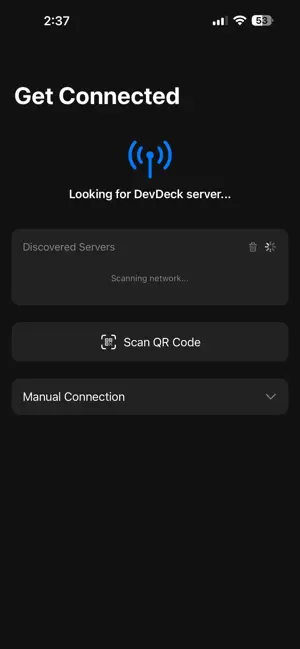
DevDeck turns your iPhone or iPad into a customizable shortcut deck for your Mac. Launch apps, run terminal commands, trigger multi-step workflows, and organize everything into context-aware decks — all with a single tap. HOW IT WORKS Install the free DevDeck Server on your Mac (via Homebrew or DMG). The app auto-discovers the server on your local network — no manual configuration needed. Scan a QR code or let mDNS handle the pairing. CONTEXT-AWARE DECKS Your shortcuts automatically switch based on the active app on your Mac. Working in VS Code? Dev tools appear. Switched to Zoom? Meeting controls are ready. On Slack? Communication shortcuts at your fingertips. Define rules per app or let AI generate them. AI-POWERED GENERATION Describe what you want in plain English and AI generates commands, full decks, or multi-step workflows. Supports Claude, OpenAI, and local Ollama models. Preview and edit before saving. MULTI-STEP WORKFLOWS Chain actions together with dynamic inputs. One tap to "start my meeting" can open Zoom, snooze Slack notifications, and set your status — all automatically. Template variables let you reuse workflows with different inputs. BROWSER AUTOMATION With the optional Chrome extension, automate web pages directly from your phone — click buttons, fill forms with semantic field matching, and navigate sites. CUSTOM ICONS Use SF Symbols or your own PNG/JPEG images with color tinting. Make your deck truly yours. FEATURES - One-tap app launching and command execution - Context-aware auto-switching decks - AI command, context, and workflow generation - Multi-step workflow automation with templated inputs - Browser automation via Chrome extension - Custom icons with color tinting - Auto-discovery via Bonjour (mDNS) - QR code pairing - Portrait and landscape layouts - Haptic feedback - Configurable grid layout - Hot-reload configuration — no restart needed - Secure WebSocket communication - Dark mode optimized REQUIREMENTS - Mac running DevDeck Server (free download at devdeck.app) - iPhone and Mac on the same network (or use ngrok for remote access) - iOS 17.0 or later Visit devdeck.app for documentation and server download
What’s new
Version 1.1 · Updated May 12, 2026
Add rate app functionality
Alternatives to DevDeck
Looking for apps like DevDeck? Here are 6 similar apps on the App Store. The highest rated is Shortcut Recorder (5.0/5), and all 6 are free to download.




| App | Rating | Price | Last updated | Compare |
|---|---|---|---|---|
| DevDeck | – | Free | May 12, 2026 | |
| memory.wiki | – | Free | Jun 7, 2026 | Compare |
| Notes AI: Note Taking App | – | Free | Oct 9, 2026 | Compare |
| Shortcut Recorder | 5.0 / 5 (2) | Free | Mar 19, 2026 | Compare |
| Overlay One | – | Free | Oct 12, 2026 | Compare |
| TDLogix Portal | 5.0 / 5 (1) | Free | Mar 12, 2026 | Compare |
| Unyx | – | Free | Sep 19, 2026 | Compare |
Compare DevDeck with the top alternatives: ratings, updates, ASO score and keyword gaps →