

Scanter: PDF Scanner & Docs
VISORYA YAZILIM VE TEKNOLOJI ANONIM SIRKETI Productivity iPhoneiPadiPod touch
Scanter: PDF Scanner & Docs is a free Productivity app for iPhone and iPad by VISORYA YAZILIM VE TEKNOLOJI ANONIM SIRKETI. Requires iOS 15.5.
- Price
- Free
- on the App Store
- Size
- 89 MB
- Age 4+
- Updated
- Oct 15
- 2026 · v1.1.4
Screenshots

About Scanter: PDF Scanner & Docs
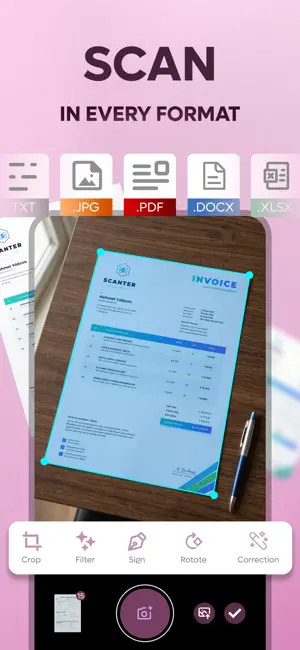
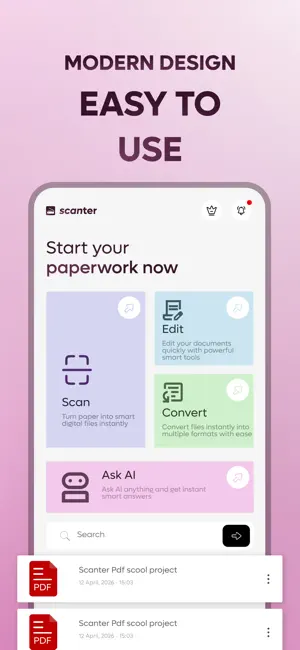
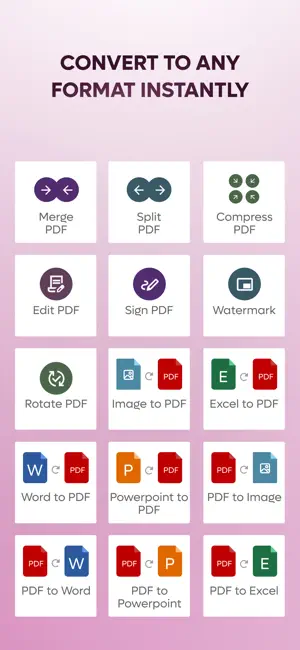
Scanter is a PDF scanner and document toolkit. Scan paper documents, then edit, sign, convert and share them from your phone. WHAT YOU CAN DO • Scan documents with automatic edge detection and perspective correction • Scan several pages in a row • Color, grayscale and black & white filters • Export to PDF or images • Merge, split, compress, rotate and watermark PDFs • Crop, edit and sign your pages • Convert Word, Excel, PowerPoint and images to PDF, and PDF to Word, PowerPoint and images • Ask AI: type a question and get an answer • Share by email, Messages, WhatsApp, Drive, Dropbox and more, or print directly YOUR DATA Scanning, merging, splitting, compressing, signing and editing happen on your device. File conversion and cloud storage upload your file over an encrypted connection to Scanter's servers in Türkiye; converted files are deleted automatically within hours. Ask AI sends only the text of your question to Google's Gemini service. The free version shows ads, and you can manage your ad and privacy choices in the app. We do not sell your data. AVAILABLE IN 28 LANGUAGES SCANTER PRO SUBSCRIPTION Scanter Pro is an auto-renewing subscription that removes ads and daily limits and includes cloud storage. Payment is charged to your store account at purchase confirmation. The subscription renews automatically unless it is cancelled at least 24 hours before the end of the current period, and you can manage or cancel it in your store account settings. Prices vary by country or region and are shown in the app before purchase. Terms of Use (EULA): https://scanterapp.com/terms-tr.html Privacy Policy: https://scanterapp.com/privacy.html
What’s new
Version 1.1.4 · Updated October 15, 2026
Privacy update: you now choose your ad and tracking options, Ask AI and file uploads ask for your consent first, sign-in is more secure (saved passwords are no longer stored), and the app descriptions are more accurate. Bug fixes and improvements.
App privacy
The developer, VISORYA YAZILIM VE TEKNOLOJI ANONIM SIRKETI, reported these privacy practices to Apple.
Data Used to Track You
The following data may be used to track you across apps and websites owned by other companies:
- Identifiers: Device ID
Data Linked to You
The following data, which may be collected and linked to your identity, may be used for the following purposes:
- Location: Coarse Location
- Identifiers: Device ID, User ID
- Usage Data: Product Interaction, Advertising Data
- Purchases: Purchase History
- Contact Info: Email Address, Name
- User Content: Photos or Videos, Other User Content
Used for: Third-Party Advertising, Developer’s Advertising or Marketing, Analytics, App Functionality
Data Not Linked to You
The following data, which may be collected but is not linked to your identity, may be used for the following purposes:
- Diagnostics: Crash Data, Performance Data, Other Diagnostic Data
Used for: Third-Party Advertising, Analytics
Alternatives to Scanter: PDF Scanner & Docs
Looking for apps like Scanter: PDF Scanner & Docs? Here are 6 similar apps on the App Store. The highest rated is PDF Scanner: Scan & Convert. (5.0/5), and all 6 are free to download.
-
 PDF Scanner TR
-
 WebDAV Scan - Document Scanner
-
 PDF Pro – Scan & OCR
-
 PDF Toolkit: Scan & Convert
-
 Papr: PDF Editor & Scanner
-
 PDF Scanner: Scan & Convert.
5.0
PDF Scanner: Scan & Convert.
5.0
| App | Rating | Price | Last updated | Compare |
|---|---|---|---|---|
| Scanter: PDF Scanner & Docs | – | Free | October 15, 2026 | |
| PDF Scanner TR | – | Free | Jun 8, 2026 | Compare |
| WebDAV Scan - Document Scanner | – | Free | Aug 17, 2026 | Compare |
| PDF Pro – Scan & OCR | – | Free | Oct 7, 2026 | Compare |
| PDF Toolkit: Scan & Convert | – | Free | Jun 9, 2026 | Compare |
| Papr: PDF Editor & Scanner | – | Free | Jan 19, 2026 | Compare |
| PDF Scanner: Scan & Convert. | 5.0 / 5 (1) | Free | Oct 15, 2026 | Compare |