

Papr: PDF Editor & Scanner
Muhammet EREN Productivity iPhoneiPadiPod touch
Papr: PDF Editor & Scanner is a free Productivity app for iPhone and iPad by Muhammet EREN. Requires iOS 16.6. Updated January 19, 2026.
- Price
- Free
- on the App Store
- Size
- 53 MB
- Age 4+
- Updated
- Jan 19
- 2026 · v1.0.3
Screenshots

About Papr: PDF Editor & Scanner
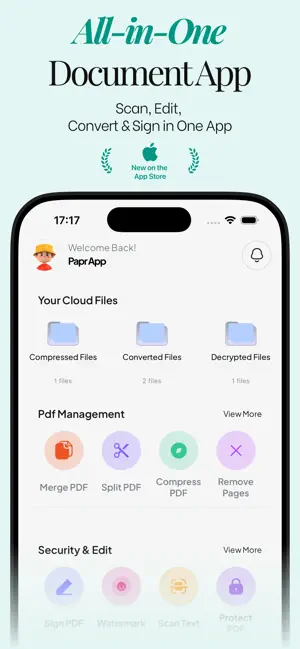
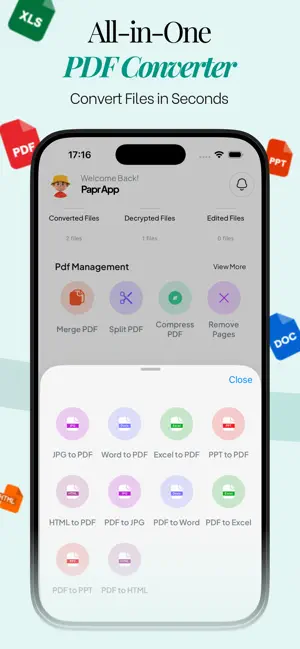
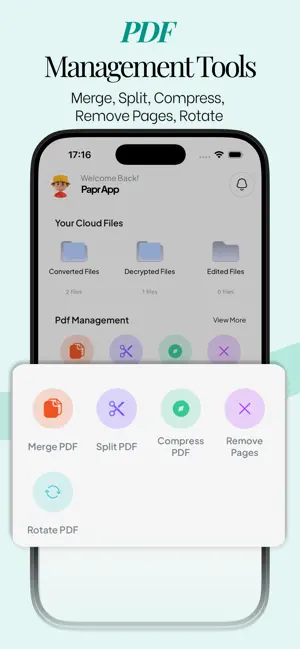
Transform your mobile device into a powerful office with Papr. Papr is an all-in-one document management solution designed to replace heavy scanners and complex desktop software. Whether you need to digitize receipts, convert photos to editable Word documents, or sign contracts on the go, Papr handles it all instantly. Why choose Papr? Because productivity matters. DOCUMENT SCANNER AND OCR High-Quality Scans: Capture IDs, passports, receipts, and books with crystal clear clarity. OCR (Text Recognition): Turn images into text. Extract text from scans to copy, edit, or search. Edge Detection: Automatically detects document borders and corrects perspective. ADVANCED CONVERTERS Total format freedom: Convert files seamlessly between formats. To PDF: Convert JPG, Word, Excel, PPT, and HTML to professional PDFs. From PDF: Turn PDFs back into editable Word, Excel, PPT, or JPG images. PDF MANAGEMENT TOOLS Merge: Combine multiple files into one report. Split: Extract only the pages you need. Compress: Reduce file size for easy email sharing without losing quality. Edit: Rotate pages, remove unwanted pages, or reorder them. SECURITY AND CLOUD E-Signature: Sign documents directly on your screen. Watermark: Add custom stamps to protect your intellectual property. Protect: Lock sensitive files with passwords. Cloud Backup: Automatically back up your docs to the cloud. Never lose a file again. Step into the future of document management. Download Papr now. Terms of Use: https://www.apple.com/legal/internet-services/itunes/dev/stdeula/ Privacy Policy: https://www.zapplin.co/papr-privacy-terms
What’s new
Version 1.0.3 · Updated January 19, 2026
We’re constantly working to make Papr better for you! In this update: Offer Codes: You can now redeem subscription offer codes directly within the app. Performance: We’ve squashed bugs and optimized performance for a smoother experience.
App privacy
The developer, Muhammet EREN, reported these privacy practices to Apple.
Data Used to Track You
The following data may be used to track you across apps and websites owned by other companies:
- Identifiers: Device ID
- Usage Data: Product Interaction, Advertising Data
Data Linked to You
The following data, which may be collected and linked to your identity, may be used for the following purposes:
- Identifiers: Device ID, User ID
- Usage Data: Product Interaction, Advertising Data
- Contact Info: Email Address, Name
- Diagnostics: Crash Data, Performance Data
- User Content: Photos or Videos
Used for: Third-Party Advertising, Analytics, App Functionality
Alternatives to Papr: PDF Editor & Scanner
Looking for apps like Papr: PDF Editor & Scanner? Here are 6 similar apps on the App Store. The highest rated is Push PDF: PDF Editor & Scan (5.0/5), and all 6 are free to download.
-
 Push PDF: PDF Editor & Scan
5.0
Push PDF: PDF Editor & Scan
5.0
-
 PDF Scanner: Smart Doc Tools
1.0
PDF Scanner: Smart Doc Tools
1.0
-
 Scanter: PDF Scanner & Docs
-
 iScanPDF : Easy Scanner
-
 MDReader: Markdown Editor
-
 TaskLoco: Sticky Note To-Do
| App | Rating | Price | Last updated | Compare |
|---|---|---|---|---|
| Papr: PDF Editor & Scanner | – | Free | January 19, 2026 | |
| Push PDF: PDF Editor & Scan | 5.0 / 5 (4) | Free | Sep 8, 2026 | Compare |
| PDF Scanner: Smart Doc Tools | 1.0 / 5 (1) | Free | Feb 10, 2026 | Compare |
| Scanter: PDF Scanner & Docs | – | Free | Oct 15, 2026 | Compare |
| iScanPDF : Easy Scanner | – | Free | Mar 20, 2026 | Compare |
| MDReader: Markdown Editor | – | Free | Aug 18, 2026 | Compare |
| TaskLoco: Sticky Note To-Do | – | Free | Oct 23, 2026 | Compare |