

PDF Scanner: Scan & Convert.
Bilal Akkoc Productivity iPhoneiPadiPod touch
PDF Scanner: Scan & Convert. is a free Productivity app for iPhone and iPad by Bilal Akkoc. Rated 5.0/5 from 1 ratings. Requires iOS 17.4.
- Rating
- 5.0
- 1 ratings
- Price
- Free
- on the App Store
- Size
- 31 MB
- Age 4+
- Updated
- Oct 15
- 2026 · v1.2
Screenshots


About PDF Scanner: Scan & Convert.
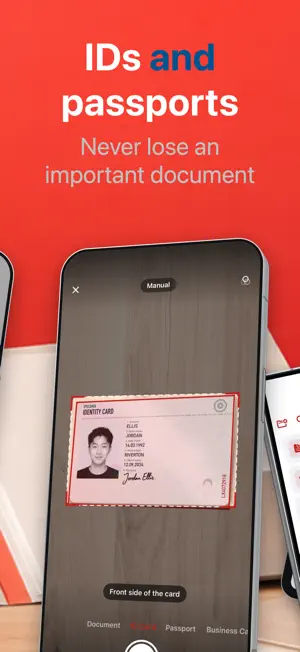
Turn Documents into Smart PDFs in Seconds PDF Scanner helps you scan documents, create high-quality PDFs, extract text with OCR, sign files electronically, and keep everything organized across your devices. Whether you're managing contracts, receipts, invoices, notes, IDs, forms, or business documents, PDF Scanner gives you a fast and secure way to digitize your paperwork and access it anytime. Scan Anything Into PDF Capture documents with your camera and instantly convert them into clean, professional PDFs. • High-quality document scanning • Automatic edge detection • Smart document cropping • Multi-page PDF creation • Save and share PDFs instantly Powerful OCR Text Recognition Extract text from scanned documents and images in seconds. • Convert images into editable text • Create searchable PDFs • Copy and share recognized text • Support for multiple languages • Fast and accurate OCR technology Sign Documents Anywhere Add your signature and complete documents without printing. • Create and save signatures • Sign contracts and forms digitally • Add initials and dates • Streamline document workflows • Send signed PDFs instantly Keep Everything Organized Store all your important files in one place. • Organize documents into categories • Quickly search your files • Manage receipts, contracts, notes, and records • Easy document management Access Your Documents Everywhere Stay connected across all your devices. • iCloud synchronization • Secure cloud backup • Access documents anytime • Seamless multi-device experience Perfect For • Business professionals • Students and educators • Freelancers and consultants • Real estate agents • Lawyers and legal teams • Small business owners • Anyone who works with documents Download PDF Scanner today and transform paper documents into searchable, shareable, and securely organized PDFs. Auto-Renewable Subscription Terms: Premium features such as ad-free experience, unlimited access, and advanced tools require an active auto-renewable subscription. Basic features remain available for free. Auto-Renewable Subscription Information: Payment will be charged to your Apple ID once the purchase is confirmed. The subscription renews automatically unless it is canceled at least 24 hours before the current billing period ends. Your account will be billed for renewal within 24 hours prior to the end of the active subscription period. You can view, manage, or cancel your subscription anytime in your App Store account settings after purchase. Privacy Policy & Terms of Use: Privacy Policy: https://pdfscanner.bilalakkoc.com/privacy Terms of Use: https://pdfscanner.bilalakkoc.com/terms
What’s new
Version 1.2 · Updated October 15, 2026
A brand-new scanner • Seven scan modes: Document, ID Card, Passport, Business Card, Receipt, Whiteboard and Book • Edges are found and the page is captured automatically; a level helps you keep the camera straight • Book mode splits a two-page spread and flattens curved pages • Five filters: Photo, Color, Grayscale, Black & White and Whiteboard Searchable PDFs • The text of every scan is recognized in its own language and saved inside the PDF • Search finds documents by the words in them, not only by their names Text reader • See a page as text with its layout kept: tables, checkboxes and logos stay where they were • Tap a line to correct a word, then copy the text or share it as text or CSV Signatures and stamps • Take a signature or a company stamp from a photo of paper Sharing • Choose Original, Medium or Small when you share • Pages take far less space and keep the shape of what you scanned, so receipts have no white bars Fixes • Signing a rotated page no longer cuts it off • Edited pages keep their full resolution
App privacy
The developer, Bilal Akkoc, reported these privacy practices to Apple.
Data Used to Track You
The following data may be used to track you across apps and websites owned by other companies:
- Identifiers: Device ID
Data Not Linked to You
The following data, which may be collected but is not linked to your identity, may be used for the following purposes:
- Purchases: Purchase History
- Identifiers: Device ID
- Usage Data: Product Interaction
- Diagnostics: Crash Data, Other Diagnostic Data
Used for: Analytics, App Functionality
Alternatives to PDF Scanner: Scan & Convert.
Looking for apps like PDF Scanner: Scan & Convert.? Here are 6 similar apps on the App Store.
-
 PDF Pro – Scan & OCR
-
 PDF Toolkit: Scan & Convert
-
 Zokan: PDF Scanner & OCR
-
 InstaCal: Menu Bar Calendar
-
 Scanify: PDF & OCR Scanner
-
 OneHabit
| App | Rating | Price | Last updated | Compare |
|---|---|---|---|---|
| PDF Scanner: Scan & Convert. | 5.0 / 5 (1 rating) | Free | October 15, 2026 | |
| PDF Pro – Scan & OCR | – | Free | Oct 7, 2026 | Compare |
| PDF Toolkit: Scan & Convert | – | Free | Jun 9, 2026 | Compare |
| Zokan: PDF Scanner & OCR | – | Free | Jun 10, 2026 | Compare |
| InstaCal: Menu Bar Calendar | – | 19.99 USD | Oct 11, 2026 | Compare |
| Scanify: PDF & OCR Scanner | – | Free | Jun 11, 2026 | Compare |
| OneHabit | – | Free | Mar 12, 2026 | Compare |