

Dock: StandBy Clock & Planets
Ali Corak Utilities iPhoneiPadiPod touch
Dock: StandBy Clock & Planets is a free Utilities app for iPhone and iPad by Ali Corak. Requires iOS 16.4. Updated October 8, 2026.
- Price
- Free
- on the App Store
- Size
- 26 MB
- Age 4+
- Updated
- Oct 8
- 2026 · v1.1.14
Screenshots

About Dock: StandBy Clock & Planets
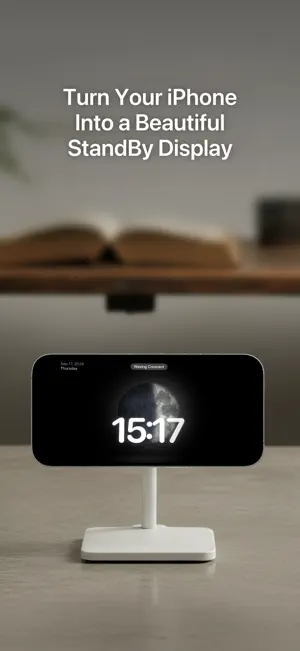
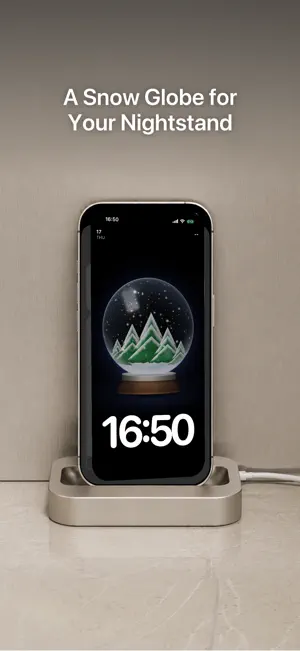
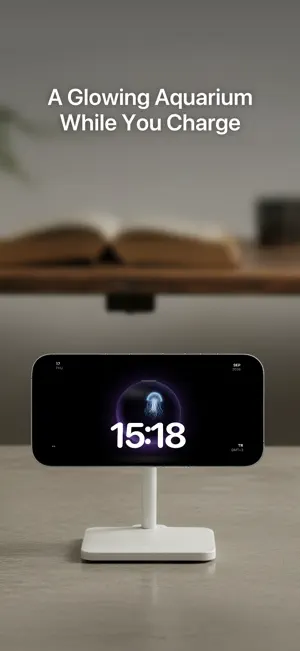
The only StandBy-style dock with a living planetary system — watch the Moon, Mars and Saturn spin while your iPhone charges on your desk or nightstand. Dock transforms your iPhone into a beautiful display while charging. Inspired by StandBy mode, it brings elegant clocks, animated planets, and immersive visuals to your desk, nightstand, or workspace. SIX CLOCK STYLES • Minimal Analog, Analog, Digital, Compact Analog, Word clock, and Slider • Digital clock digits can float subtly, StandBy-style • Charging style: your battery level fills the screen behind a bold two-tone clock • Every clock works beautifully in landscape A LIVING SKY • Animated planetary system with the Moon, planets and real rotation • Live moon phase rendered on the Moon itself • Date, location and weather at a glance MADE FOR YOUR NIGHTSTAND • Clean, distraction-free, dark-first design • Screen saver timing options for overnight use • Launches automatically when you start charging, via Apple Shortcuts • Keep-screen-on while charging Whether your phone is on your desk during work or beside your bed at night, Dock turns it into a display you'll actually want to look at. Terms of Use: https://www.apple.com/legal/internet-services/itunes/dev/stdeula/ Privacy Policy: https://www.alicorak.com/dock/privacy-policy
What’s new
Version 1.1.14 · Updated October 8, 2026
What's new in Dock: • Night mode: after sunset the dock turns red and dims, then returns at sunrise. You choose how strong the dimming is. • Fireflies: a swarm of glowing lights over a night, meadow or forest backdrop. • A ray-traced Snow globe with real reflections and falling snow. • Aqua creatures now look wet and translucent, with open water plus density and lighting settings. • Charging gets new Ring and Glow looks. • Density, intensity and weight controls across Nature, Shaders and Print, and a Show date and location switch on every style. • Settings tabs slide like pages, the dock stays still when you swipe up for Settings, and pages and sheets move like StandBy. • A new two-screen welcome, with tips that show each gesture. • Siri phrases for opening Dock now come in six languages. • Built for iPhone Duo: edge to edge on the outer display, and a small stage when the fold is half open.
App privacy
The developer, Ali Corak, reported these privacy practices to Apple.
Data Not Linked to You
The following data, which may be collected but is not linked to your identity, may be used for the following purposes:
- Purchases: Purchase History
- Location: Coarse Location
- Identifiers: User ID, Device ID
Used for: App Functionality
Alternatives to Dock: StandBy Clock & Planets
Looking for apps like Dock: StandBy Clock & Planets? Here are 6 similar apps on the App Store. The highest rated is AlwaysOn: Standby Clock (4.8/5), and all 6 are free to download.
-
 Clock Stand: Desk Clock
-
 AlwaysOn: Standby Clock
4.8
AlwaysOn: Standby Clock
4.8
-
 TimeQ: Digital Clock
-
 Nightglow
4.3
Nightglow
4.3
-
 Minimal Digital Clock: StandBy
3.8
Minimal Digital Clock: StandBy
3.8
-
 Big Clock – Always On Display
4.5
Big Clock – Always On Display
4.5
| App | Rating | Price | Last updated | Compare |
|---|---|---|---|---|
| Dock: StandBy Clock & Planets | – | Free | October 8, 2026 | |
| Clock Stand: Desk Clock | – | Free | Jul 12, 2026 | Compare |
| AlwaysOn: Standby Clock | 4.8 / 5 (10) | Free | Oct 4, 2026 | Compare |
| TimeQ: Digital Clock | – | Free | Jun 20, 2026 | Compare |
| Nightglow | 4.3 / 5 (3) | Free | Sep 7, 2026 | Compare |
| Minimal Digital Clock: StandBy | 3.8 / 5 (6) | Free | Oct 9, 2026 | Compare |
| Big Clock – Always On Display | 4.5 / 5 (4) | Free | Oct 5, 2026 | Compare |