

Chista: Screenshot Inbox
Paul Shilla Productivity iPhoneiPadiPod touch
Chista: Screenshot Inbox is a free Productivity app for iPhone and iPad by Paul Shilla. Requires iOS 17.0. Updated July 14, 2026.
- Price
- Free
- on the App Store
- Size
- 5 MB
- Age 4+
- Updated
- Jul 14
- 2026 · v1.0.2
Screenshots

About Chista: Screenshot Inbox
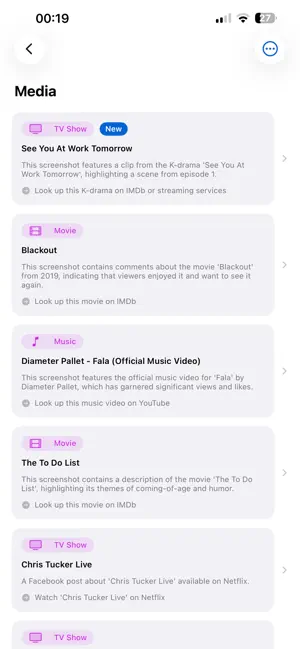
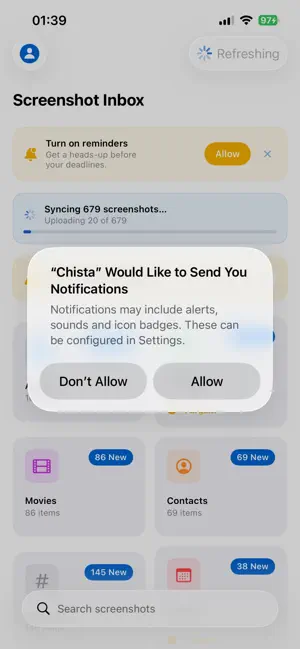
Your camera roll is full of screenshots you'll never look at again. Articles you meant to read. Products you wanted to buy. Events you wanted to attend. Restaurants you wanted to try. Chista is a smart inbox for your screenshots. It quietly reads every new screenshot you capture, figures out what it's about, and files it in the right category — so the things you actually cared about don't get buried in your photo library. WHAT CHISTA DOES • Auto-imports your screenshots in the background — no manual work • Categorizes each one with AI: Articles, Products, Events, References, and Media (videos, podcasts, posts) • Pulls out the important bits: titles, prices, deadlines, suggested actions, and where to take action next • Reminds you about events before the date sneaks past • Opens the right destination with one tap — read in Safari, buy on Amazon, reserve on OpenTable, add to your calendar, save a contact, watch the video HOW YOU'LL ACTUALLY USE IT • Screenshot a product on Instagram → "Buy on Amazon" appears in your inbox the moment AI finishes • Screenshot an article you'll read later → "Open in Safari" with the title and source preserved • Screenshot a concert flyer → a gentle reminder the day before the show • Screenshot a restaurant rec from a friend's text → "Reserve on OpenTable" • Screenshot a meeting invite → "Add to Calendar" with the date pre-filled • Screenshot a movie poster → "Look up on IMDb" or your streaming service PRIVACY FIRST • Photos permission is limited to screenshots only — your regular photos are never accessed • Your screenshots stay yours; we don't share them or sell them • Sign in with Apple supported for private email • Export everything or delete your account, anytime, from the app CHISTA PRO • Unlimited screenshots — no monthly cap • Premium AI — sharper categorization on harder images • Custom reminder time — get pings when YOU want them 14-day free trial. $4.99/month or $39.99/year (save vs monthly). Don't let your interests die in your camera roll. --- Terms of Use (EULA): https://www.apple.com/legal/internet-services/itunes/dev/stdeula/ Privacy Policy: https://chista.app/privacy-policy.html Questions, feature requests, or just want to say hi? Reach us at [email protected]
What’s new
Version 1.0.2 · Updated July 14, 2026
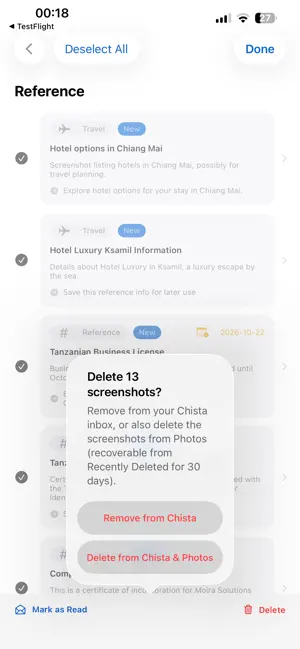
Bug fixes and refinements. • Fixed: books, music, and podcasts were sometimes labeled "Movies" — each now shows its correct type. • Reference and event items now show what they actually are (Travel, Restaurant, Meeting, and more). • Select multiple items in a category and delete them from Chista — or from Chista and your Photos together — in one step.
App privacy
The developer, Paul Shilla, reported these privacy practices to Apple.
Data Not Linked to You
The following data, which may be collected but is not linked to your identity, may be used for the following purposes:
- Contact Info: Email Address, Name
- User Content: Photos or Videos, Other User Content
- Identifiers: User ID
Used for: App Functionality
Alternatives to Chista: Screenshot Inbox
Looking for apps like Chista: Screenshot Inbox? Here are 6 similar apps on the App Store. The highest rated is Skreenly (5.0/5), and all 6 are free to download.
-
 Bloop — Screenshot Actions
-
 Sifted - Screenshot Reminders
-
 Skreenly
5.0
-
 Minimal Habit & Routine - Rows
5.0
-
 3D Scanner LiDAR
3.9
-
 Showtime VR Controller
3.2
| App | Rating | Price | Last updated | Compare |
|---|---|---|---|---|
| Chista: Screenshot Inbox | – | Free | July 14, 2026 | |
| Bloop — Screenshot Actions | – | Free | Aug 28, 2026 | Compare |
| Sifted - Screenshot Reminders | – | Free | Jun 11, 2026 | Compare |
| Skreenly | 5.0 / 5 (12) | Free | Aug 17, 2026 | Compare |
| Minimal Habit & Routine - Rows | 5.0 / 5 (1) | Free | Jul 1, 2026 | Compare |
| 3D Scanner LiDAR | 3.9 / 5 (21) | Free | Sep 29, 2026 | Compare |
| Showtime VR Controller | 3.2 / 5 (5) | Free | May 27, 2026 | Compare |