

Skreenly
Gil KANIEL Cohen Productivity iPhoneiPadiPod touch
Skreenly is a free Productivity app for iPhone and iPad by Gil KANIEL Cohen. Rated 5.0/5 from 12 ratings. Requires iOS 16.0. Updated August 17, 2026.
- Rating
- 5.0
- 12 ratings
- Price
- Free
- on the App Store
- Size
- 101 MB
- Age 4+
- Updated
- Aug 17
- 2026 · v1.8.5
Screenshots

About Skreenly
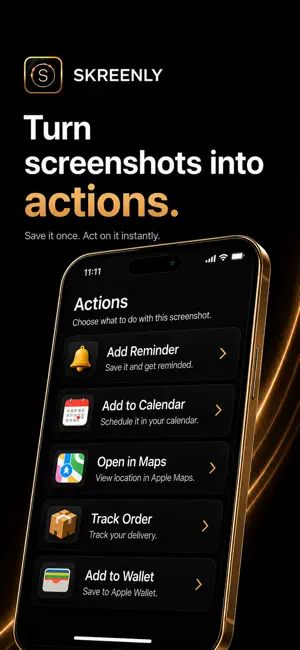
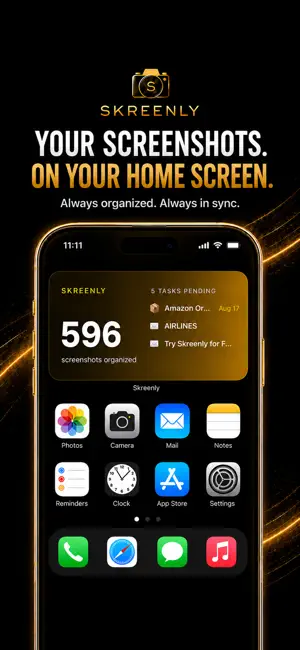
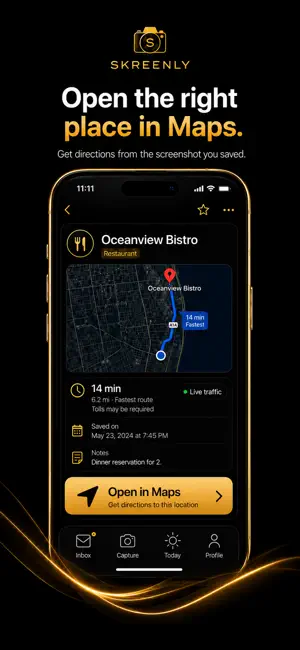
Your phone is full of screenshots you saved for a reason. If you saved it, it deserves to be found. Skreenly turns screenshots into organized, searchable, actionable information, so you can stop scrolling through your camera roll and actually use what you saved. SAVE IT ONCE. FIND IT FAST. Import screenshots from Photos or share them directly to Skreenly. AI helps understand what you saved and organizes it so important information is easier to find again. ASK SIRI When a screenshot has been saved in Skreenly, ask Siri to find it using the details you remember. Skreenly can route you to the matching screenshot or open the closest search results when there are multiple possibilities. SEARCH WITH WHAT YOU REMEMBER Search naturally for things like: • “restaurant by the water in Miami” • “my flight to Los Angeles” • “Amazon order” • “receipt from last week” • “concert ticket” TURN SCREENSHOTS INTO ACTIONS Depending on what Skreenly recognizes, useful actions can include: • Add to Reminders • Add to Calendar • Open locations and routes in Maps • Track orders • Save receipts • Add tickets and passes to Apple Wallet • Add to To-Do • Review Later • Send as PDF • Copy useful text, codes, addresses, phone numbers, and more SMART FOLDERS Skreenly automatically helps organize screenshots into useful categories such as Travel, Receipts, Orders, Events, Restaurants, and more. HOME SCREEN WIDGET Keep your screenshot activity and important tasks visible from your Home Screen with the Skreenly widget. SIRI + SPOTLIGHT Find saved Skreenly screenshots faster using Siri and system search experiences supported by iOS. PRIVACY CONTROLS Use features such as Private Vault and Face ID protection for sensitive screenshots, and manage, move, organize, or delete your saved items whenever you choose. BUILT FOR REAL LIFE Screenshots are often where important plans, purchases, places, tickets, receipts, ideas, and reminders begin. Skreenly helps turn that pile of saved images into something useful. Take a screenshot. We’ll do the rest.
Ratings & reviews
5.0
12 ratings
What’s new
Version 1.8.5 · Updated August 17, 2026
Meet the latest Skreenly: faster, smarter, and more connected to the tools you already use. • Lightning-fast local-first imports, so screenshots appear immediately while AI processing continues in the background • Stronger background processing, caching, and recovery for a smoother experience • Smarter Maps actions for routes, places, and locations • Improved Siri + Spotlight discovery for screenshots saved in Skreenly • More dependable Home Screen widget syncing • Enhanced Apple Wallet, Smart Folders, search, and screenshot actions • New “A Word from the Founder” video inside Profile • Additional performance, reliability, and interface refinements throughout the app Take a screenshot. We’ll do the rest.
App privacy
The developer, Gil KANIEL Cohen, reported these privacy practices to Apple.
Data Not Linked to You
The following data, which may be collected but is not linked to your identity, may be used for the following purposes:
- Purchases: Purchase History
- Contact Info: Other User Contact Info
- User Content: Photos or Videos, Other User Content
- Identifiers: Device ID
- Diagnostics: Crash Data
Used for: Analytics, App Functionality
Alternatives to Skreenly
Looking for apps like Skreenly? Here are 6 similar apps on the App Store.
-
 Avantido
-
 AfterSnap: AI Photo to Action
-
 Origami: AI Calendar Assistant
-
 ScreenArk: Screenshot Recall
-
 Chista: Screenshot Inbox
-
 Recall - Screenshot Reminder
| App | Rating | Price | Last updated | Compare |
|---|---|---|---|---|
| Skreenly | 5.0 / 5 (12 ratings) | Free | August 17, 2026 | |
| Avantido | – | Free | Sep 18, 2026 | Compare |
| AfterSnap: AI Photo to Action | – | Free | Sep 29, 2026 | Compare |
| Origami: AI Calendar Assistant | – | Free | Sep 12, 2026 | Compare |
| ScreenArk: Screenshot Recall | – | Free | Jul 16, 2026 | Compare |
| Chista: Screenshot Inbox | – | Free | Jul 14, 2026 | Compare |
| Recall - Screenshot Reminder | – | Free | Apr 6, 2026 | Compare |
Compare Skreenly with the top alternatives: ratings, updates, ASO score and keyword gaps →