

Sifted - Screenshot Reminders
BRETT BLAKELEY Productivity iPhoneiPadiPod touch
Sifted - Screenshot Reminders is a free Productivity app for iPhone and iPad by BRETT BLAKELEY. Requires iOS 18.6. Updated June 11, 2026.
- Price
- Free
- on the App Store
- Size
- 3 MB
- Age 4+
- Updated
- Jun 11
- 2026 · v1.4.3
Screenshots


About Sifted - Screenshot Reminders
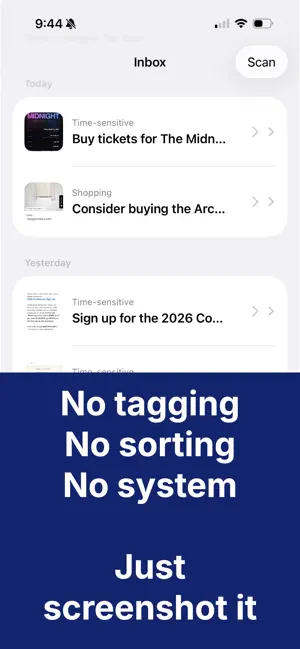
You see something on your phone and think: I should deal with that. But not right now. So you screenshot it — and forget about it. Sifted makes sure it's handled. No sorting. No systems. No upkeep. HOW IT WORKS Screenshot anything you don't want to forget. Sifted reads it, understands it, and prepares the next step — automatically, often before you even open the app. A concert announcement becomes a calendar event, with the date, time, and venue already filled in A message you can't answer right now becomes a reminder, with the sender and their words attached A deadline becomes a reminder on the right day A promo code, confirmation number, or Wi-Fi password is extracted and ready to copy Once a day, a quiet brief sums up what was captured. Review and move on. WHAT SIFTED DOES Automatically turns screenshots into calendar events and reminders, pre-filled and ready in one tap Understands dates, times, venues, senders, and multi-day events — even in screenshots with no text at all Scans new screenshots on its own when you open the app, and checks quietly in the background so things are ready when you arrive Sends a daily brief at the time you choose Cleans up everything you've already handled in one step PRIVACY Sifted only looks at screenshots — never your other photos. Screenshots are analyzed securely using industry-standard AI, are never stored on external servers, and are never shared. Your inbox lives on your device, and you can delete anything at any time. SIFTED PRO Unlimited processing, the daily brief, and export to any app — Things, OmniFocus, Notion, and more. Start with a free 7-day trial. $4.99/month or $29.99/year. Terms of Use: https://www.apple.com/legal/internet-services/itunes/dev/stdeula/ Privacy Policy: https://withsifted.app/privacy.html
What’s new
Version 1.4.3 · Updated June 11, 2026
Sifted now works before you do. • Scans on its own. Open the app and new screenshots are already being handled. Sifted also checks quietly in the background, so things are often ready before you arrive. • New items announce themselves. Freshly handled screenshots slide in with a brief gold highlight, then settle down. You always know what's new. • Clean up inbox. A new manage screen clears everything you've already acted on, or anything older than a threshold you choose (Settings → Inbox). Nothing is ever deleted automatically — it's always your call. • Smarter dates. Sifted now reads two-digit years (like 04/26/26), spans multi-day events across the full range, and places events at the correct local time. Calendar and reminder sheets open pre-filled with the actual event date — not the date the email was sent. • Better titles. Calendar events and reminders pre-fill with clean, short titles. Message screenshots carry the sender and a quote of the message into your reminder notes, so the context travels with the task. • Picture-only screenshots are now understood too. • The daily brief is more reliable and reflects what actually happened today. • Fixes: price detection works again, Restore Purchases reports honestly when there's nothing to restore, the annual plan badge shows the correct savings (50%), and a handful of quieter repairs. As always: your screenshots stay yours. Nothing is stored or shared.
App privacy
The developer, BRETT BLAKELEY, reported these privacy practices to Apple.
Data Not Linked to You
The following data, which may be collected but is not linked to your identity, may be used for the following purposes:
- User Content: Customer Support, Other User Content, Photos or Videos
- Identifiers: Device ID
- Usage Data: Product Interaction
- Diagnostics: Crash Data, Performance Data, Other Diagnostic Data
Used for: Developer’s Advertising or Marketing, Analytics, App Functionality
Alternatives to Sifted - Screenshot Reminders
Looking for apps like Sifted - Screenshot Reminders? Here are 6 similar apps on the App Store. The highest rated is Leaflet: Plant Care & Watering (5.0/5), and all 6 are free to download.
-
 Chista: Screenshot Inbox
-
 Photo Reminder: AI Tasks
-
 SnapActions - AI Reminders
-
 ScreenSort: Screenshot Manager
-
 Leaflet: Plant Care & Watering
5.0
Leaflet: Plant Care & Watering
5.0
-
 Shotted
5.0
Shotted
5.0
| App | Rating | Price | Last updated | Compare |
|---|---|---|---|---|
| Sifted - Screenshot Reminders | – | Free | June 11, 2026 | |
| Chista: Screenshot Inbox | – | Free | Jul 14, 2026 | Compare |
| Photo Reminder: AI Tasks | – | Free | Jul 9, 2026 | Compare |
| SnapActions - AI Reminders | – | Free | Mar 12, 2026 | Compare |
| ScreenSort: Screenshot Manager | – | Free | Mar 21, 2026 | Compare |
| Leaflet: Plant Care & Watering | 5.0 / 5 (1) | Free | Sep 11, 2026 | Compare |
| Shotted | 5.0 / 5 (2) | Free | Mar 12, 2026 | Compare |