

PureBit: Hi-Res Music Player
Dinh Van Hoang Music iPhoneiPadiPod touch
PureBit: Hi-Res Music Player is a free Music app for iPhone and iPad by Dinh Van Hoang. Rated 5.0/5 from 7 ratings. Requires iOS 16.0.
- Rating
- 5.0
- 7 ratings
- Price
- Free
- on the App Store
- Size
- 14 MB
- Age 4+
- Updated
- Sep 26
- 2026 · v1.8.0
Screenshots
About PureBit: Hi-Res Music Player
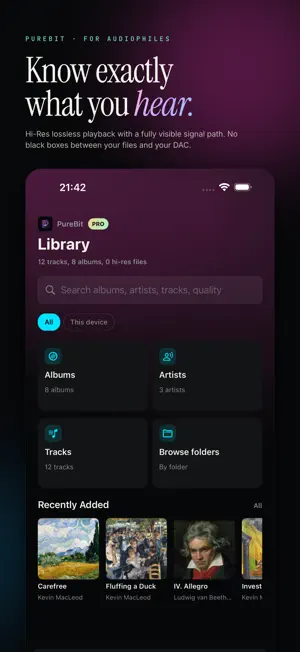
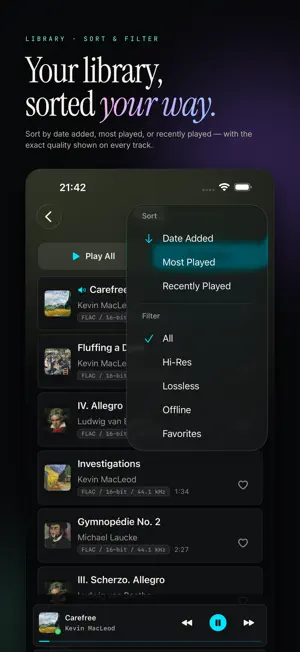
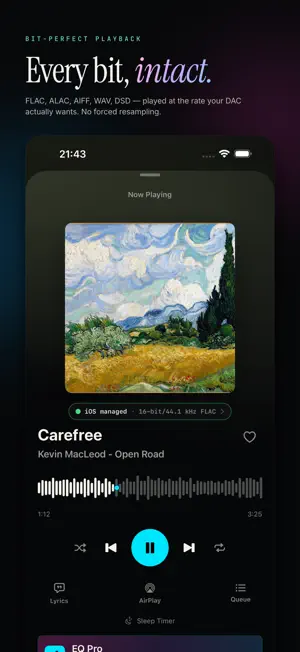
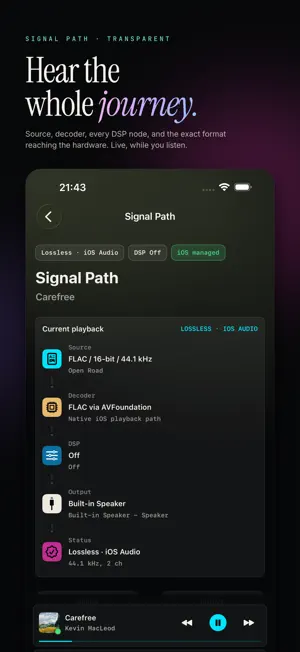
Most music players show you a waveform and a volume knob. PureBit shows you the rest of it — every decoder, every conversion, every filter — so you know exactly what's happening between the file and your ears. For the listener who cares whether a 24-bit FLAC actually plays as 24-bit. Whether the DAC is getting the native sample rate. What an EQ band sounds like when it's measured, not just imagined. What you get: - Lossless and Hi-Res playback. FLAC, ALAC, AIFF, WAV, DSD. Native CoreAudio path that respects your DAC's preferred format. No forced upsampling unless you ask for it. - A live Signal Path view. Source rate, decoder output, every DSP node, the format reaching the hardware. Tap a node, see what it's doing. Tap again, change it. - 10-band parametric EQ with adjustable Q. AutoEq integration pulls a target curve for your headphones straight from the AutoEq community (jaakkopasanen/AutoEq) — two taps and you're done. - Audio Lab: upsampling, convolution for impulse responses (room correction, HRTF, custom), crossfeed for headphone soundstage, balance and mono tools for diagnostic listening. - Files from the Files app, or stream from Dropbox and OneDrive. Browse and play your music by folder. Offline downloads come with Pro. PureBit Pro - One purchase. No subscription, no ads, no upsell. Unlocks the full Audio Lab, AutoEq search, offline cloud downloads, and unlimited EQ presets. App Store handles the payment; we never see your card. Privacy - PureBit doesn't track what you listen to. No analytics on your library, no listening profile sent anywhere. You bought the app — that's the end of the transaction. Network Sources (Pro): stream your own library straight from your home network — a NAS over SMB (Synology, QNAP, Windows/macOS shares), UPnP/DLNA media servers, or WebDAV. Auto-discover servers, browse and import, read embedded metadata and cover art, and download tracks for offline listening. Bytes pass through unmodified, so it stays bit-perfect — no third-party cloud in between.
Ratings & reviews
5.0
7 ratings
What’s new
Version 1.8.0 · Updated September 26, 2026
PureBit 1.8 is our most worthwhile upgrade yet, built for discerning audiophiles with large music libraries on Subsonic/Navidrome, Jellyfin, OneDrive and Dropbox. What's new in 1.8.0: - Connect your own Subsonic/Navidrome and Jellyfin servers (Pro), including their playlists. - Make your own playlists, reorder them, and save the queue as a playlist. - Headphone profiles (Pro): each Bluetooth/USB headphone remembers its own sound and switches automatically. - Much faster OneDrive and Dropbox scans; track details fill in quietly in the background. - A new Library home, folder artwork, and albums for untagged music. - More reliable track changes on Bluetooth headphones, and cloud playback that recovers from network hiccups.
App privacy
The developer, Dinh Van Hoang, reported these privacy practices to Apple.
Data Not Collected
The developer does not collect any data from this app.
Alternatives to PureBit: Hi-Res Music Player
Looking for apps like PureBit: Hi-Res Music Player? Here are 6 similar apps on the App Store. The highest rated is Synq - Hires Offline Music (5.0/5), and all 6 are free to download.
-
 Synq - Hires Offline Music
5.0
Synq - Hires Offline Music
5.0
-
 fidelplayer: Hi-Res Audio
-
 PurePlayer Hi-Res
4.0
PurePlayer Hi-Res
4.0
-
 Tonar: FLAC Hi-Res Player
4.0
Tonar: FLAC Hi-Res Player
4.0
-
 BitaBit Hi-Fi Audio Player
4.0
BitaBit Hi-Fi Audio Player
4.0
-
 Nyquist Player
| App | Rating | Price | Last updated | Compare |
|---|---|---|---|---|
| PureBit: Hi-Res Music Player | 5.0 / 5 (7 ratings) | Free | September 26, 2026 | |
| Synq - Hires Offline Music | 5.0 / 5 (1) | Free | Sep 5, 2026 | Compare |
| fidelplayer: Hi-Res Audio | – | Free | Sep 9, 2026 | Compare |
| PurePlayer Hi-Res | 4.0 / 5 (2) | Free | Sep 25, 2026 | Compare |
| Tonar: FLAC Hi-Res Player | 4.0 / 5 (5) | Free | Sep 24, 2026 | Compare |
| BitaBit Hi-Fi Audio Player | 4.0 / 5 (2) | Free | Aug 12, 2026 | Compare |
| Nyquist Player | – | Free | Sep 21, 2026 | Compare |