

Rclone GUI
Vitalys ROUGETET--DE TROYANE Productivity iPhoneiPadiPod touchMac
Rclone GUI is a free Productivity app for iPhone and iPad by Vitalys ROUGETET--DE TROYANE. Rated 5.0/5 from 3 ratings. Requires iOS 26.4.
- Rating
- 5.0
- 3 ratings
- Price
- Free
- on the App Store
- Size
- 134 MB
- Age 4+
- Updated
- Aug 8
- 2026 · v2.1.2
Screenshots

About Rclone GUI
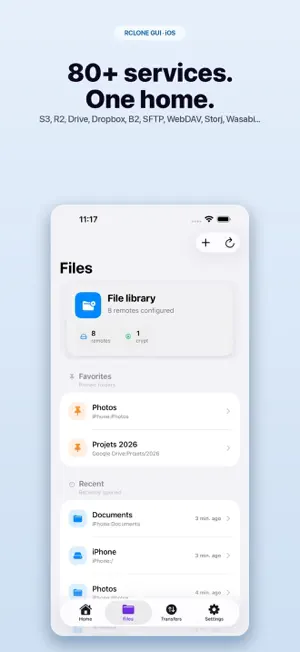
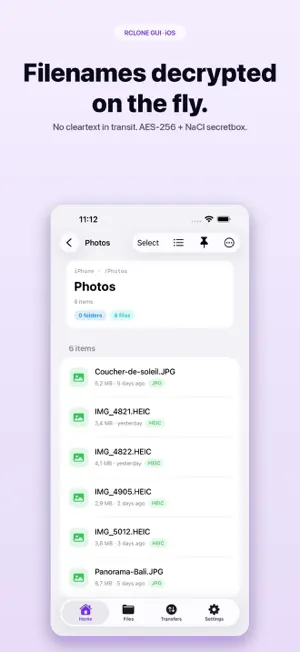
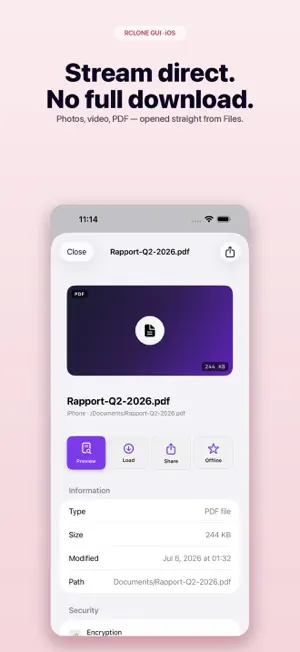
Rclone GUI is a native, open-source iOS client for rclone — the reference tool for managing your personal cloud storage. Connect Amazon S3, Backblaze B2, Cloudflare R2, Storj, Wasabi, Dropbox, Google Drive, Microsoft OneDrive, pCloud, Mega, Box, Filen, Internxt, Drime, SFTP, WebDAV, and 70+ other services straight from your iPhone, with no middleman. PREMIUM SUBSCRIPTION REQUIRED All Rclone GUI features (remote management, transfers, Files app integration, PhotoSync, crypt decryption, streaming, etc.) require a Premium subscription. • Free 7-day trial, then €1.99/month or €19.99/year • Auto-renewing, cancel anytime in Settings → Apple ID → Subscriptions • No feature is usable without an active subscription (beyond onboarding) CRYPT-FIRST ENCRYPTION (Premium) The whole interface is built around rclone "crypt" encryption: encrypted remotes are tagged with a purple lock, filenames are decrypted on the fly so you see the real tree, and file content is decrypted during playback without ever transiting in clear through a third-party server. The cryptographic core uses NaCl secretbox (XSalsa20-Poly1305), executed locally by rclone. iOS FILES INTEGRATION (Premium) A File Provider extension exposes every remote inside Apple's Files app, encrypted ones included. Open a PDF straight from Files, drag and drop documents between apps, and stream video or audio without downloading the full asset. SMART PHOTO SYNC (Premium) Automatically sync new photos and videos to the cloud of your choice. Adaptive throttling while you're using the app, background execution, clean resume after a network drop. GUIDED ADD-REMOTE WIZARD (Premium) A step-by-step wizard covers every rclone backend: per-backend forms, tutorials for OAuth providers (Drive, OneDrive, Dropbox), instant validation. "Where to get your credentials" panels and a remote picker (for crypt vaults, alias, union…) make setup even simpler. Import an existing rclone.conf in one tap, with automatic secret migration to the iOS Keychain. PRIVACY BY DESIGN - No analytics, no tracker, no third-party SDK - No backend server: the app talks directly to your cloud services - Face ID / Touch ID to lock the configuration - Configuration encrypted at rest (ChaCha20-Poly1305 + iOS Keychain) - OAuth tokens in the iOS Keychain, never in UserDefaults - Strict ATS, no network exception FEATURES (all included in the Premium subscription) - 70+ rclone backends supported - Parallel transfers, pause, resume, queue - Adaptive bandwidth throttling (cellular / Wi-Fi) - Video and audio streaming with range requests - Built-in QuickLook preview - Search, sort, filter in folders - Detailed transfer stats - Exportable local logs for debugging SUBSCRIPTION TERMS The Rclone GUI Premium subscription auto-renews at the end of each period (€1.99/month or €19.99/year). Renewal is billed to your Apple ID within 24 hours before the end of the current period. You can manage your subscription and turn off auto-renewal at any time in Settings → Apple ID → Subscriptions. Terms of use: https://www.apple.com/legal/internet-services/itunes/dev/stdeula/ Privacy policy: https://vitalysrdt.github.io/rclone-gui-ios/privacy.html OPEN SOURCE Rclone GUI is fully open source: https://github.com/VitalysRDT/rclone-gui-ios This app is not affiliated with Apple, Google, Amazon, Microsoft, Dropbox or any other cloud provider. "rclone" is a trademark of Nick Craig-Wood (rclone author).
What’s new
Version 2.1.2 · Updated August 8, 2026
What's new in 2.1.2: - Custom CDN domains: optionally remove a path prefix, such as the bucket name returned by Qiniu Kodo or other S3-compatible storage. - Cancel PhotoSync: stop the sync, clear its local index and queue, then change the selected albums or destination folder. Files already uploaded remain on the remote. - PhotoSync albums on Mac: selections update immediately, and only photos from the chosen albums are indexed and synced. - More reliable PhotoSync pause: it interrupts the current Photos export and rclone batch without pausing your other transfers.
App privacy
The developer, Vitalys ROUGETET--DE TROYANE, reported these privacy practices to Apple.
Data Not Collected
The developer does not collect any data from this app.
Alternatives to Rclone GUI
Looking for apps like Rclone GUI? Here are 6 similar apps on the App Store. The highest rated is Enter Space (5.0/5), and all 6 are free to download.
-
 Enter Space
5.0
Enter Space
5.0
-
 S3 Client - Files location
4.8
S3 Client - Files location
4.8
-
 FTP Client - Files location
4.5
FTP Client - Files location
4.5
-
 Kagi Assistant
4.5
Kagi Assistant
4.5
-
 Cryptomator: Protect Privacy
4.4
Cryptomator: Protect Privacy
4.4
-
 NAS Pro
4.3
NAS Pro
4.3
| App | Rating | Price | Last updated | Compare |
|---|---|---|---|---|
| Rclone GUI | 5.0 / 5 (3 ratings) | Free | August 8, 2026 | |
| Enter Space | 5.0 / 5 (1) | Free | Oct 19, 2026 | Compare |
| S3 Client - Files location | 4.8 / 5 (56) | Free | Oct 20, 2026 | Compare |
| FTP Client - Files location | 4.5 / 5 (37) | Free | Oct 13, 2026 | Compare |
| Kagi Assistant | 4.5 / 5 (42) | Free | Oct 19, 2026 | Compare |
| Cryptomator: Protect Privacy | 4.4 / 5 (436) | Free | Oct 2, 2026 | Compare |
| NAS Pro | 4.3 / 5 (176) | Free | Oct 17, 2026 | Compare |
Compare Rclone GUI with the top alternatives: ratings, updates, ASO score and keyword gaps →