

S3 Client - Files location
Anders Borum ApS Productivity iPhoneiPadiPod touchMac
S3 Client - Files location is a free Productivity app for iPhone and iPad by Anders Borum ApS. Rated 4.8/5 from 56 ratings. Requires iOS 18.2.
- Rating
- 4.8
- 56 ratings
- Price
- Free
- on the App Store
- Size
- 63 MB
- Age 4+
- Updated
- Oct 28
- 2026 · v2026.42
Screenshots



About S3 Client - Files location
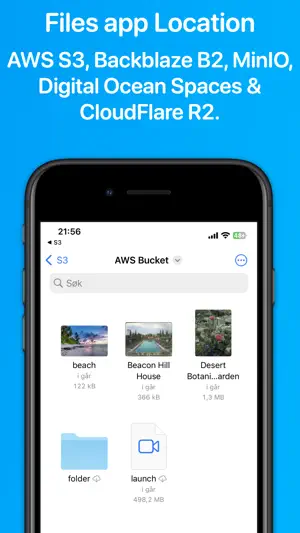
Access your S3 storage directly from the Files app, Finder, and other applications on iPhone, iPad, and Mac. Developed by the creator of Working Copy, this application provides seamless integration with S3-compatible storage services. Once configured, S3 buckets appear alongside other cloud storage providers, with files available on demand. Files are downloaded as needed and automatically synchronized back to S3 when modified. The app supports a wide range of S3-compatible services, including AWS S3, BackBlaze B2, CloudFlare R2, DigitalOcean Spaces, MinIO, and others. Files and directories can be uploaded through the system share sheet on iOS and the Services menu on macOS. The app remembers preferred upload destinations for different file types, streamlining file management. Pre-signed sharing links can be generated directly from Finder and the Files app, allowing temporary access to files for up to seven days. Support for server-side encryption with customer-provided keys (SSE-C) and client-side AES-GCM encryption compatible with the Amazon S3 Encryption Client. Comprehensive support for Shortcuts automation enables operations such as listing, downloading, uploading, and moving files. The app is free to use with a single server. A Pro Unlock is required for multiple servers, available as a one-time purchase or a monthly subscription, with access shared across iPhone, iPad, and Mac. A one-week free trial allows users to evaluate Pro features before purchase.
Ratings & reviews
4.8
56 ratings
What’s new
Version 2026.42 · Updated October 28, 2026
Improved text file detection in the editor. Move files and folders to another folder from their menu in the browser.
App privacy
The developer, Anders Borum ApS, reported these privacy practices to Apple.
Data Not Linked to You
The following data, which may be collected but is not linked to your identity, may be used for the following purposes:
- Purchases: Purchase History
- Usage Data: Product Interaction
Used for: Analytics
Alternatives to S3 Client - Files location
Looking for apps like S3 Client - Files location? Here are 6 similar apps on the App Store. The highest rated is Extended File Info (4.7/5), and all 6 are free to download.
-
 Dropshare - File Sharing Tool
4.1
Dropshare - File Sharing Tool
4.1
-
 Container Manager
1.0
Container Manager
1.0
-
 Extended File Info
4.7
Extended File Info
4.7
-
 Mission Ctrl for DigitalOcean
3.8
Mission Ctrl for DigitalOcean
3.8
-
 Control for GitLab
3.9
Control for GitLab
3.9
-
 DriveHQ File Manager
4.1
DriveHQ File Manager
4.1
| App | Rating | Price | Last updated | Compare |
|---|---|---|---|---|
| S3 Client - Files location | 4.8 / 5 (56 ratings) | Free | October 28, 2026 | |
| Dropshare - File Sharing Tool | 4.1 / 5 (66) | Free | Oct 26, 2026 | Compare |
| Container Manager | 1.0 / 5 (2) | Free | Sep 18, 2026 | Compare |
| Extended File Info | 4.7 / 5 (32) | Free | Apr 7, 2026 | Compare |
| Mission Ctrl for DigitalOcean | 3.8 / 5 (10) | Free | Jan 3, 2025 | Compare |
| Control for GitLab | 3.9 / 5 (260) | Free | Feb 24, 2026 | Compare |
| DriveHQ File Manager | 4.1 / 5 (9) | Free | Feb 10, 2026 | Compare |