

Cryptomator: Protect Privacy
Skymatic GmbH Productivity iPhoneiPadiPod touch
Cryptomator: Protect Privacy is a free Productivity app for iPhone and iPad by Skymatic GmbH. Rated 4.4/5 from 433 ratings. Requires iOS 16.0.
- Rating
- 4.4
- 433 ratings
- Price
- Free
- on the App Store
- Size
- 95 MB
- Age 4+
- Updated
- Oct 2
- 2026 · v3.1.3
Screenshots



About Cryptomator: Protect Privacy
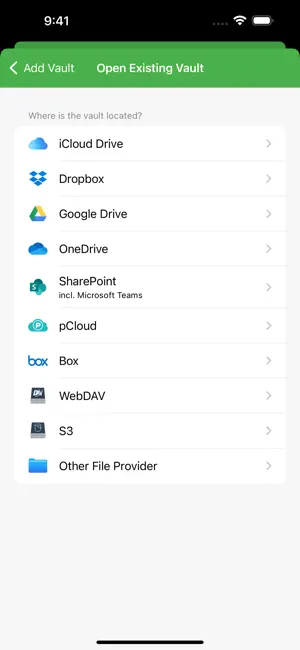
Take the security of your data into your own hands. Cryptomator encrypts your files before they reach the cloud — so only you hold the key. Not your cloud provider, not us, no one. Most cloud providers encrypt your data only during transmission, or they keep the decryption keys themselves — keys that can be stolen, copied, or misused. With Cryptomator, the key to your data stays in your hands. EASY TO USE Cryptomator is a simple tool for digital self-defense. Protect your cloud data yourself, independently. • Assign a password to a folder — we call it a vault. That's all: no key creation, no registration, no configuration • Unlock vaults with Face ID / Touch ID • Fully integrated into the Files app — browse and open your encrypted files right where you already manage them • Everything you save into a vault is encrypted automatically COMPATIBLE Cryptomator works with the most commonly used cloud storages and is available for all major operating systems. • Compatible with iCloud Drive, Dropbox, Google Drive, OneDrive, SharePoint (incl. Microsoft Teams), pCloud, Box, WebDAV- and S3-based cloud storage services • Create vaults in any location via other File Providers (third-party apps must support this) • Access the same vaults across all your mobile devices and computers SECURE & TRUSTWORTHY You don't have to trust Cryptomator blindly, because it is open source software — everyone can see the code: https://github.com/cryptomator/ios • No backdoors and no expiration date, thanks to open source • File content and filename encryption with AES and 256 bit key length • Vault password secured with scrypt for enhanced brute-force resistance • Independently audited by security researchers; crypto implementation publicly documented If someone looks into the folder in your cloud, they cannot draw any conclusions about your data. AWARD-WINNING Cryptomator received the CeBIT Innovation Award 2016 for Usable Security and Privacy. CRYPTOMATOR COMMUNITY Join the Cryptomator Community and participate in the conversations with other Cryptomator users: • Community: https://community.cryptomator.org • Mastodon: @[email protected] --- Terms of Use: https://www.apple.com/legal/internet-services/itunes/dev/stdeula/
Ratings & reviews
4.4
433 ratings
What’s new
Version 3.1.3 · Updated October 2, 2026
- Fixed the unlock screen in the Files app closing without a message when unlocking fails. - Fixed Hub vaults opening read-only when Hub is reached through an HTTP/1.1 proxy (#466). - Fixed files and folders inside a moved folder pointing to their old location (#450, #459).
App privacy
The developer, Skymatic GmbH, reported these privacy practices to Apple.
Data Not Collected
The developer does not collect any data from this app.
Alternatives to Cryptomator: Protect Privacy
Looking for apps like Cryptomator: Protect Privacy? Here are 6 similar apps on the App Store. The highest rated is Notesnook: Private notepad (4.7/5), and all 6 are free to download.
-
 Filen - Cloud Storage
3.8
-
 Notesnook: Private notepad
4.7
-
 Standard Notes
4.7
-
 Tresorit
4.6
-
 Strongbox - Password Manager
4.7
-
 Möbius Sync
3.8
| App | Rating | Price | Last updated | Compare |
|---|---|---|---|---|
| Cryptomator: Protect Privacy | 4.4 / 5 (433 ratings) | Free | October 2, 2026 | |
| Filen - Cloud Storage | 3.8 / 5 (125) | Free | Aug 26, 2026 | Compare |
| Notesnook: Private notepad | 4.7 / 5 (676) | Free | Oct 9, 2026 | Compare |
| Standard Notes | 4.7 / 5 (3,755) | Free | Sep 30, 2026 | Compare |
| Tresorit | 4.6 / 5 (510) | Free | Aug 5, 2026 | Compare |
| Strongbox - Password Manager | 4.7 / 5 (4,070) | Free | Sep 1, 2026 | Compare |
| Möbius Sync | 3.8 / 5 (140) | Free | Jan 27, 2025 | Compare |